What is AI-native production? A new operating model for visual content


Your next collection needs product photos, campaign variations, marketplace crops, and short videos. While an AI tool can help create them, someone still has to choose the inputs, protect product details, maintain the visual direction, review the results, and deliver the right files.
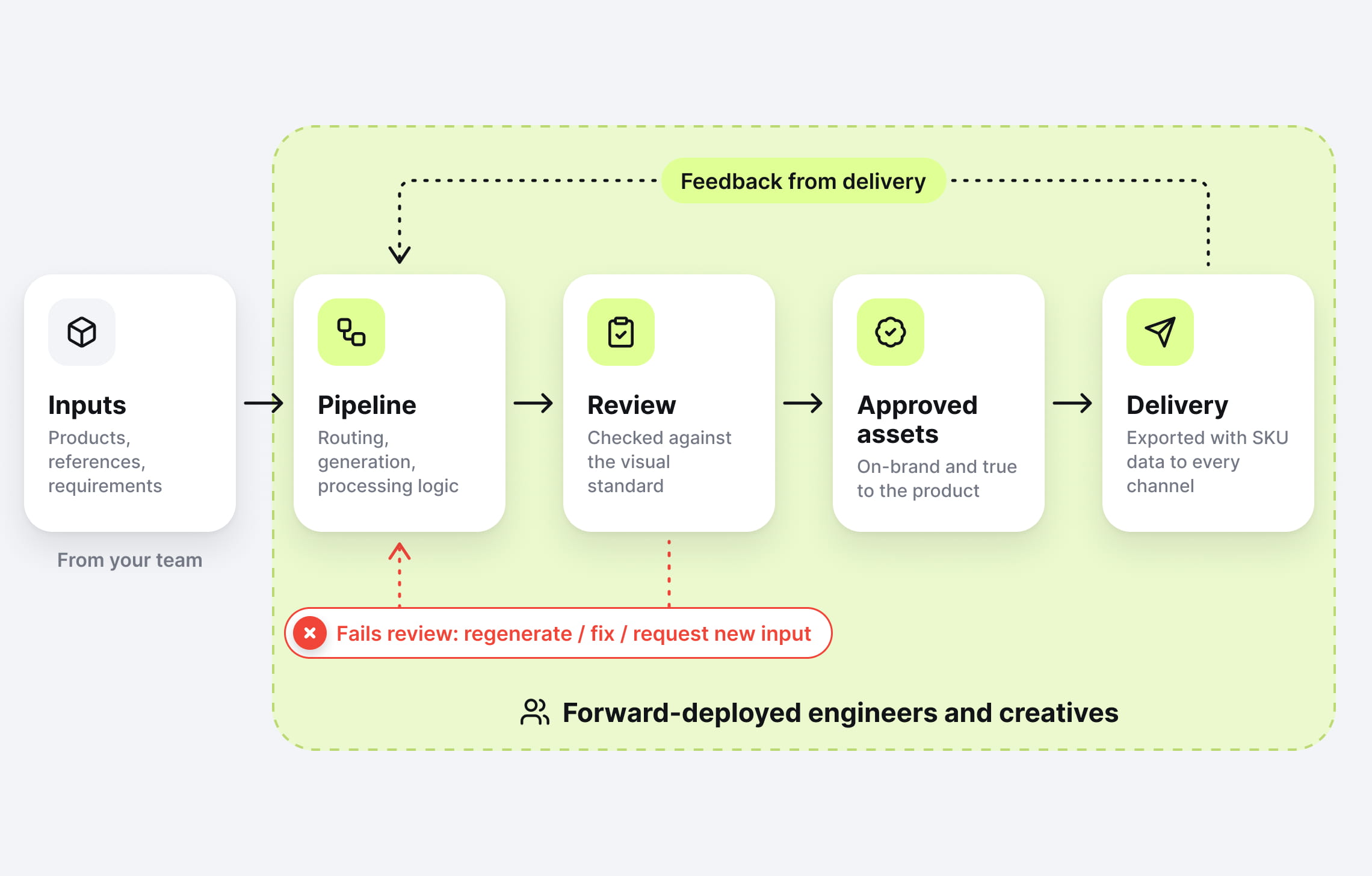
At Claid, we offer forward-deployed engineers and creatives who work directly with your business to build and run AI image workflows. You bring the products, references, and commercial requirements. The team translates them into a pipeline that can produce against an agreed standard, repeatedly.
What is AI-native production?
AI-native production is an operating model for visual content in which a dedicated team of engineers and creatives designs, runs, and continuously improves an AI pipeline that turns your product inputs into approved, channel-ready assets, against a standard you agree up front.
You’re buying approved output and a maintained production system: not a one-off shoot, and not a tool your team has to operate.
Why faster generation only solves part of the problem
The pressure on content teams is real. In Adobe’s 2025 research involving more than 1,600 marketers, 96% said content demand had at least doubled over the previous two years.
For an ecommerce team, that pressure arrives as practical requests: add another view, refresh the seasonal background, cover the long-tail assortment, make a vertical version, get the new products live.
Generating an image faster helps. But the launch can still wait on someone checking garment details, finding the correct SKU, fixing a crop, or repeating an explanation of the brand’s lighting style.
Broader AI research shows why individual efficiency and business impact deserve separate attention. McKinsey’s 2026 survey found that 80% of respondents improved personal productivity with AI, while 37% attributed some enterprise-level earnings impact to it.
For visual production, the implication is practical: redesign the whole path from brief to approved delivery. Faster generation leaves much of the work untouched if input preparation, review, revisions, and file handling remain disconnected.
How AI-native production compares with agencies and in-house AI tools
If you’re looking for an AI alternative to a creative agency, compare who owns the work from brief to approved delivery. Agencies provide creative services and production capacity. Self-serve tools provide capabilities your team operates. Managed AI-native production provides a team responsible for building, running, and refining the agreed workflow.
| What you’re buying | Traditional agency | Self-serve AI tools | Managed AI-native production |
|---|---|---|---|
| Core deliverable | Assets for an agreed project | Access to creation and editing capabilities | Approved assets produced through an operated pipeline |
| Workflow design | Built around the project and production team | Your team configures the process | Engineers and creatives design it around your recurring requirements |
| Day-to-day operation | Coordinated through production schedules and revisions | Your team runs jobs and handles exceptions | The delivery team runs the workflow and resolves exceptions within scope |
| Quality control | Creative direction and review | Your team defines and applies acceptance criteria | Acceptance criteria become part of the production process |
| Recurring work | Reuses relationships and creative knowledge | Reuses your templates and automations | Reuses and refines a maintained production system |
| Workflow maintenance | Depends on the project or retainer scope | Your team maintains the process around the tool | The delivery team maintains the agreed pipeline |
These models overlap. Agencies can adopt AI-native production, and internal teams can build sophisticated workflows. The meaningful distinction is ownership of the complete process: who maintains it, resolves exceptions, and keeps delivery aligned with your standard as requirements change.
An in-house team using foundation models is another option. That team also needs to manage references, evaluate outputs, protect product details, handle revisions, and organize delivery. Model access is one part of that operating capability.
Building internally makes sense when you have the expertise and capacity to maintain the process. Claid’s managed model assigns that operational work to a dedicated team of engineers and creatives, while your business retains creative direction and approval of the standard.
The forward-deployed team is central to the model
“Forward-deployed” means the specialists work directly on your production problem. Their work starts with your catalog and requirements and continues after the first successful batch.
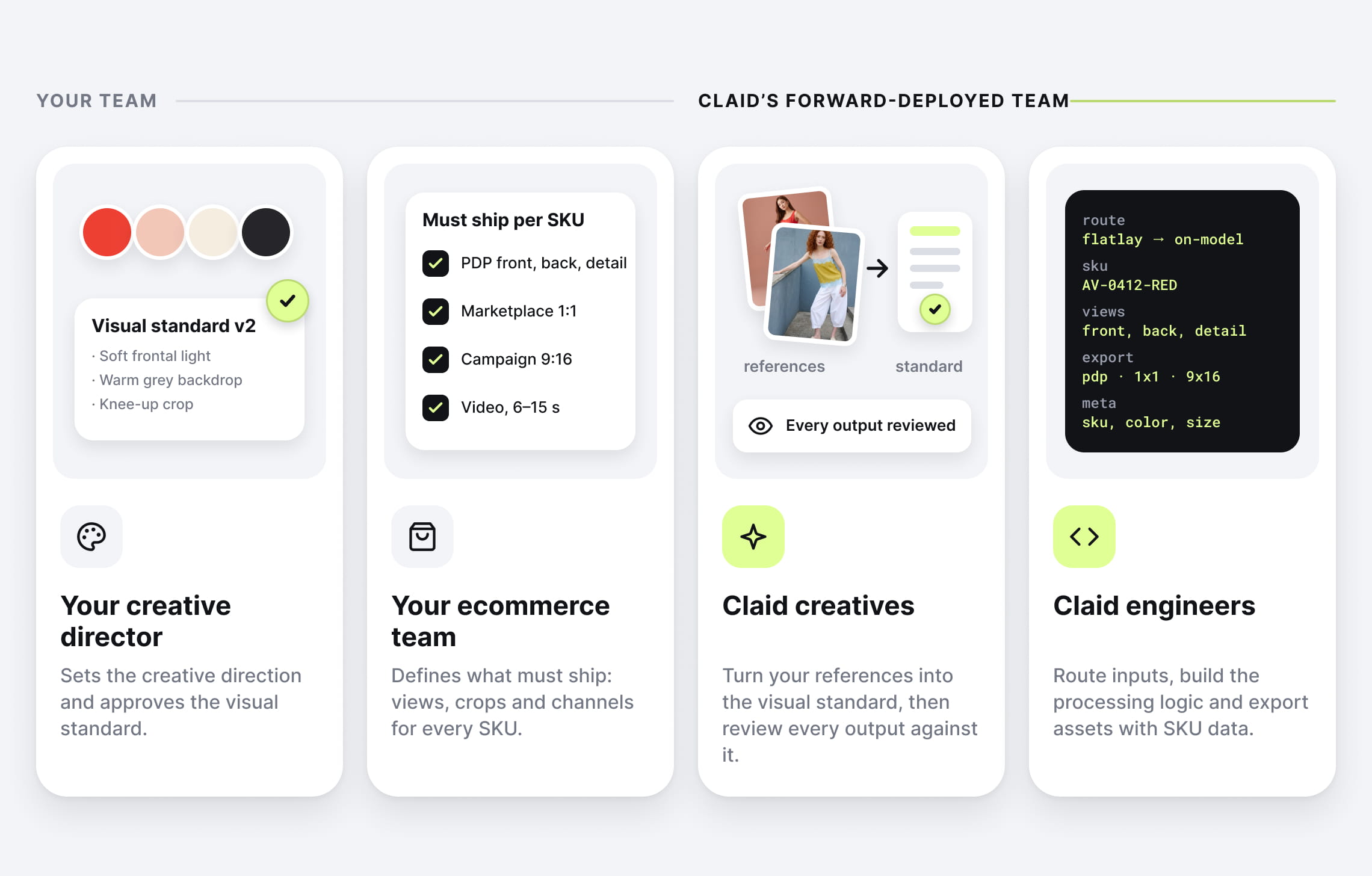
At Claid, creatives turn references into a usable visual standard and review outputs. Engineers build the processing logic around it, including ongoing production, exception handling, and refinement.
Consider a recurring collection with a distinctive visual identity. The creative decisions might include the approved cast, lighting, styling, poses, and how much of the frame a garment should occupy. The engineering decisions concern how to identify suitable inputs, apply the right sequence of operations, preserve product associations, and export the required files.
Those decisions affect each other. Your creative director still sets the direction and approves the standard. Your ecommerce team defines what the business needs to publish. Finally, our AI-native production team takes responsibility for executing the agreed workflow.
What happens inside the pipeline
A pipeline is simply a connected series of steps, with rules for what happens next. In visual production, it should also define what happens when an asset fails a check.
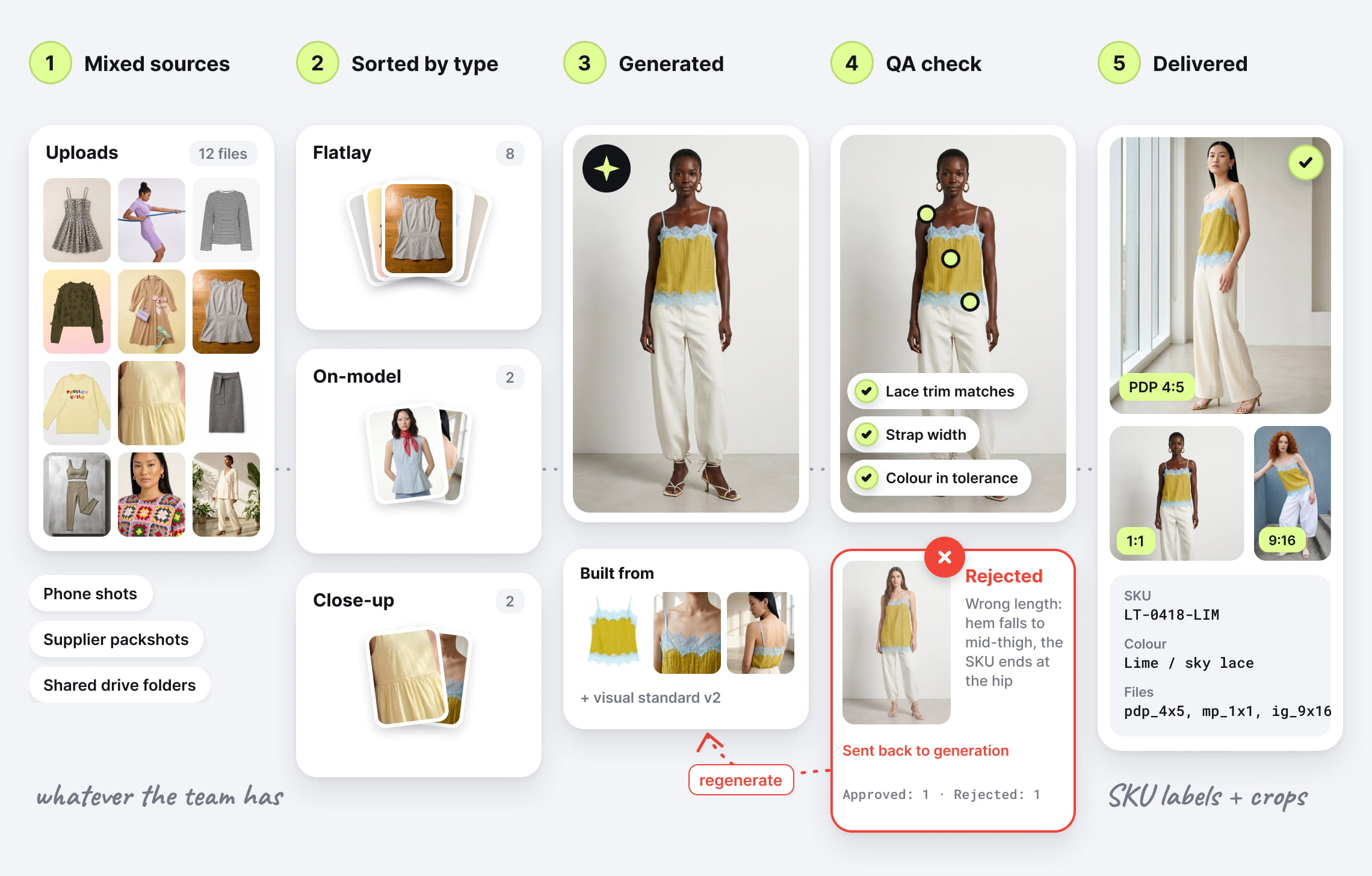
Here’s an illustrative workflow for a fashion collection (the exact design depends on the products, source material, and agreed scope):
- Define the deliverable. Specify the required views, model references, backgrounds, dimensions, and product details that must survive processing. “Premium-looking” needs examples and acceptance criteria before it can guide repeatable work.
- Check and route the inputs. Match images to products and identify suitable source types. A flatlay, an existing model image, and a close-up may need different treatment. Missing source information may require another photograph.
- Apply the appropriate operations. Combine photo and video generation with background removal, enhancement, or other image operations. Preserve a suitable existing asset when it already meets the brief.
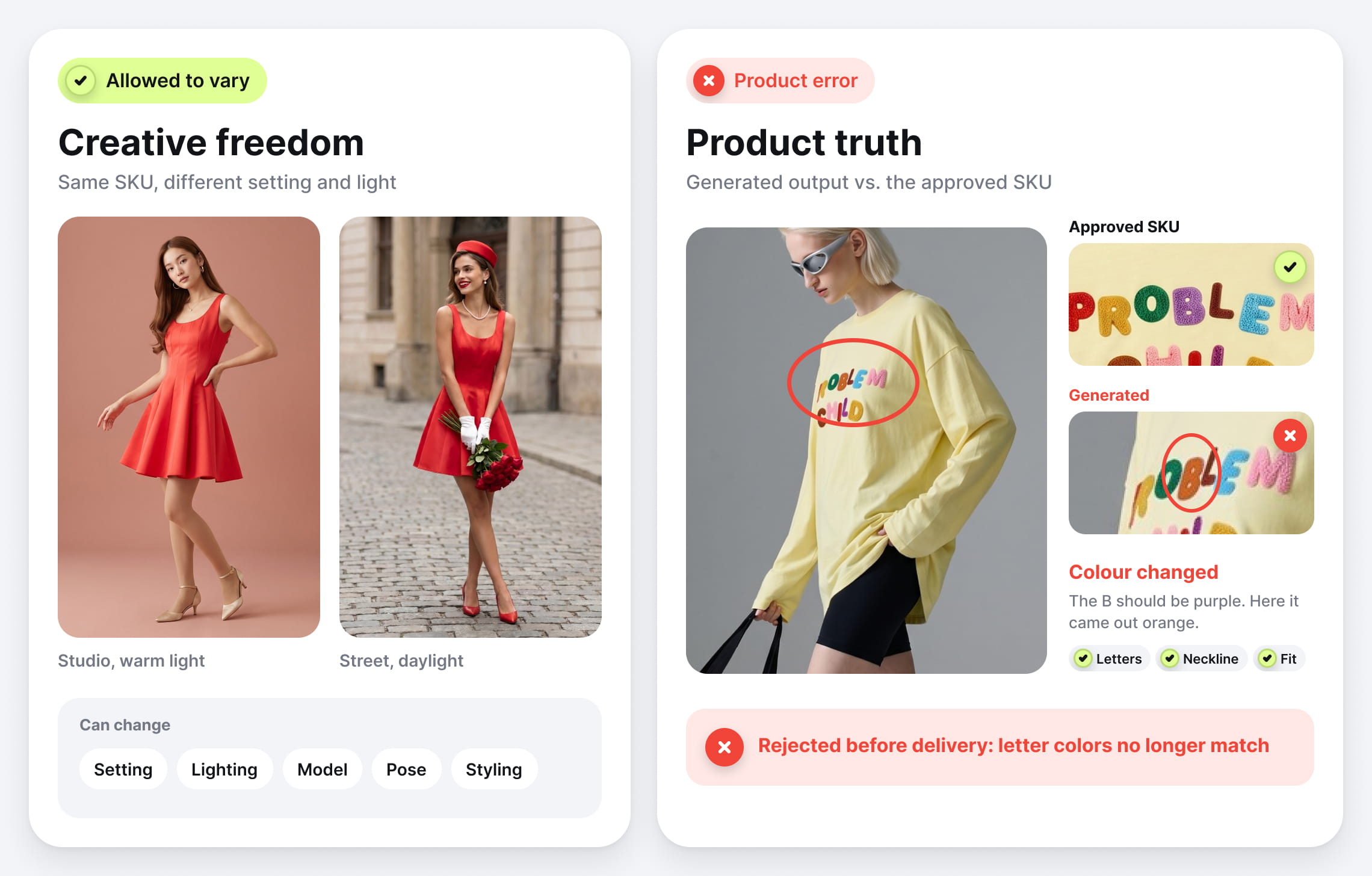
- Review against the standard. Check product fidelity separately from visual appeal. A changed logo, invented fastening, or altered hemline is a product error, even in a convincing image. Route failures for correction, regeneration, or a request for better inputs.
- Deliver and refine. Deliver approved files with the right product associations and channel specifications, into the storage, DAM or catalog system your team already uses. Record recurring failures so the next batch benefits from a better rule, reference, or processing step.
This last step is what makes the workflow a lasting capability. Repeated corrections should inform how future work is produced.
What Claid’s customer work demonstrates
Claid offers creative expertise and engineering delivered as a continuing production capability. Here are a few stories showing different parts of our AI-native production.
Kasta: several fashion operations in one catalog workflow
Kasta combined flatlay-to-model generation, model face replacement, and pose expansion. The company reports 3× faster processing than traditional methods, with forward-deployed engineers tailoring the solution to Kasta’s infrastructure and preserving the data structures needed to return assets to its catalog.
Rappi: image processing connected to restaurant onboarding
Rappi integrated Claid’s photo enhancement API into its CRM and sent images in batches. With restaurants submitting dozens or hundreds of menu items, manual editing could hold up onboarding for days per restaurant.
With an automated pipeline, the company reported 42% less photo-editing time and a 25% productivity improvement.
Kleidn: selecting the right images before editing them
Kleidn needed usable product cutouts for an outfit editor. Its custom workflow analyzes incoming imagery, identifies suitable flatlays, and removes their backgrounds. This demonstrates a less visible part of production: deciding which assets are appropriate for the job before transforming them.
Product truth belongs in the production standard
Product images set expectations about what will arrive. In Rithum’s 2025 survey of more than 6,000 consumers, 33% reported returning products that didn’t match their online descriptions or images. A beautiful image that changes the product’s color, proportions, or details can set the wrong expectation before the purchase.
For AI-native production, approval should include checking the output against the actual product and its reference assets.
A production brief should distinguish creative freedom from product facts. Lighting and setting may vary. The product’s construction, markings, color, and included components need to remain faithful to approved references.
Some requirements still call for physical photography: documenting a detail absent from the source material, showing verified fit, or capturing a particular real-world event. A good production team recognizes those boundaries early.
Weighing a shoot budget against AI-generated alternatives? Check out our breakdown of traditional vs. AI photography costs.
AI-native production can coexist with an original campaign shoot. The shoot establishes a creative direction; an AI workflow can help extend approved material into recurring catalog and channel needs, with review appropriate to each use.
Build the business case around approved output
For an internal champion, the most useful comparison is the full cost and time required to deliver work the business accepts.
Use this measure: cost per approved asset = total production cost ÷ number of assets accepted for use.
Include setup, source preparation, generation, review, revisions, delivery, and internal coordination. Allocate setup costs over a realistic volume. Count rejected attempts in the cost, rather than treating every generated file as delivered value.
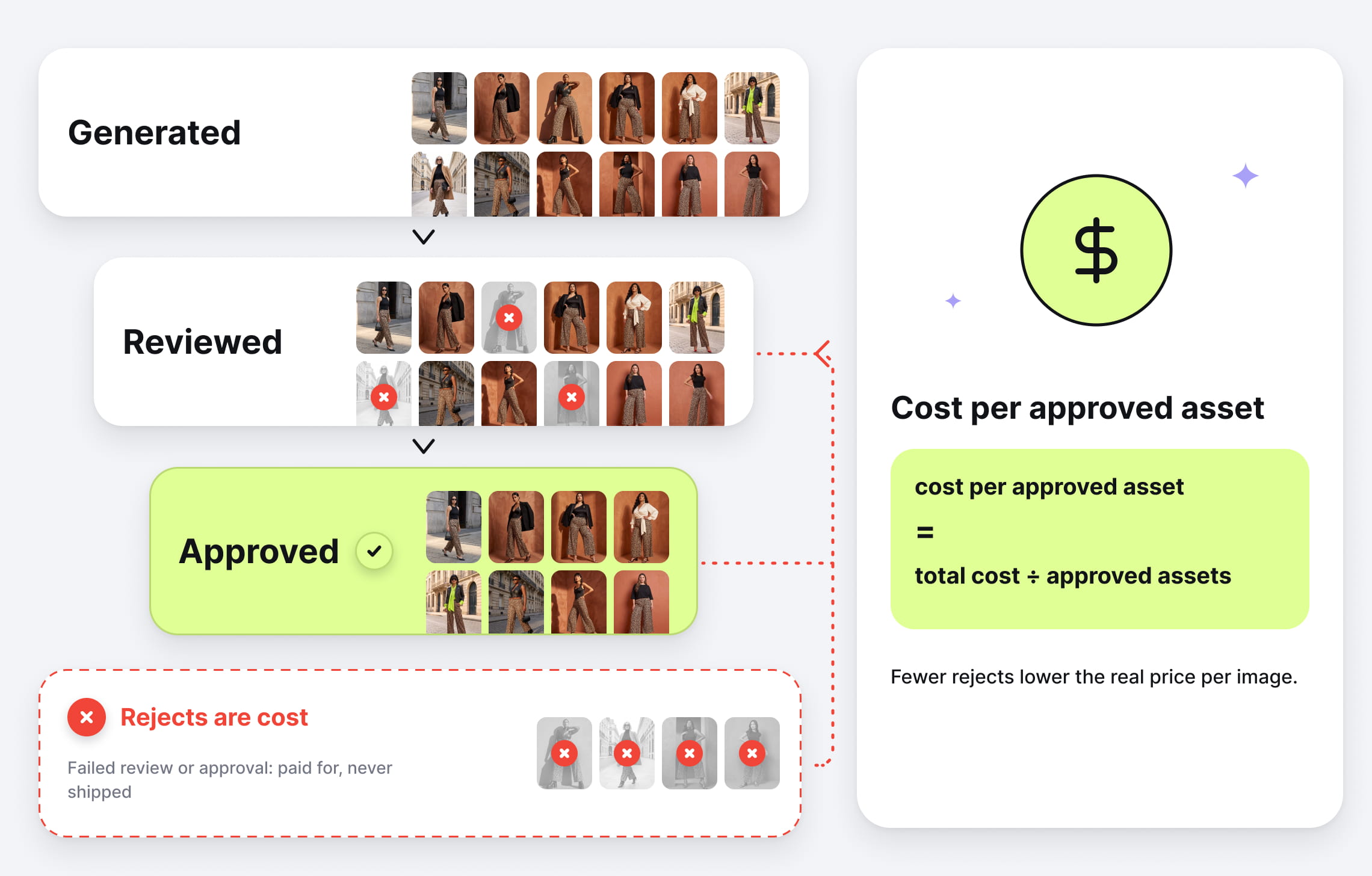
A useful pilot measures the following:
| Measure | What it tells you |
|---|---|
| Cost per approved asset | Whether the economics hold after review and rework |
| Time from accepted inputs to approved delivery | Whether the workflow improves the actual launch timeline |
| First-pass approval rate | How consistently production meets the agreed standard |
| Internal hours per batch | How much work remains with your team |
| Complete product sets delivered | Whether you can publish the required assortment |
Test a representative selection, including difficult materials, detailed patterns, inconsistent source images, and ordinary products. Agree on the acceptance criteria before the pilot starts. Then evaluate a fresh batch to see whether the process works beyond the examples used to tune it.
Managed production is most compelling when:
- You have repeatable production needs across collection launches, seasonal refreshes, or ongoing catalog updates
- Your visual standard is specific enough to write down and check
- Launches stall on review, rework, and file handling rather than on ideas
- You’d rather not turn your team into pipeline operators
For occasional edits, self-serve tools may be sufficient. Physical photography remains important when the brief requires original capture, verified fit, or product details that aren’t available in the source material.
A production capability that carries forward
AI-native production changes what an ongoing creative relationship can deliver. The assets matter. So does the accumulated knowledge of how to produce them reliably: which references work, which inputs need special handling, and what your team will approve.
Claid’s forward-deployed engineers and creatives build that knowledge into workflows they operate and refine. Its managed offering covers defining the workflow, building the pipeline, running production, and improving it as requirements evolve.
Let’s talk: bring us your representative product set, visual references, and the outputs you need.
FAQ
Is AI-native production the same as an AI agency?
An AI agency describes a provider; AI-native production describes how the work is organized. An agency may use AI for individual tasks or operate a complete production pipeline. For recurring visual content, look for responsibility for the whole workflow: production, review, exception handling, delivery, and ongoing improvement.
How is it different from using AI tools in-house?
With in-house tools or foundation models, your team owns the surrounding production process. That includes references, quality checks, revisions, delivery, and maintenance. Managed AI-native production assigns the agreed operational work to a dedicated provider team, while your business sets the creative direction and approves the standard.
What does a pilot involve?
Start with representative products, visual references, and defined outputs. Agree on acceptance criteria, then build and review an initial batch. Measure cost per approved asset, turnaround, approval rate, and the internal hours required. Test a fresh batch before scaling to check that the workflow performs beyond the examples used to refine it.
Do we need an engineering team to use AI-native production?
A fully managed engagement can be run by the provider’s engineers and creatives. Your team supplies the product information, visual references, and approval criteria. If the workflow needs to connect directly to your internal systems, agree on the integration requirements and any involvement from your technical team during scoping.
How does AI-native production protect product accuracy?
Product accuracy needs explicit review criteria. Define which characteristics must remain faithful to the source, such as color, proportions, logos, seams, and included components. Check outputs against those references and route failures for correction or better source material. A convincing image still needs to pass the product checks.
Can the content match our existing brand identity?
Your existing campaigns, approved imagery, and creative guidelines provide the starting point. The production team translates those references into decisions about lighting, composition, styling, backgrounds, and models. An initial batch lets you assess whether that interpretation meets your standard before extending it across the catalog.
What source material do we need to provide?
Start with your available product images, product identifiers, relevant specifications, and examples of the visual direction you want. Also define the required views, formats, and delivery destinations. The team should assess whether those inputs contain enough information to produce accurate results and identify any gaps before production begins.
Can one workflow produce both images and videos?
A workflow can include still-image production and video generation, with separate requirements for each output. Approved stills can provide a starting point for motion content. Video also needs its own review: product details, shape, and appearance must remain consistent throughout the clip.
What happens when our catalog or creative direction changes?
A maintained pipeline needs to evolve with your requirements. New categories, materials, visual references, or channel specifications may require different processing steps and review criteria. Agree on how changes will be evaluated, tested, and introduced, including which adjustments fall within the ongoing service scope.
Need this at scale?
Process thousands of images via API, or let our team handle it for you.


Claid.ai
November 9, 2026


