Your photos just got sharper: Meet Prime🎉

Product swap AI: Reuse the same setup for different products

Product swap AI helps you replace one product with another in the same image, so you can reuse a setup instead of recreating it from scratch. If you already have a strong mockup, campaign visual, or styled product photo, Claid lets you swap product variants fast while keeping the overall scene consistent.
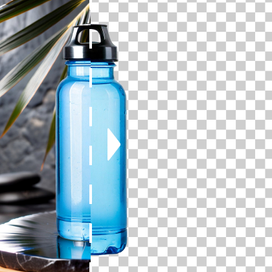
Product swap AI showing product replacement in same setup

Need this at scale?

Process thousands of images via API, or let our team handle it for you.

Create more photos without rebuilding the setup

A good product shot takes time to get right. Don't reshoot the same composition for every SKU, packaging update, or variant. With product swap AI, you can keep the scene and swap the product inside it.

Create more photos without rebuilding the setup - product swap example

Keep consistency across more SKUs

When you need a product line to look unified, consistency matters as much as creativity. With AI product swap, you can reuse the same angle, framing, and scene structure across multiple items. Create cleaner catalogs, more polished campaign sets, and repeatable visuals.

Keep consistency across more SKUs - unified product line example

Test packaging and variant changes without a reshoot

Swap product workflows are especially useful when the product changes but the visual concept stays the same. Update packaging, test a new label, replace one SKU with another, or show multiple colorways in the same setup.

Test packaging and variant changes without a reshoot - packaging variations

How to swap one product for another with AI

STEP 1: UPLOAD YOUR PRODUCT

Upload the product you want to feature

Upload the photo of a product you want to place into a successful setup you already have.

Step 1: Upload your product - product upload interface

STEP 2: ADD EXISTING PHOTO

Upload the composition you want to reuse

Add the image you want to reuse: a mockup, another product photo, or any scene where the composition already works.

Step 2: Add existing photo - composition upload interface

STEP 3: GENERATE AND EXPORT

Seamlessly swap products with AI

Generate 1-4 options and review how naturally the new product fits into the original setup.

Step 3: Generate and export - AI product swap results

Reuse strong visuals instead of remaking them

If you already have a scene that works, you shouldn't need to rebuild it for every new product. Claid makes product swap easier, so you can scale content faster across launches, variants, and campaigns.

Elipse

TRUSTED BY 100+ CUSTOMERS

"Stores with better images have 3x more probability of someone buying"

Read Rappi story
Rappi visual

Tools

Your all-in-one AI photo studio

Simplify your product photography with tools that handle everything. Combine into simple and fast workflows to get the desired results in seconds.

Claid AI Studio

AI photoshoot tool creating lifestyle product photo with oranges

AI Photoshoot

Place your products into editorial and lifestyle scenes.

AI fashion model tool showing dress applied to a model

AI Fashion Models

Turn your garment into professional on-model shots.

AI image to video tool turning a portrait photo into mp4

AI videos

Turn still images into eye-catching video clips.

Remove background
Remove background

Remove background

Instantly create clean, consistent product shots.

Upscale
Upscale

Upscale

Sharpen details and boost resolution for crisp images.

Fix light & colors
Fix light & colors

Fix light & colors

Brighten dark or faded images for a professional look.

10+ more tools

are waiting in Claid Studio.

What is product swap AI?
Product swap is a way to replace one product with another inside an existing image. Instead of generating a whole new scene from scratch, the tool keeps the visual setup and swaps the product itself. This is useful for mockups, packaging updates, and repeatable product photography workflows.
How is Product Swap different from other AI Photoshoot modes?
Product Swap is the mode for keeping the existing scene exactly as it is and replacing only the product inside it. It's similar to Inspiration mode in that both use a reference, but Inspiration mode reimagines the reference into a new generated visual direction, while Product Swap is designed to preserve the original scene and simply swap the item. Other AI Photoshoot modes solve different problems: Precise creates controlled new product shots, Creative explores more open-ended directions, and Backgrounds let you put your product against custom backgrounds.
Can I use AI product swap for color variations?
Yes. If your main composition stays the same, product swap can help you create visuals for different colorways or product variants more efficiently. It's a practical option when you want the same shot structure across multiple SKUs.
What kinds of photos work best for AI product swap?
Photos where the product to replace is clearly isolated in the composition work best for AI product swap. The ideal image has one obvious main item, a clean angle, and enough visible shape, edges, and surface details for the model to understand exactly what should be replaced.
What should I look for to find the best product swap AI tool?
Look for product preservation, realistic fit inside the scene, consistent perspective, and outputs that still feel commercially usable. The best product swap AI tool should help the new item sit naturally in the composition instead of looking pasted in or disconnected from the environment.
Can I use product swap AI for free?
You can explore Claid's AI Photoshoot, along with other tools, with free credits. A single product swap costs 4 credits

Explore more features

AI fashion models

AI fashion models

AI expander

AI expander

Background remover

Background remover