Custom AI image pipelines for marketplaces: from catalog scanning to visual QA


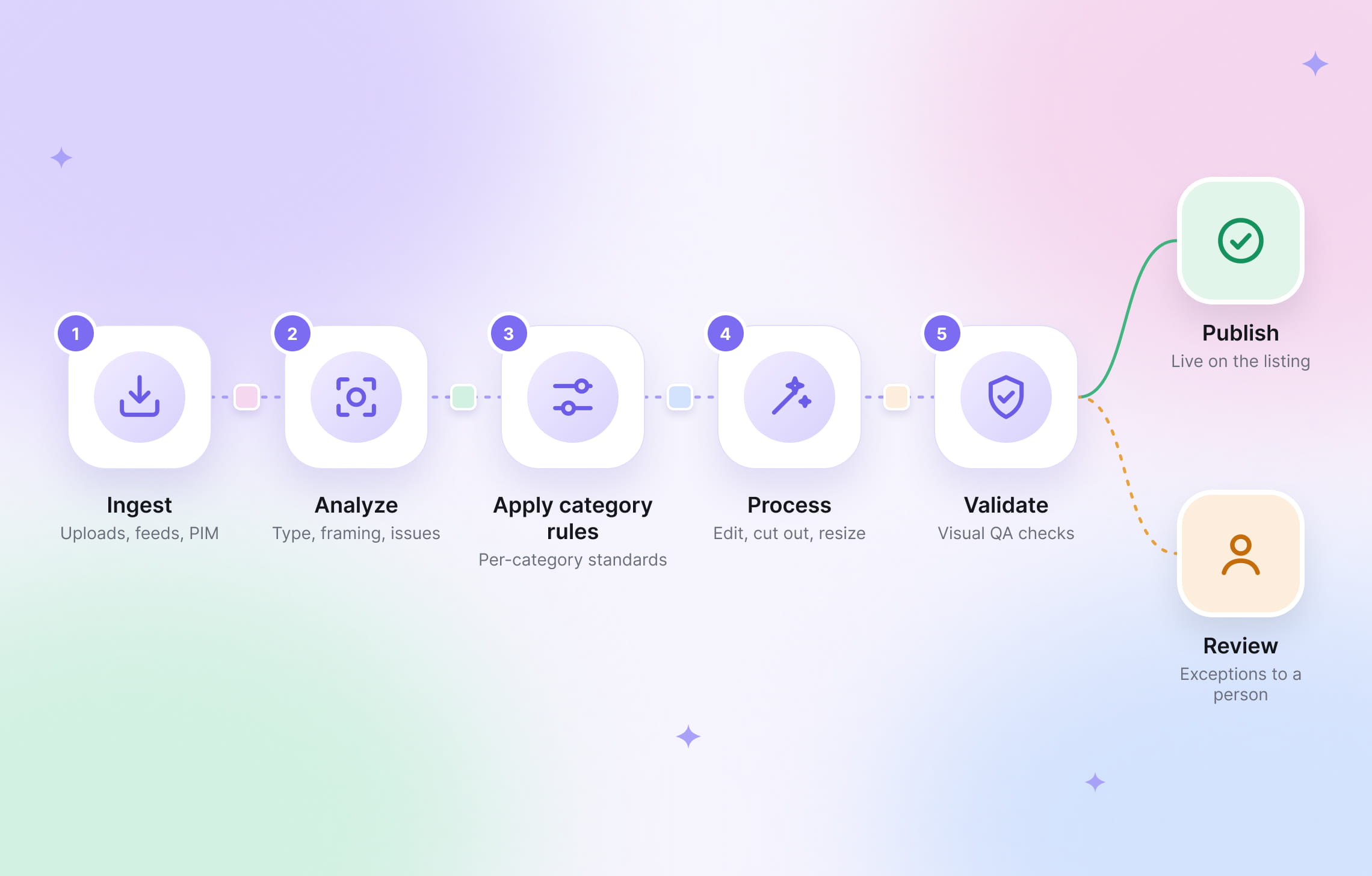
Marketplace images arrive in every shape, and someone has to decide what each one needs. Custom AI image pipelines connect the decisions and edits behind that work: identifying useful images, applying the right treatment, checking the result, and sending exceptions for review. The goal is to get more listings ready with less manual sorting, editing, and rework.
Claid builds these workflows around your catalog and production requirements. Our forward-deployed team, the engineers who work directly with you on the implementation, connects image analysis and processing to the way your platform operates. You bring the brief and examples; we build and refine the workflow.
Here’s what that can look like.
What makes an image pipeline custom?
A standard editing workflow applies a known set of operations: remove the background, adjust lighting, resize, export. A custom pipeline can add decisions based on the image, the listing, and your business rules.
For example, a delivery marketplace might keep the setting around a restaurant’s dish photograph, require a plain background for packaged groceries, and flag a promotional graphic for replacement. All three images arrive through the same upload form, but each needs a different route.
With Claid, those differences become part of the workflow for marketplace image automation. We can build around category-specific standards, quality checks, and export requirements, then connect the processing to your seller portal or catalog tools.
Custom workflows in real Claid projects
We’ve helped teams find usable assets in mixed catalogs, standardize restaurant imagery, and produce new visuals at marketplace scale. These projects show how the workflow changes with the business needs.
Kleidn: asset selection and preparation for an outfit editor

Kleidn’s outfit editor lets shoppers combine individual fashion items into looks. To make that experience work, the app needs clean, isolated product images that users can drag, layer, and arrange together.
But its catalog draws on mixed images scraped from retailers. Those images weren’t all created for outfit composition, so the first challenge was deciding which ones were usable.
Background removal alone wouldn’t solve that selection problem. It can isolate a subject, but removing the background from an unsuitable product view doesn’t turn it into the flatlay the editor needs. The workflow first has to identify the right kind of source image.
Claid built a custom pipeline that analyzes the incoming imagery, identifies usable flatlays, and then removes their backgrounds. The resulting cutouts are prepared for use inside Kleidn’s outfit editor. Image intelligence determines what to process; background removal prepares the selected assets for composition.
HeroContent: consistent restaurant visuals from mixed sources
HeroContent turns imagery from restaurant websites, social profiles, and customer uploads into social content. Its existing automation still needed manual fixes when crops cut through dishes, missed the main subject, or lost logos.
Claid brought together smart cropping, upscaling, lighting correction, background removal, and compression cleanup. The workflow prepares varied source images for consistent use across posts, stories, and reels, reducing the correction work after processing.
Kasta: diverse catalog visuals without rebuilding the catalog
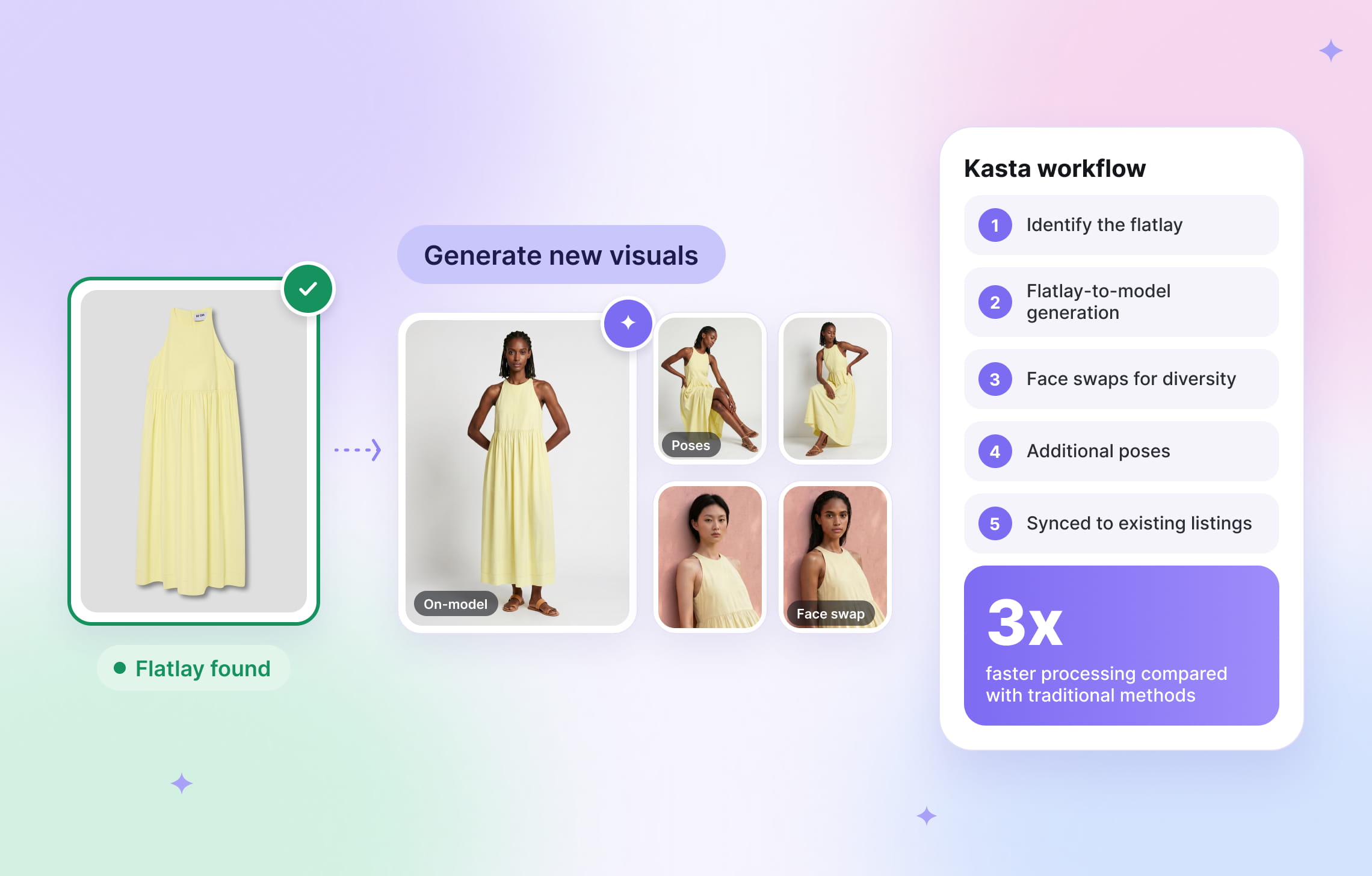
Kasta needed to refresh fashion imagery across a large marketplace catalog. Its workflow combined flatlay-to-model generation, face swaps, and additional poses, while keeping the updated assets connected to the existing catalog structure.
Claid’s engineers helped tailor the solution to Kasta’s infrastructure and operational needs. The marketplace achieved 3x faster processing compared with traditional methods.
Three ways a custom pipeline can improve your catalog
Your starting point might be a backlog of inconsistent images, a slow seller-upload process, or a product feature that needs a particular kind of asset. The following examples show workflows you can scope with Claid’s team; the exact checks and actions depend on your requirements.
1. Scan and standardize a mixed catalog
Before editing a large catalog, work out which images need attention. A clean product shot may only need resizing. A lifestyle image may belong in the gallery. A cropped package may need a replacement from the seller.
A catalog-scanning workflow can sort that work into useful groups:
- Ready to use: images that already meet your standards
- Ready to improve: suitable images that need lighting, framing, background, or resolution adjustments
- Useful elsewhere: detail shots or lifestyle images that belong in another position
- Needs attention: missing, unsuitable, or ambiguous assets that require review or a new upload
Claid’s image-processing workflows can include enhancement, background removal, resizing, and other operations. In a custom project, the selection and routing logic determines when to apply them.

2. Add visual QA to new seller uploads
Visual quality assurance, or visual QA, checks whether an image is suitable for its intended use. Some problems can be corrected automatically; others need a person to decide or a seller to supply a better source.
The image alone doesn’t supply every answer. A size check needs the destination’s specifications. A product-mismatch check needs trusted listing data or an approved reference image tied to the same item and variant. If that information is missing or the relevant detail isn’t visible, the workflow should mark the check as inconclusive rather than assume the image is wrong.
| What comes in | What the check needs | What the workflow should do |
|---|---|---|
| A photo that appears to meet the category standard | Defined acceptance rules and examples of acceptable and unacceptable images | Approve without editing when all required checks pass |
| A complete product photo in the wrong dimensions | Required dimensions, aspect ratio, and framing rules for the destination | Resize or add space around it, then check the framing |
| A suitable packshot with a distracting background | The category’s background policy and the original image for comparison | Remove or replace the background, then compare product edges with the original |
| A photo whose visible product details appear inconsistent with the listing | Trusted listing attributes or an approved reference image for the same item and variant; enough visible detail to compare | Flag the specific discrepancy for review; treat insufficient evidence as inconclusive |
| A photo with an essential label cut off | A rule specifying which label details must be visible, supported by examples or a reference image where needed | Request a replacement when the missing detail is clear; otherwise send for review |
Claid offers automated image processing and custom workflows that bring together image intelligence, editing, and QA. For a marketplace project, the brief should define the checks you need, what can be corrected, and when your team must make the decision.
3. Make the images you already have easier to use
An image can be technically sound and still be wrong for its placement. A close-up of a sofa’s fabric is useful in a gallery, but shoppers need to see the whole sofa in search results.
Image analysis can help distinguish those roles. Depending on the project, useful outputs could include the image type, the product’s position, visible text, or a flag that it needs closer review.
Claid’s work with Kleidn shows the value of this approach: identifying the right asset type makes the next step possible. The same principle can inform a brief for home goods, grocery, or electronics, where the workflow needs to select an appropriate view before editing it.
What should visual QA check?
The acceptance criteria in your brief should answer three practical questions.
Technical validity
Check the file format, dimensions, aspect ratio, and background requirements. A transparent cutout for a composition tool has different requirements from a search thumbnail.
Visual suitability
Check the framing, visibility, and image role. A sharp image still fails if the crop removes a chair leg or makes the product too small to recognize.
Product fidelity
Compare important details before and after processing: labels, color, shape, accessories, and visible condition. A used sofa should retain its wear. A meal should retain its actual components. Cleaner presentation should leave buyers with an accurate picture of what they’ll receive.
Test the workflow on the images that slow your team down
A useful pilot includes the difficult inputs your team sees every week: reflective packaging, dim phone photos, cluttered backgrounds, and images that sit on the boundary between acceptable and unusable.
For a Claid pilot, bring these alongside typical uploads and agree on what a successful result looks like. Keep a separate batch for the final check so the workflow has to handle images beyond the examples used to refine it.
Measure the operational result as well as the visual output:
| Question | What to measure |
|---|---|
| How much work can move through automatically? | Share of images approved without manual intervention |
| Are unsuitable images slipping through? | Problems found in a sample of automatic approvals |
| Are good images being blocked? | Acceptable images incorrectly rejected or sent back |
| Is the catalog team saving time? | Review and correction time per 1,000 images |
| Are listings getting ready sooner? | Time from upload to publishable assets |
| Does the workflow make economic sense? | Total processing, review, and rework cost per approved asset |
Look at the results by category and source. Good performance on boxed electronics may hide problems with glassware. Review some automatic approvals, too, so you can spot errors that never entered the manual queue.
Keep new listings moving while you update older images
An existing-catalog cleanup and daily seller uploads need different priorities. A large refresh should not leave today’s new listings waiting behind older assets.
Claid supports batch image editing and background processing with completion notifications. In a custom implementation, our team can help plan how these fit your upload flow and catalog updates.
The operational brief should cover the following:
- Traceability: retain the original, output, listing association, checks, and workflow version.
- Recovery: distinguish retryable failures from invalid inputs, cap retries, and provide a route for unresolved jobs.
- Duplicate handling: make repeated job events safe and prevent duplicate publication.
- Change control: test new rules and models against the evaluation set, release gradually, and retain a rollback path.
- Ownership: specify who monitors the pipeline, resolves exceptions, and approves policy changes.
Deciding how much of the workflow to own in-house? Our guide to building vs. buying an AI image pipeline can help you evaluate the options.
Send us the brief. We’ll build the workflow.
Bring us the part of your image operation that keeps generating manual work: sorting supplier photos, standardizing seller uploads, checking catalog quality, or preparing assets for a new shopping experience.
Claid’s forward-deployed team maps the steps, builds a pilot, and refines the workflow with you before scaling it. You define what your catalog needs; we handle the custom implementation.
FAQ
When does a marketplace need a custom AI image pipeline?
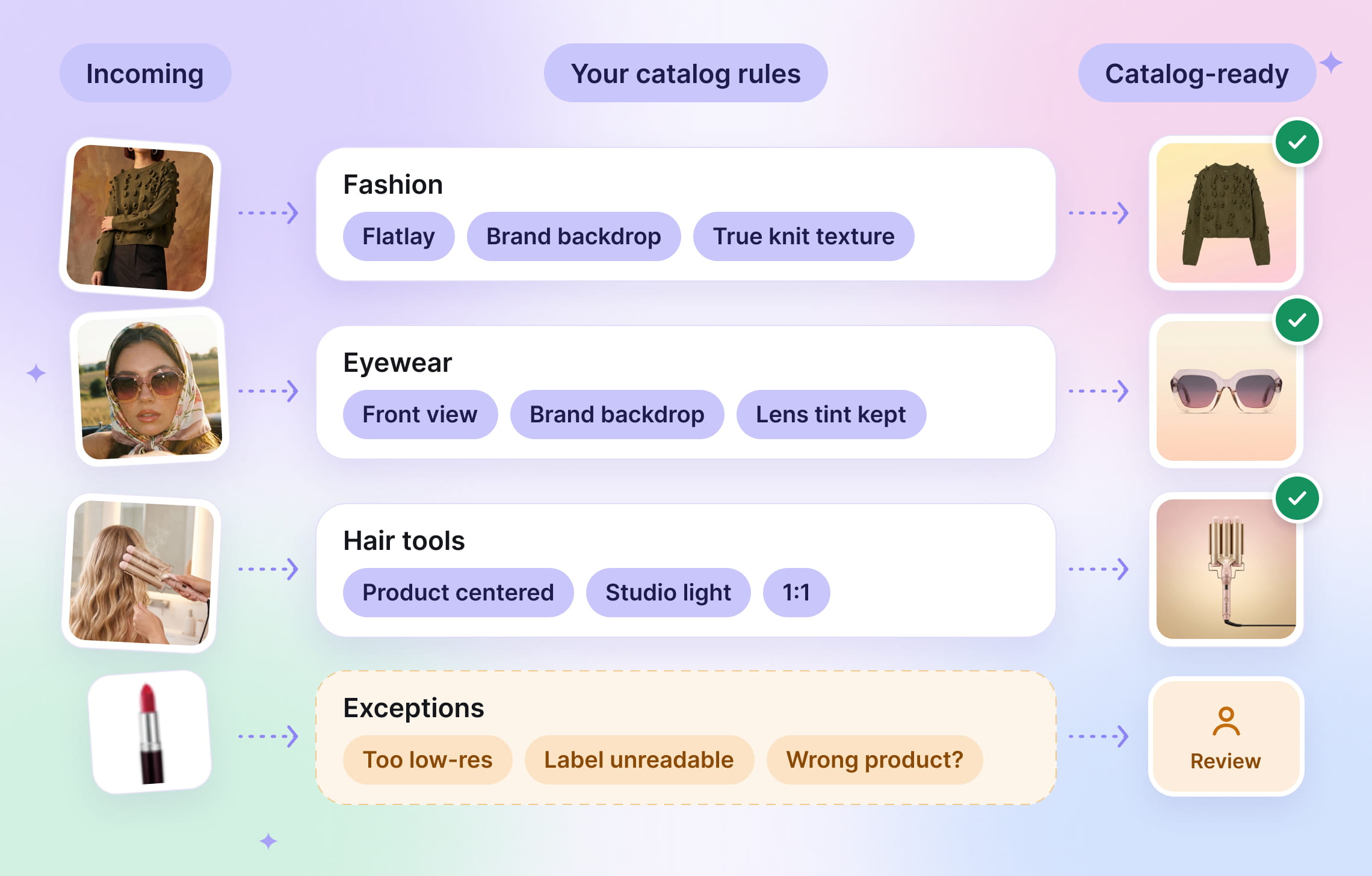
A custom pipeline makes sense when different images need different treatment. You might have category-specific standards, mixed supplier feeds, several output formats, or quality checks that determine whether an image can be published. Claid’s team can connect those requirements into a workflow built around your catalog.
How is a custom pipeline different from using an image-editing API?
An API provides operations such as background removal, enhancement, or resizing. A custom pipeline connects those operations with decisions: which image to use, which edits to apply, how to check the result, and where to send it next. Claid can build that workflow and integrate it into your existing process.
Can one pipeline handle several product categories?
Yes, with different rules for each category. Packaged groceries may need readable labels and plain backgrounds, while furniture listings need complete product views and automotive listings may require license-plate blurring. The workflow can share common processing steps while applying category-specific requirements.
Can visual QA replace manual image review?
Visual QA can reduce routine review by checking defined requirements and routing straightforward cases automatically. Ambiguous images, possible product mismatches, and missing details may still need a person’s judgment. A pilot helps establish which decisions can be automated reliably on your catalog.
Do we need an engineering team to work with Claid?
Claid offers managed custom workflows as well as integrations into your own systems. Our forward-deployed team handles the custom implementation. The involvement needed from your engineers depends on the systems being connected, access requirements, and how you want to operate the workflow.
What should we send Claid to get started?
What to put in your brief:
- Your categories and roughly how many images each one receives per day or week
- The standard each category must meet (backgrounds, framing, dimensions, what must stay untouched)
- 50–200 sample images per category, including the ones your team hates (the exact number depends on your catalog and image needs)
- Where the pipeline plugs in: seller portal, PIM, catalog database, storage
- What should happen to exceptions, and who decides them
- How you’ll judge the pilot a success
Need this at scale?
Process thousands of images via API, or let our team handle it for you.


Claid.ai
November 5, 2026


