AI inpainting to edit your product photos


Superior quality and product preservation
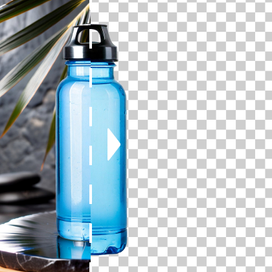
Our AI image inpainting technology is tuned to keep real textures looking real, so fabrics don't turn waxy and glossy surfaces don't get muddy. It also aims to preserve the original lighting, shadows, and geometry, so edits blend naturally instead of looking pasted on.


Adding objects to photos without reshoots
Need to spice up a minimalist shot? AI inpainting lets you introduce props and styling details that make the scene feel intentional and lifestyle-ready, while keeping your product as the hero. It's a fast way to create new creative directions from the same base photo.


Effortlessly replacing elements or backgrounds
Sometimes you only need to change one thing: a distracting object, an outdated prop, or a background that doesn't fit a new campaign. With our image inpainting AI, you can swap specific elements or refresh the entire background in a few clicks.


Need AI photo editing at scale?
Handle high-volume image editing without adding production bottlenecks. Automate the workflow through our API, or let our team build and run a setup around your needs.
How it works
STEP 1: UPLOAD A PRODUCT SHOT
Select your photo
Drag and drop a high-resolution image, or pick one you already generated in Claid.


STEP 2: DESCRIBE CHANGES
Give AI inpainting directions
Describe the fix, and watch the image inpainting AI work its magic in real-time.


STEP 3: EXPORT RESULTS UP TO 4K
Download high-quality outputs
Our AI image inpainting tool ensures your final output is sharp, clear, and ready for your Shopify store, Amazon listing, or marketing campaign.


Tools
Your all-in-one AI photo studio
Simplify your product photography with tools that handle everything. Combine into simple and fast workflows to get the desired results in seconds.
Claid AI Studio




10+ more tools
are waiting in Claid Studio.
Transform your workflow with AI inpainting
If you're making product visuals at scale, inpainting is your "fix it fast" tool to update creatives for seasons and promos, clean up batches of images for marketplace compliance, and build more variants for A/B tests.


