Background color changer that keeps your product crisp


Match different palettes without reshooting
When you need a background color change across dozens (or thousands) of SKUs, manual editing turns into a bottleneck. With AI Edit, you can change the background color of a photo in seconds.


Meet marketplace requirements
Many marketplaces and ad placements expect clean, uniform backgrounds. Use our online background color changer to make listings look compliant and polished, while keeping the product sharp.


Keep edges and details intact
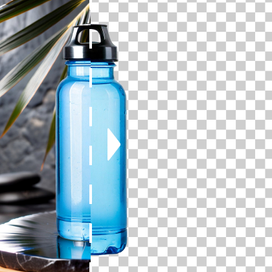
Our background color changer doesn't "eat" into hairline edges, transparent plastic, glass, jewelry, or fuzzy textiles. AI Edit focuses on preserving product contours and fine details, so your catalog stays clean without that obvious cutout look.


Need AI photo editing at scale?
Handle high-volume image editing without adding production bottlenecks. Automate the workflow through our API, or let our team build and run a setup around your needs.
How to change background color
STEP 1: UPLOAD A PRODUCT SHOT
Select your photo
Choose any product photo you want to edit. The cleaner the original image, the more consistent your results.


STEP 2: DESCRIBE CHANGES
Specify the color for background change
Say what you want the background to become. A request like "change background color to gradient blue and keep labels untouched" is enough for a clean background color change.


STEP 3: EXPORT RESULTS
Download your photos with new backgrounds
When the new background is ready, export the final image in high quality so it's immediately usable for your PDP, marketplace listings, and ads.


Tools
Your all-in-one AI photo studio
Simplify your product photography with tools that handle everything. Combine into simple and fast workflows to get the desired results in seconds.
Claid AI Studio




10+ more tools
are waiting in Claid Studio.
Your fastest background color change workflow
Change background color in seconds to match your brand palette, meet marketplace requirements, and keep your catalog looking clean and cohesive. Try it on one photo, then scale the same look across your whole collection.


