Should you hire a product photographer or use an AI service?


Short answer: Hire a product photographer when you need to capture something your existing images can’t show: a new product, precise material details, real fit, or a person using it. Choose an AI product photography service when you already have reliable product photos and need more scenes, campaign variations, or consistent catalog content.
No usable photos yet? A practical option is to commission a clean base set, then use AI to create additional settings and variations. You get a reliable record of the product and more ways to present it.
Below, we’ll compare the options on cost, speed, and control, then work through catalog, hero-shot, lifestyle, and fashion examples.
Product photographer vs. AI service: the practical comparison
Each route starts from different inputs and puts the production work with a different team, which shapes its cost, speed, and control:
| What you’re buying | Photographer or studio | Managed AI photography service | Self-serve AI software |
|---|---|---|---|
| Starting point | Physical products and a shot list | Existing product images and a brief | Existing images, plus your team’s time |
| Cost structure | Per image, product, hour, or project; production extras may apply | Scoped project or volume quote; confirm revisions and review | Subscription or usage fees, plus your own production and review labor |
| Speed | Often 1–2 weeks after product receipt; some offer 24–72-hour editing | Test batch in 48 hours or sooner; automated production follows approval, with final review | Minutes for initial options; selection, corrections, and review add time |
| Control | Direct control over physical lighting, angle, styling, and performance | Approve the visual rules on a sample, then review against them | Hands-on iteration, selection, and editing |
| Strongest fit | New capture, fine details, real people, exact physical behavior | Reusing accurate assets across many scenes, formats, and channels | Repeatable work with a capable internal owner |
| Main constraint | Physical setup and logistics | Source-image limitations and output verification | Your team does the work needed to reach an approved result |
If your goal is to hire someone, compare the first two columns. The third matters if you’d rather bring production in-house with self-serve tools or APIs.
Cost: compare the work you actually need
A studio quote may cover product preparation, photography, retouching, and delivery. An AI subscription may cover only access to generation tools. Comparing headline prices can make the savings look larger than the operational difference.
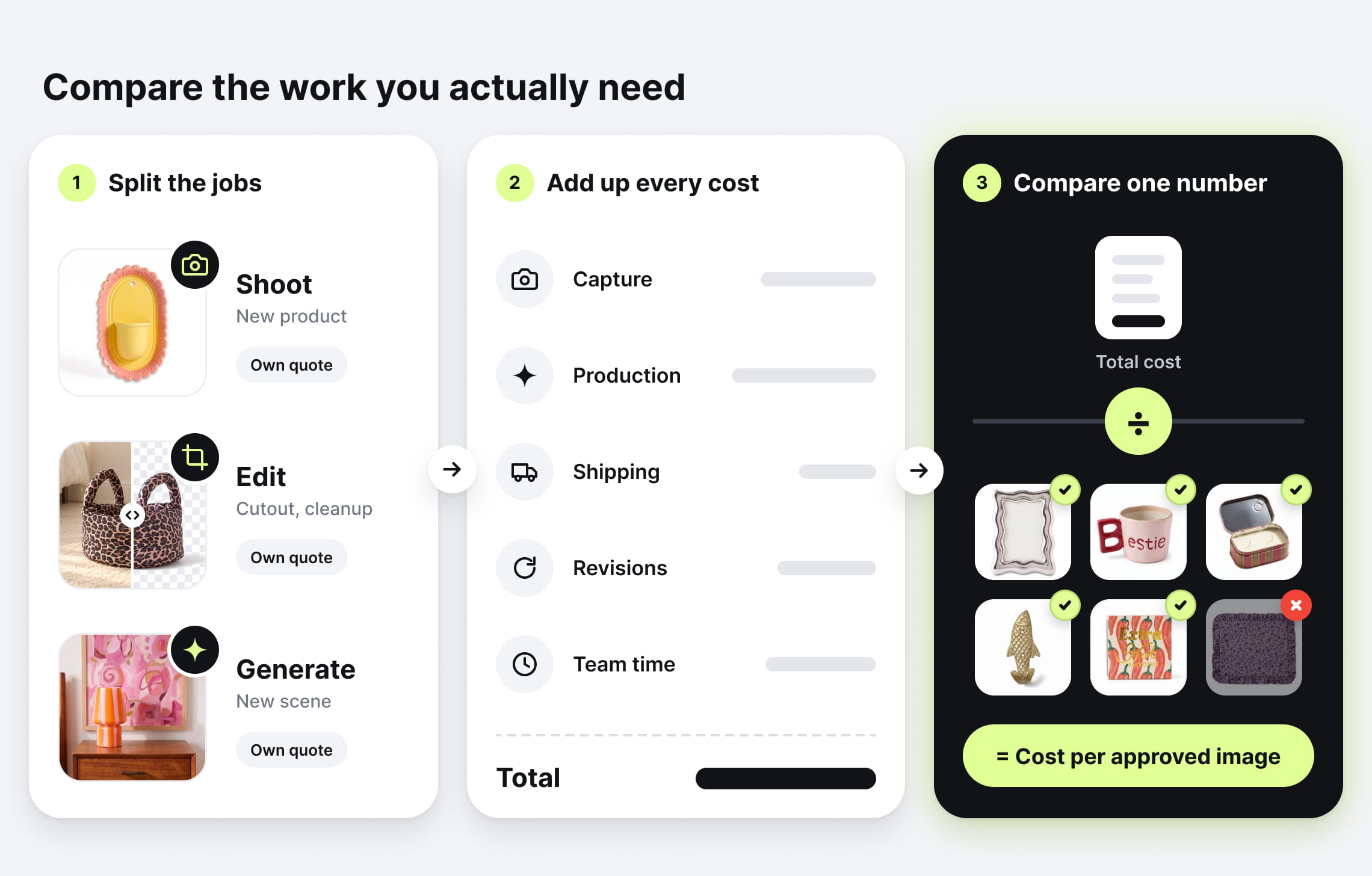
Start by separating three jobs: photographing a product, editing an existing photo, and creating a new scene around it. They require different work, so they deserve different quotes.
If you already have sharp product images and only need consistent crops, cutouts, or backgrounds, ask about editing before commissioning a reshoot. A retoucher, studio post-production team, or AI service may be able to use the same files.
For every option, use the same calculation: cost per approved image = total project cost ÷ images accepted for publication.
Include source capture, production, shipping where needed, revisions, and your team’s briefing and approval time. If the provider includes retouching or review in its fee, count that expense only once.
What photographers and studios charge
Two well-known studios publish their rates, which gives a useful benchmark for common shot types. Prices are subject to change, so confirm current rates with the provider before you book.
| Service | Published price | What to check |
|---|---|---|
| ProductPhotography.com: white-background photos | $59 each for 1–9; $49 for 10–29; $33 for 100+ | Preparation and standard editing are included; additional services cost extra |
| soona: Studio Pass | $39 per photo + $149 per booking | Models, styling, upgrades, and premium edits can add to the bill |
| ProductPhotography.com: hero shots | From $115 per photo | Extensive styling, large products, and complex arrangements may need a custom quote |
| ProductPhotography.com: lifestyle images | From $195 per photo | Custom props and complex setups cost extra; simulated locations can involve stock imagery and AI |
A studio may already combine capture, compositing, and AI. Ask how it will produce your images and what the fee includes.
What a managed AI service costs
Claid’s AI product photography service is quoted to scope. The main cost drivers are:
- Number of products and output views
- Quality of the source images
- Creative complexity: cleanup and standardization, new scenes, or on-model images
- Revision rounds and quality-control requirements
- Output specifications for each channel
A software subscription covers a different purchase from hiring a team to deliver finished assets.
For broader planning ranges, see our product photography pricing guide.
Example: 100 catalog images
Suppose you have 100 usable product photos with inconsistent backgrounds and framing. Ask both a conventional editing provider and an AI service to quote the same deliverables: the same views, backgrounds, crops, resolution, and acceptance criteria.
A new 100-image shoot starts at $3,300 using ProductPhotography.com’s published volume tier above. But that is a capture benchmark, not the appropriate baseline for every editing job. Reshoot only where the existing files cannot support the brief.
Your comparison should include each provider’s production fee, corrections outside scope, and your own review time. If a route takes 3–8 hours of internal work at an illustrative $40/hour, add $120–$320 to it. The table below uses the same range for each route, so measure the real time in your pilot.
| Expense | Studio reshoot | Editing provider | Managed AI from existing photos |
|---|---|---|---|
| Production of 100 approved images | $3,300–$4,000 (published rates) | From about $190 (published starting rate) | $200–$1,000 (illustrative) |
| Shipping products to the studio and back | $100–$300 (illustrative) | $0 | $0 |
| Packing and tracking samples: 1–3 hours at $40/hour | $40–$120 | $0 | $0 |
| Briefing and approval: 3–8 hours at $40/hour | $120–$320 | $120–$320 | $120–$320 |
| Total | $3,600–$4,700, or about $36–$47 per approved image | From about $300, or from $3 per approved image | $300–$1,300, or about $3–$13 per approved image |
The editing figure uses an estimate of $95 per month plus from $0.95 per image, with complex retouching costing more. For pure cleanup, an editing service can cost as little as an AI service. AI is the stronger fit when the same files also need new scenes, on-model images, or channel variations.
Speed: measure time to approved files
An image can generate quickly and still take several rounds to approve. A photographer can shoot quickly and still have a queue before your booking.
For example, soona lists edit delivery of 24, 48, or 72 hours, depending on the plan. That covers the editing stage, not the full journey from brief to final files. ProductPhotography.com’s white-background service describes a typical 1-to-2-week turnaround after it receives products and payment.
AI removes shipping and set-building when suitable source images exist. It still needs a clear brief, production capacity, and someone to approve the work.
Whichever route you choose, ask for two dates: the first sample and the complete approved set. Then agree how quickly your team will return feedback, because a three-day approval delay slows either workflow.
For provider shortlisting, check out our overview of the best product photography services.
Control and accuracy: decide what can change
A photographer controls the physical object: camera position, light placement, fabric arrangement, and how a person holds or wears the product. That access matters most when the image has to show a seam, connector, surface finish, or real interaction.
With a managed AI service, you don’t direct a set. You control the result by approving the visual rules before full production and holding every image to them.
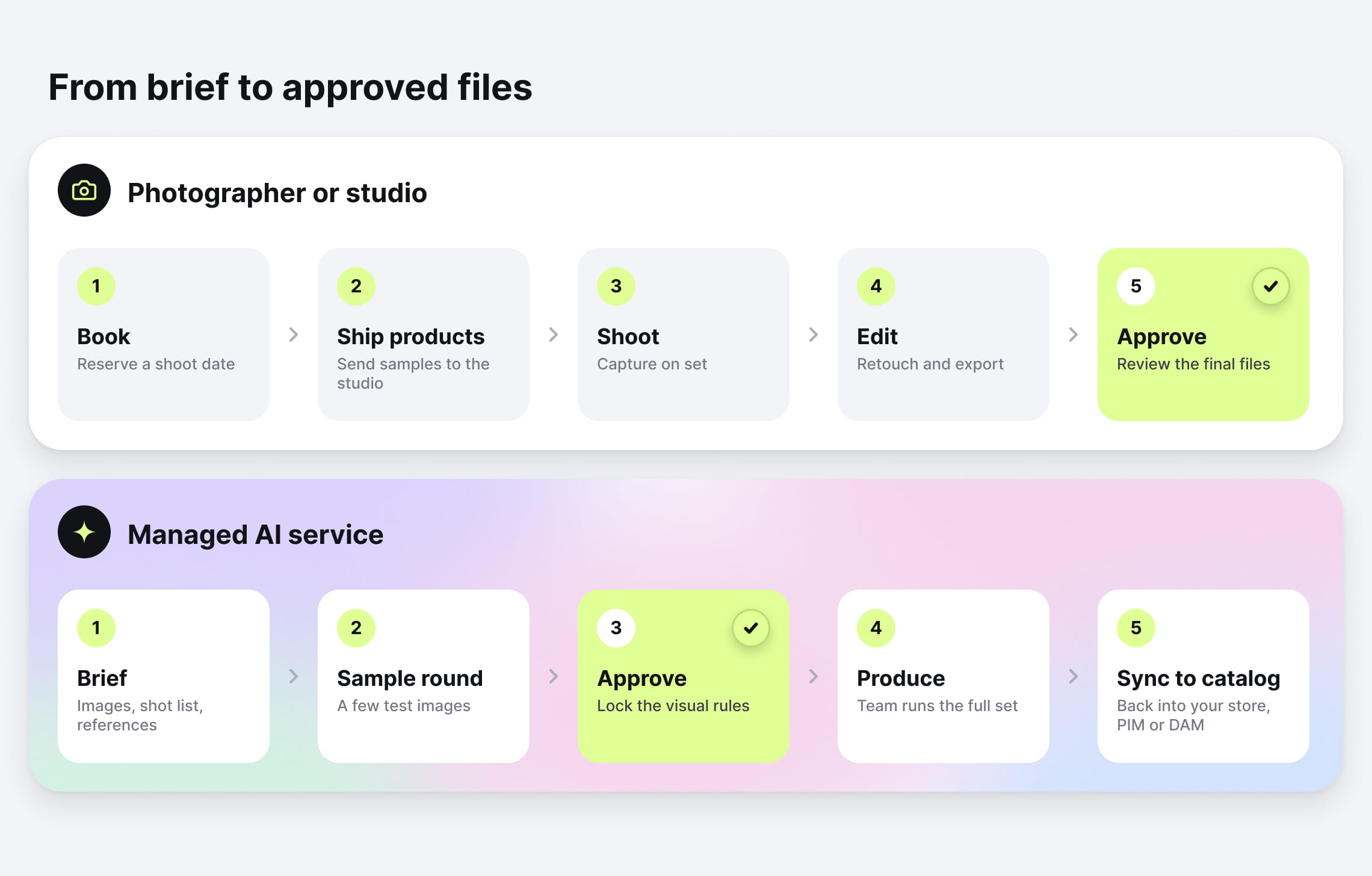
At Claid, the typical custom production process happens in the following steps:
- Brief and references. You share source images, the shot list, a moodboard or example images, and channel specifications.
- Sample round. The team produces a few representative images. You approve or correct framing, lighting direction, background, shadows, and styling.
- Agreed visual rules. Approved choices become the rules for the full set. So do the product regions that must not change, such as labels, logos, and hardware.
- Production and review. Claid’s team produces the set and checks each image against your references before delivery.
- Revisions. You flag images that miss the standard, and the team corrects them. The number of revision rounds is set in your agreement.
Background editing and inventing a new view are different jobs
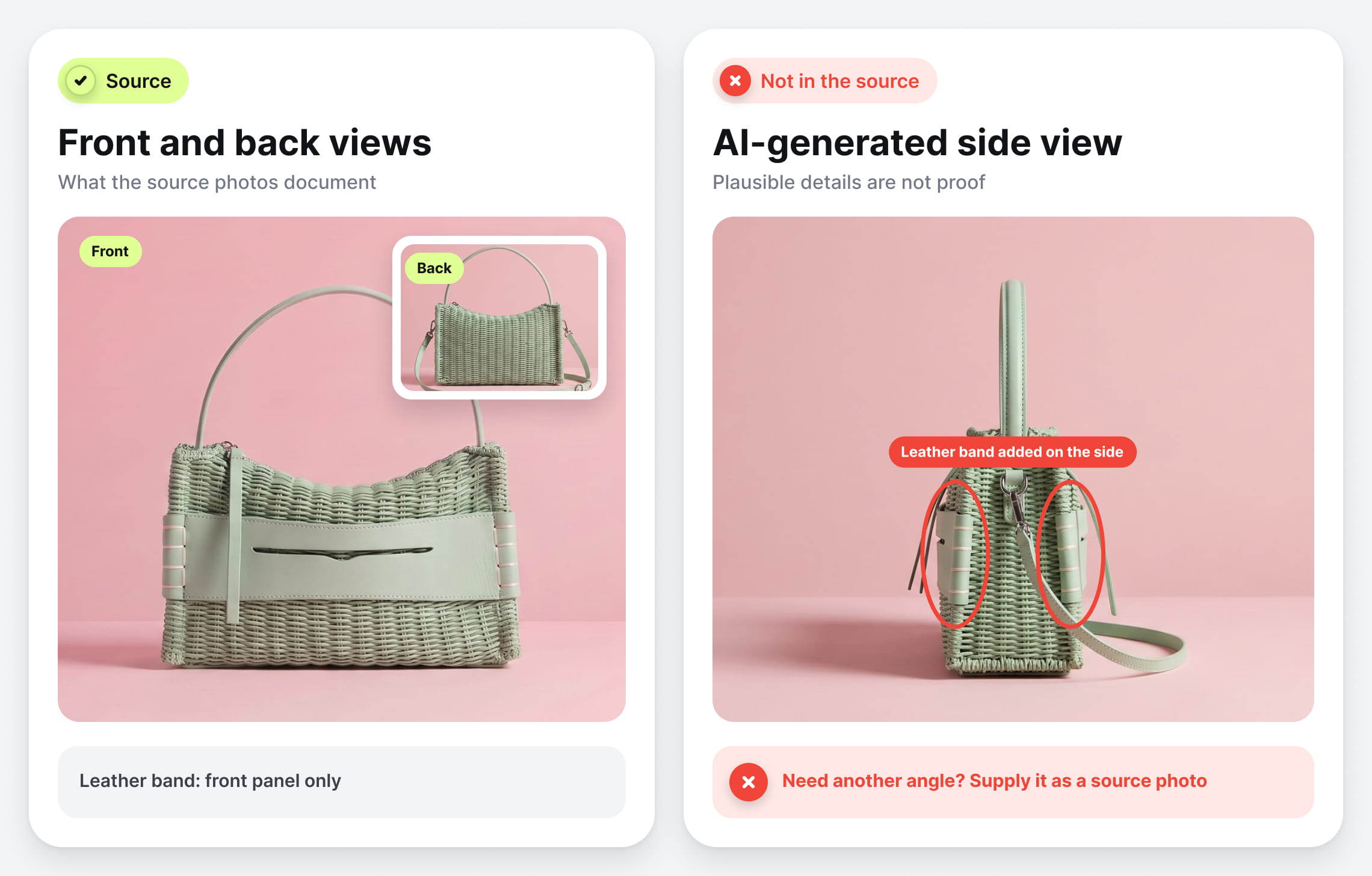
In a background-editing workflow, a mask separates the product from the area being changed, so the product itself stays untouched. A more generative transformation may also reconstruct parts of the item, its pose, or its appearance.
That distinction matters. A front photo doesn’t document the sides of a bag. If a generated side view continues the leather band from the front, plausibility doesn’t prove the band wraps around:
For an accuracy-sensitive brief, specify which product regions must stay unchanged, which transformations are allowed, and which references the reviewer will check against. When the job needs details the original image doesn’t show, supply additional source angles.
No usable photos yet? Capture a base set, then expand it
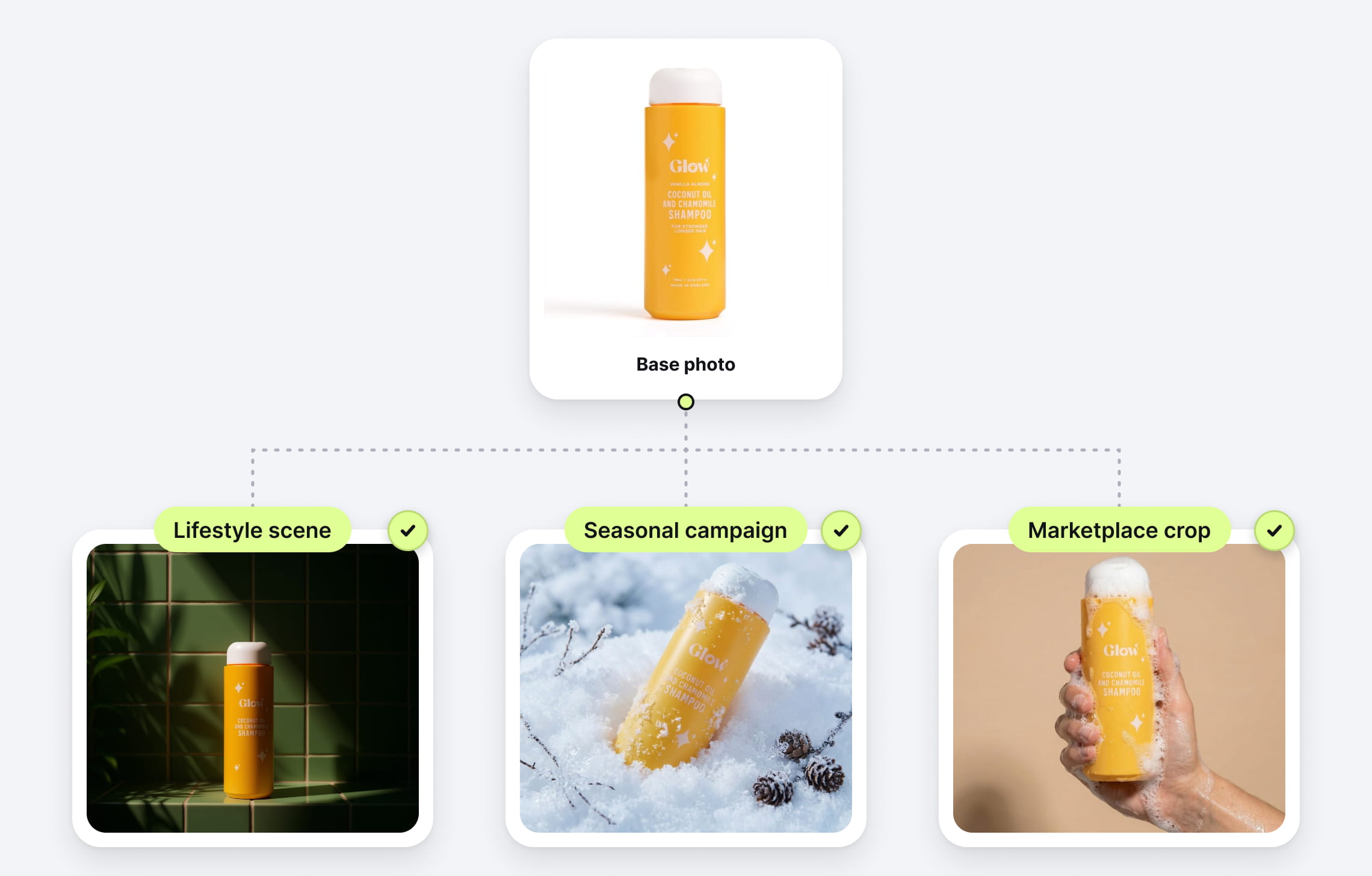
If you’re starting without good product photos, you don’t have to choose between a full studio shoot and AI. Pay a studio for one clean, accurate set, then use AI for the creative built on top of it.
Here’s how that workflow fits together:
- Capture the product. Photograph the angles, labels, materials, and details shoppers need to inspect.
- Approve the creative direction. Use a few representative products to agree on scene style, composition, lighting, and output requirements.
- Create additional content. Build lifestyle settings, seasonal variations, and channel formats from the approved assets.
- Keep real demonstrations where they matter. Use physical capture when the image needs to document actual fit, movement, or use.
Plan the base set for its intended reuse. A front view may support several front-facing scenes, but a rear view or macro detail needs its own reference.
Example: a 20-product launch
For a launch needing one white-background image and one lifestyle image per product, ProductPhotography.com’s published rates give this starting point:
| Production item | Studio-produced set | Hybrid set |
|---|---|---|
| 20 white-background photos at $49 | $980 | $980 |
| 20 lifestyle images | From $3,900 at $195 each | Scoped AI service quote |
| Production subtotal | From $4,880 | $980 + AI service quote |
Illustrative calculation using the studio rates linked above. Excludes shipping, client labor, and additional charges. Extra source angles would increase capture costs.
The decision is whether the AI quote, plus any additional preparation and review, costs less than producing the same lifestyle set through the studio. Both routes must meet the same visual standard.
Reusing source photos can make later campaigns more economical. Studios can also batch setups and reuse assets, so ask about the cost of the next collection or seasonal update, not just the first project.
Which option wins for your use case?
The same brand may need a photographer for one project and an AI service for the next. These examples show how the choice changes with the assets you have and the job each image needs to do.
Catalog volume: use AI for repeatable production
Imagine 1,000 products arriving with supplier photos in different styles. An AI service can be a strong fit for standardizing framing and backgrounds, generating supported variations, and preparing output formats. Straightforward retouching is also worth quoting when that’s all the brief requires.
In Claid’s work with Kasta, the marketplace reports 3× faster processing compared to traditional production, with workflows including flatlay-to-model conversion, model swaps, and pose expansion. The project also involved tailored integration support. This is a reported result from that workflow, rather than a speed guarantee for every catalog.
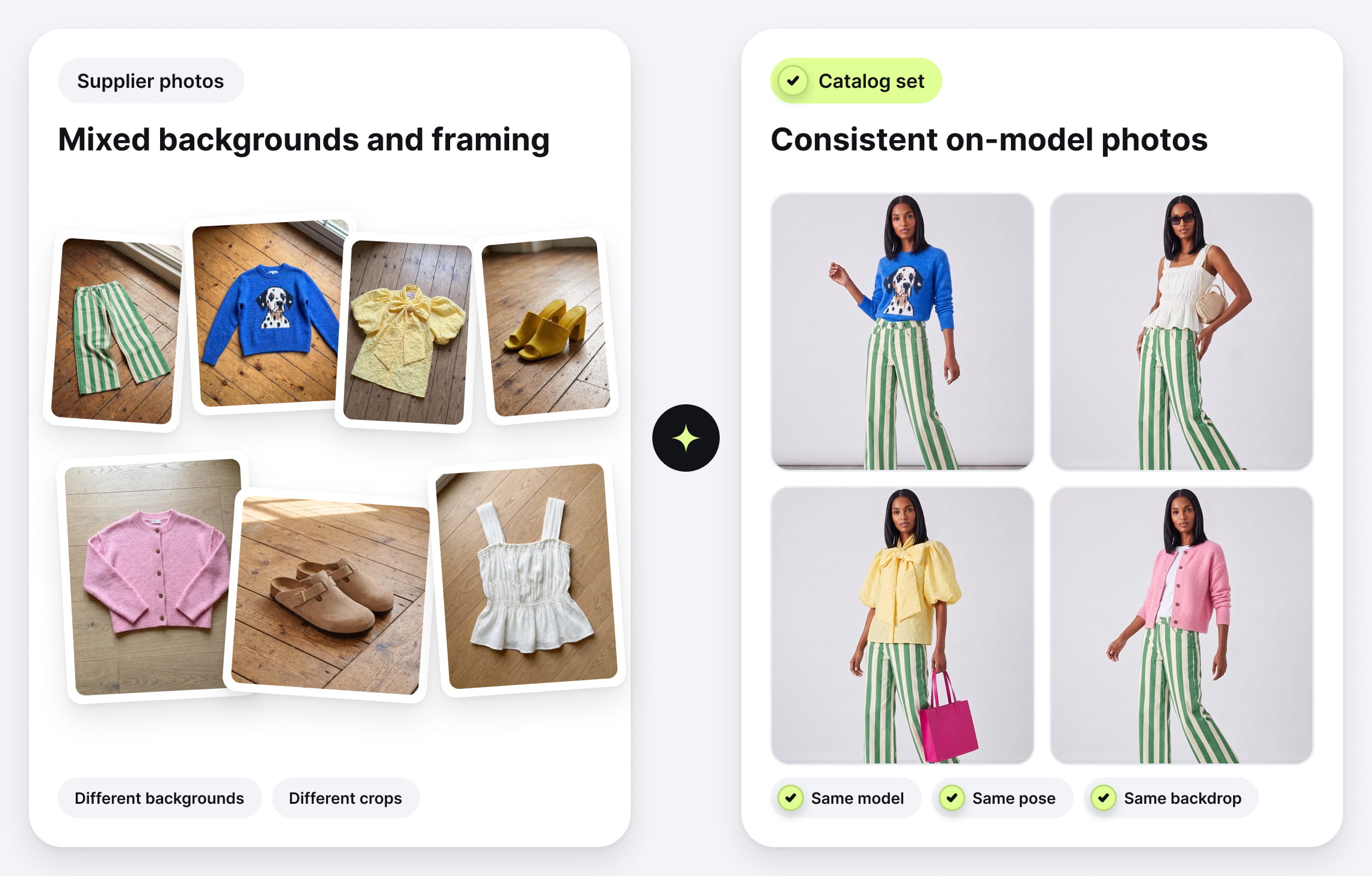
Choose AI or editing for usable source assets. Hire a photographer for missing views and products that cannot meet the standard from existing files.
Hero shots: choose around the image’s job
A watch image that must reveal brushed metal, an engraved crown, and crystal reflections benefits from a photographer experienced with watches or jewelry. You’re paying for deliberate capture of the actual object.
A skincare bottle in a seasonal campaign setting is a different brief. With an accurate bottle and label reference, an AI service can create scene variations without another physical shoot.
Choose photography when fine physical detail drives the image. Consider AI when the creative task is building a setting around a well-documented product.
Lifestyle images: separate atmosphere from demonstration
A candle on a holiday table is a reasonable AI brief. So is a photographed chair placed in several interior styles, provided its proportions and placement are checked.
A baby carrier showing strap placement or a backpack demonstrating capacity communicates physical facts. Photograph the real interaction when shoppers need evidence of how the product works.
Scale needs attention in either workflow. Baymard’s usability research found that 42% of participants tried to assess product size through product-page images. A beautiful room scene can mislead if the chair looks too large beside a table. Use verified dimensions, scale diagrams, or real reference photography to support the image.
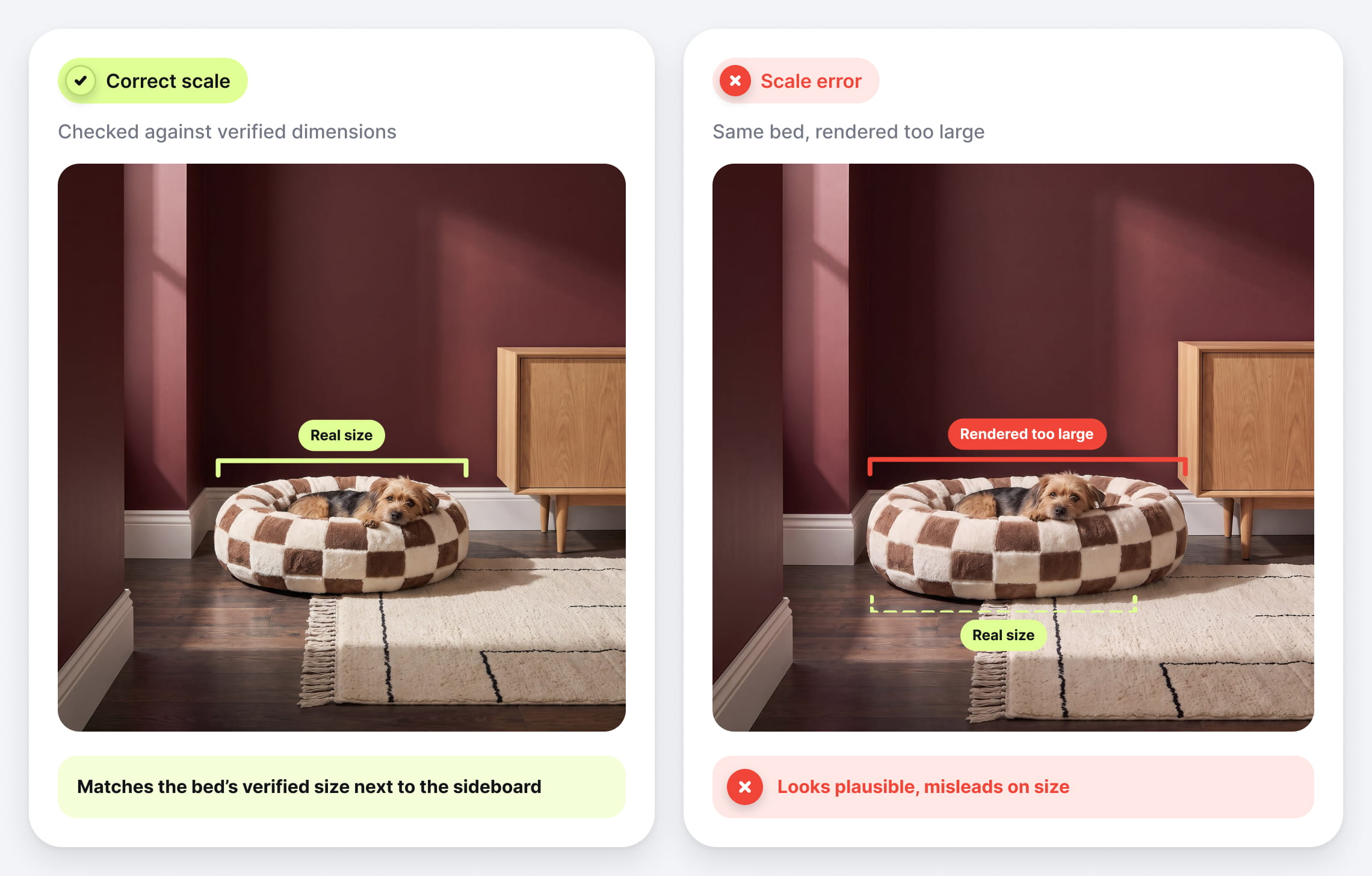
Choose AI for contextual variations and photography for demonstrations of actual use.
Fashion: expand content while preserving dependable fit references
Clean garment photos can become the starting point for on-model imagery across collections and campaigns.
With Claid’s custom workflows for Auras Activewear, the brand reports $1,000–2,000 saved per collection and 1-to-2 production days removed through a flatlay-to-model workflow.
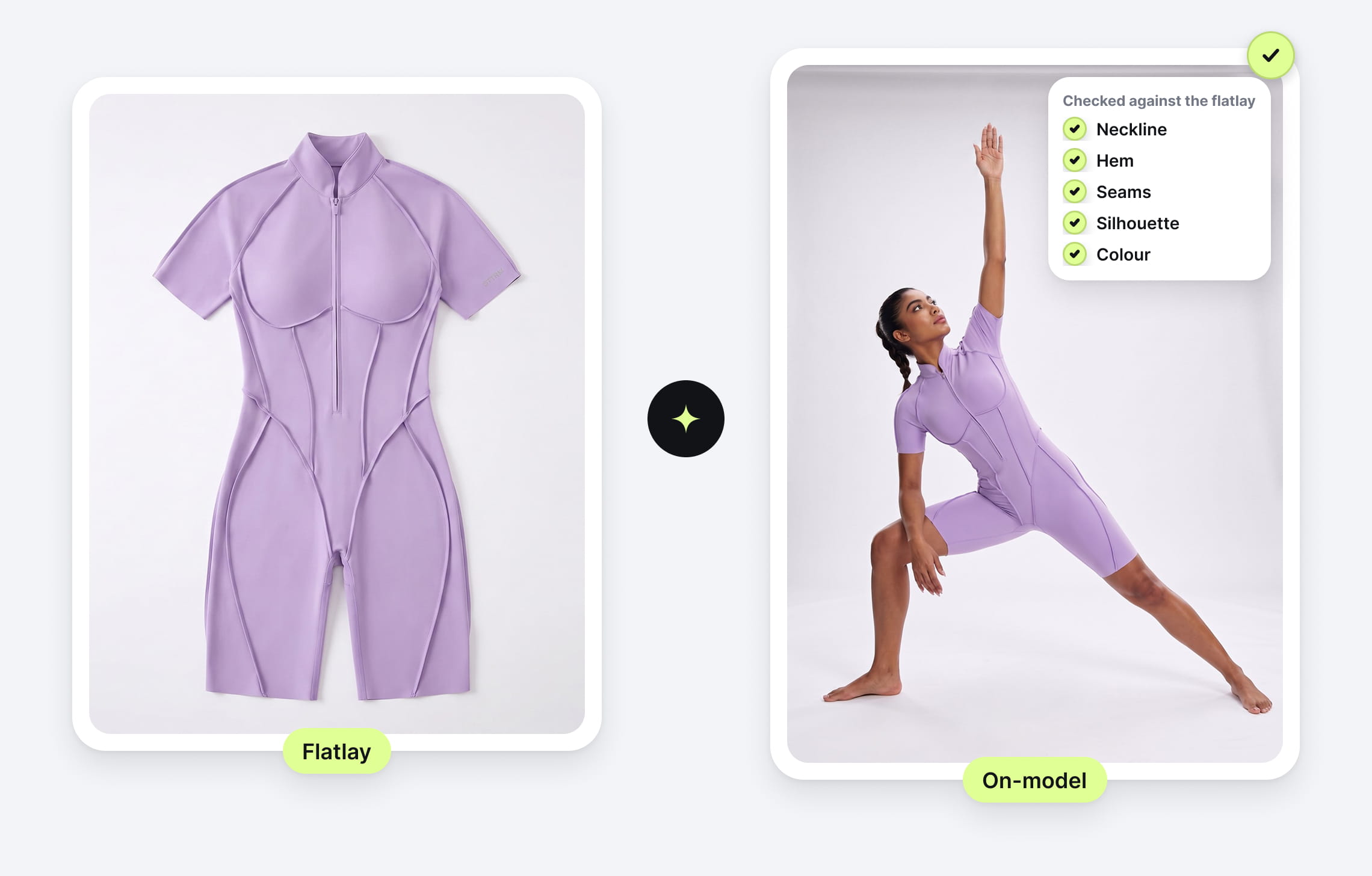
Check generated images for neckline, hem, print, seams, and silhouette. Retain real model photography and sizing information when the buying decision depends on actual fit or fabric behavior.
Choose a hybrid approach when you need both trustworthy fit references and a larger creative library.
How to choose a provider before committing the full budget
Give every provider the same brief: product count, required views, existing assets, visual references, output specifications, deadline, and intended uses.
Then request a small pilot with representative products. A useful sample might include a simple matte item, reflective packaging, fine text, patterned fabric, and your hardest product.
Judge the results with these 5 questions:
- Is it the right product? Check shape, color, label text, components, and variant.
- Does the scene make sense? Check perspective, contact shadows, reflections, and scale.
- Does the set match? Compare framing, margins, lighting direction, and background treatment across products.
- Can you use the files? Check dimensions, crops, file names, channel requirements, and agreed usage terms.
- What did approval take? Record revisions, your team’s time, final turnaround, and cost per accepted image.
For Google Shopping, add one delivery check. Google requires generative-AI images to carry metadata identifying their AI origin, asks merchants to preserve the relevant IPTC tags, and expects images to represent each product variant accurately. Confirm that your delivery and upload workflow keeps that metadata intact.
Finally, ask who fixes a failed image, whether that correction is included, and what happens when a product can’t meet the agreed standard. These answers tell you more than a portfolio does.
Confirm usage rights and data handling
Ask every provider what commercial uses are included and how it handles your source assets. With a hybrid project, confirm that the original photography agreement permits the planned editing and reuse.
Here’s where Claid stands:
- You own the outputs. Images Claid produces for you are yours to use commercially, including generated scenes and on-model images.
- Synthetic models, clear likeness rights. AI-generated models aren’t based on identifiable real people.
- In custom-built solutions, your images aren’t used for data training.
Scope a pilot with our AI production team
Claid’s AI product photography service works from your existing images and brief. You approve the visual direction on a sample; our team handles production, review, and delivery to agreed specifications.
Bring 5–10 representative products, including your hardest one, plus your shot list and examples of the style you want. We’ll scope a pilot and quote the work you actually need.
FAQ
How much does it cost to hire a product photographer?
Published studio rates run from about $33–59 per white-background photo to $195 or more per lifestyle image. Some studios add booking fees, styling, or model costs on top. To compare offers fairly, work out the cost per approved image, including shipping and your team’s time.
Can AI replace a product photographer?
Not entirely. AI can replace parts of scene creation and repeat production when accurate source images exist. Photography remains valuable for capturing new product information, intricate details, real fit, and physical demonstrations.
Do I need existing photos to use an AI product photography service?
Yes. An AI service works from source images of the real product, so it can’t show details those images don’t contain. If you don’t have usable photos, shoot a clean base set first, then use AI for variations.
Can I use AI product images on Google Shopping?
Yes, provided the images meet Google’s image requirements, including AI-origin metadata and accurate product representation. Confirm that your provider delivers the required metadata and that your upload workflow preserves it.
How long does an AI product photography project take?
It depends on source quality, creative complexity, and how fast your team approves samples. Ask any provider for two dates: the first sample and the complete approved set.
Need this at scale?
Process thousands of images via API, or let our team handle it for you.


Claid.ai
November 13, 2026


