Tech
How to create a fashion lookbook with AI


An AI fashion lookbook changes the production model. Instead of photographing every garment, outfit, and variation from scratch, you start with product images you already have and turn them into coordinated on-model photos. The same collection can then be adapted to different models, settings, poses, formats, and short videos.
This guide explains how to create a lookbook with Claid AI fashion suite step by step, what inputs produce the best results, and how to keep the final collection consistent rather than ending up with a folder of unrelated AI images.
We can build this for you
Send us your collection and style guide, and we'll create a full lookbook with consistent model identities and realistically rendered garments.
What is an AI fashion lookbook?
An AI fashion lookbook is a coordinated set of fashion images created or extended with generative AI. It presents a collection through consistent models, styling, poses, backgrounds, lighting, and art direction.
The starting point is usually existing product photography:
- Flatlay clothing photos
- Ghost mannequin images
- Existing photos of garments on models
- Photos of tops, bottoms, shoes, and accessories used for styling
An AI fashion tool converts these inputs into on-model photos, places the models in selected environments, and creates variations without requiring a new physical shoot for every image.
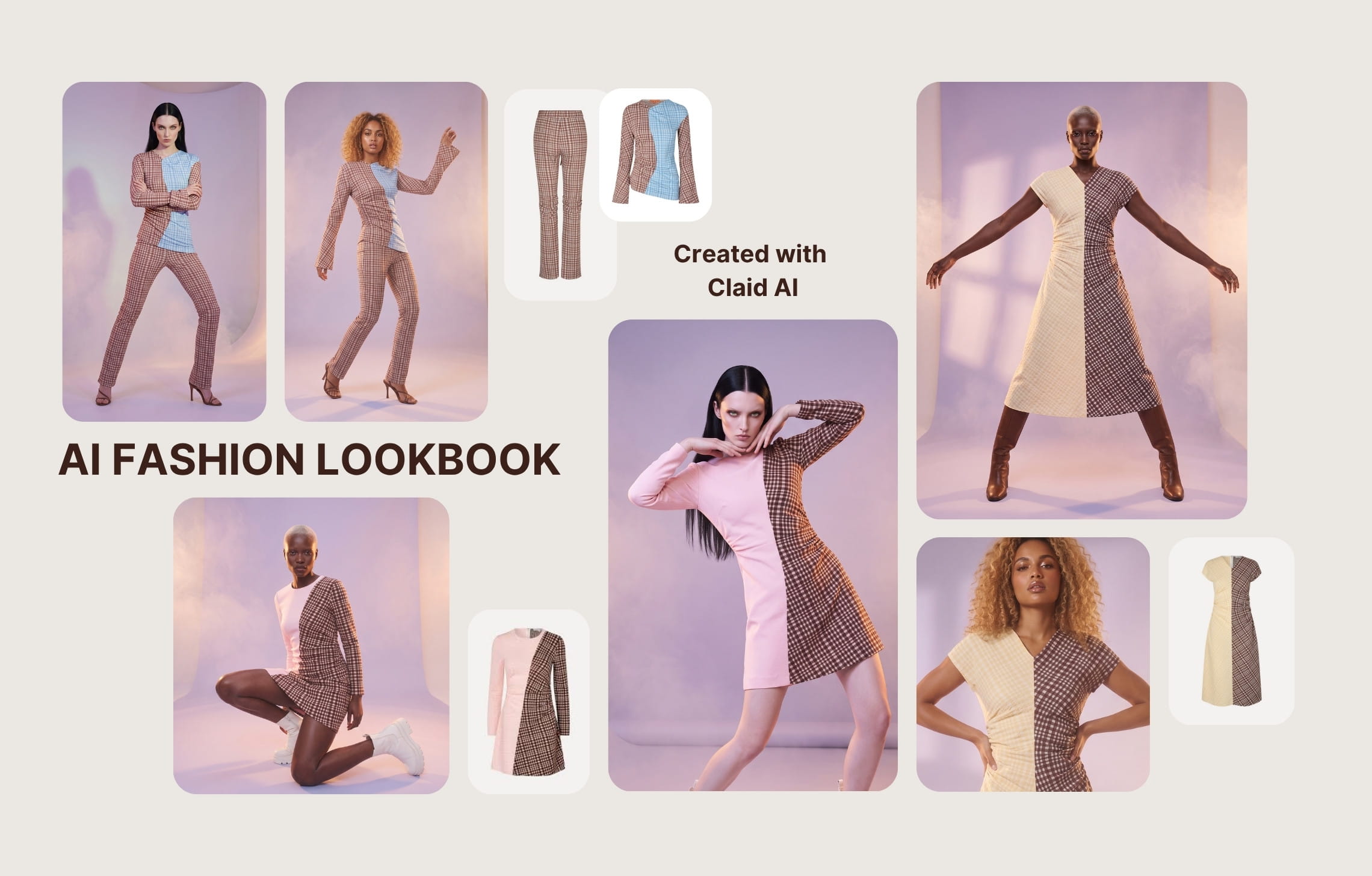
Why brands are switching to AI lookbooks
The biggest drivers behind AI adoption in lookbook production are practical: lower costs, faster turnaround, more consistent output, and far more creative freedom.
Instead of rebuilding a production from scratch for every collection, brands can reuse approved models, styling rules, and visual direction, then adapt them across more products, markets, and channels.
Lower production costs
Traditional fashion production includes more than the photographer’s fee. A typical budget may include models, studio rental, hair and makeup, styling, equipment, transport, catering, retouching, and image usage rights.
For an illustrative 20-image lookbook, the cost will reach roughly $3,000-15,000.
While AI production still has costs, you don’t rebuild the physical set for every look. Once the production system is established, additional poses, backgrounds, colorways, and crops are much less expensive to create.
With that said, a self-serve AI lookbook may require around $100–$200 (or even less) in generation credits, depending on output resolution, the number of variations, and how many retries you need.
High-end fitness brand Auras Activewear reports saving up to $2,000 per collection thanks to Claid AI.
A fully managed AI production will cost more than the software alone, but it will be still cheaper than the traditional approach and give you more control over brand rules and result verification. Claid offers custom lookbook production, where our forward-deployed creatives are generating fashion content based on your inputs, requirements, brand identity, and software integrations.
Faster collection launches
Traditional lookbooks depend on several schedules lining up. The collection samples, models, studio, photographer, stylist, and production team all need to be available at the same time.
AI removes many of those dependencies. Product images can be processed as soon as they are ready, and new images can be generated while the collection is still being finalized.
The exact turnaround depends on collection size and the number of revision rounds, but the workflow can shrink from a multi-stage shoot and post-production process to a production cycle measured in days.
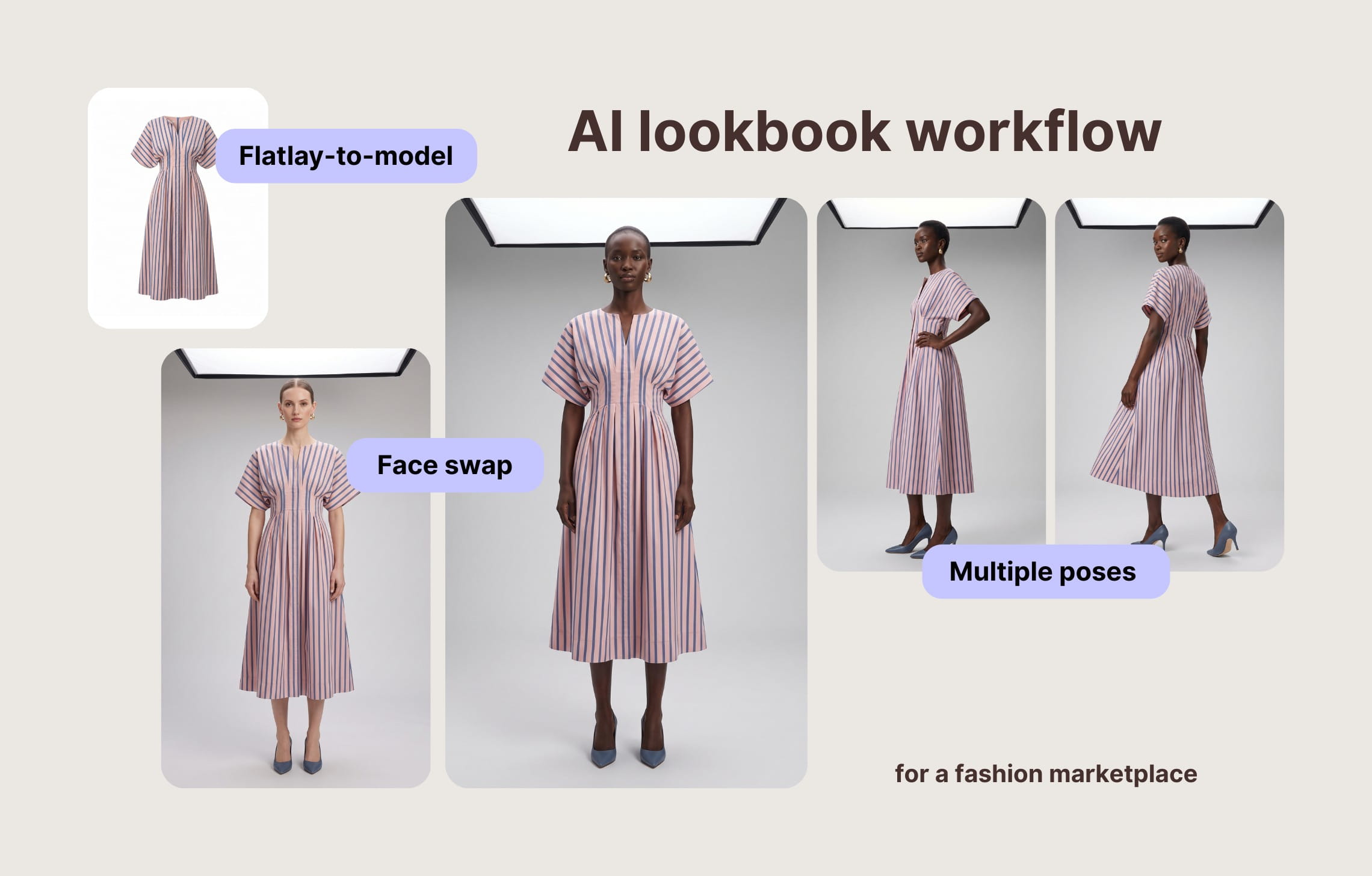
A large fashion marketplace Kasta saw 3x speed improvement after adopting Claid AI. For Kasta, we built a custom workflow that detects flatlays, generates consistent on-model photos with multiple poses, and swaps models for diversity.
More inclusive casting
Adding more body types, age groups, or model demographics to a traditional shoot usually means expanding the casting and production budget.
AI model libraries let brands test or produce a broader range of representation without organizing a separate shoot for every model group. With Claid, you can create several carefully directed model sets across different ages, body shapes, and ethnicities.
Room for experimentation
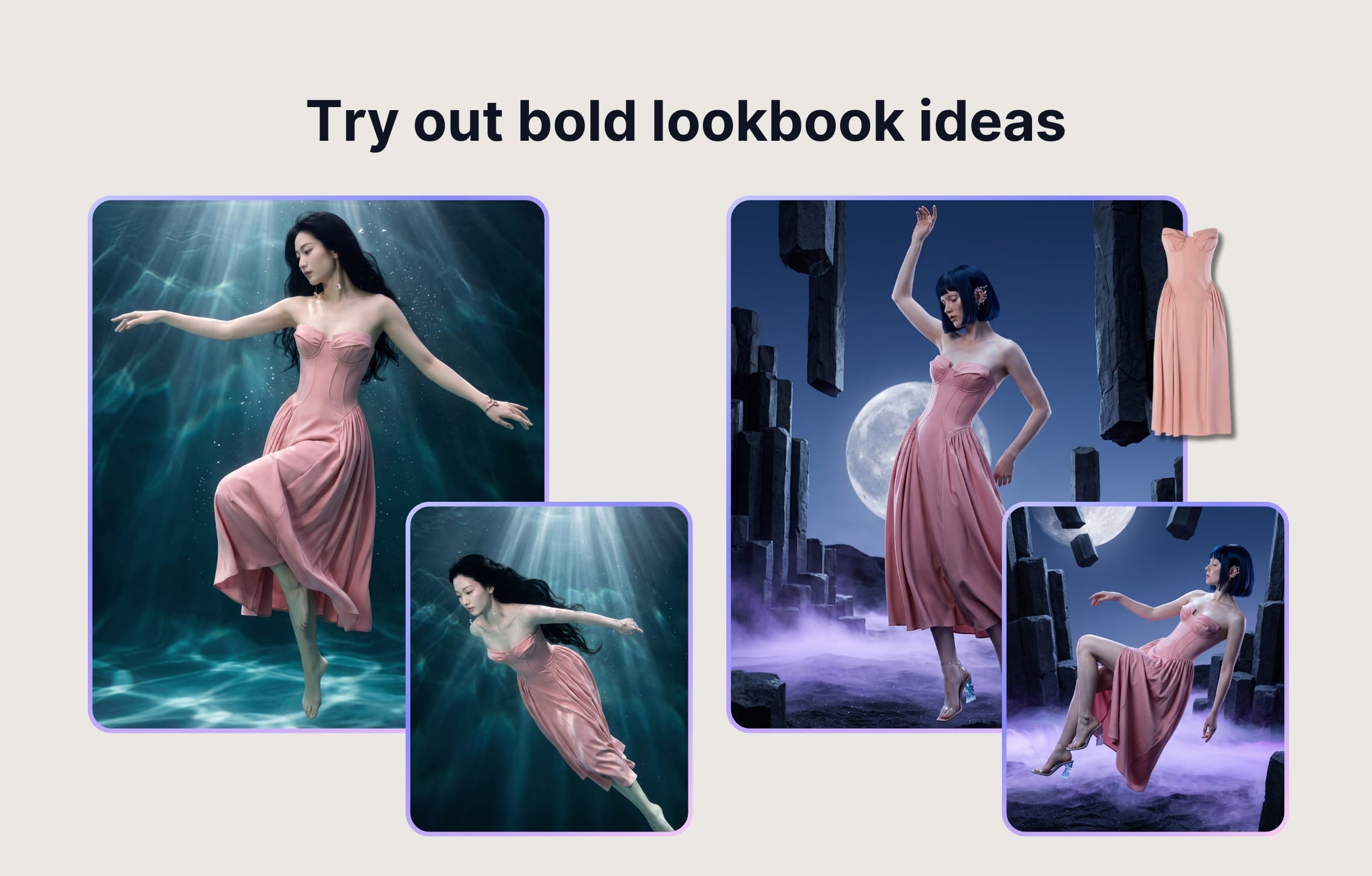
AI lookbooks let you build worlds that would be too expensive, complex, or physically impossible to produce in real life.
Place a collection in a flooded gallery, a weightless chrome landscape, a desert at night, or an oversized surreal set built around the garment itself. You can test cinematic lighting, impossible architecture, extreme scale, and dreamlike environments without constructing a set, securing a location, or putting the clothing at risk.
How to create an AI fashion lookbook, step by step
Let’s go through the process of generating a fashion lookbook with AI.
Before you start, prepare two most essential groups of assets: high-quality photos of your garments and reference images that show your desired creative direction. These will ensure the most accurate results.
1. Prepare your clothing shots
Start by auditing every garment you want to include.
Flatlays and ghost mannequin photos usually work best because the full shape of the garment is visible. Use well-lit, centered photos with a plain or transparent background (or remove background in Claid as the first step). Avoid folded sections, cropped hems, heavy shadows, and accessories that should not appear in the generated image.
For many items, it makes sense to upload front and back shots of the garment. And for complex products, include additional angles or close-ups showing prints, texture, and other details.
2. Choose AI fashion models
Model selection affects how customers interpret the complete collection, not just individual garments.
Choose models according to:
- Your actual customer demographic
- Garment category and fit
- Collection concept
- Target region
- Required age range
- Size representation
For a small lookbook, one consistent lead model may be enough. For a larger collection, define a limited cast and assign each model to specific product categories.
Claid offers 100+ synthetic AI fashion models across different ages, body shapes, and ethnicities. You can also prepare custom model images if you have the copyright and want to use custom identities.
3. Generate the first on-model photos
Do not generate the entire collection immediately. Start with a representative sample of three to five products.
Use initial generations to approve the production direction.
Review the following:
- Garment shape and length
- Color accuracy
- Fabric texture
- Pattern placement
- Seams, buttons, pockets, and closures
- Fit around the shoulders, waist, and hips
- Hands and body anatomy
- Face consistency
- Overall realism
Once the sample set works, document the model, pose, background, framing, and prompt choices. Reusing an approved setup is more efficient than trying to repair inconsistency after generating the full collection.
4. Add backgrounds and settings
The background determines whether the lookbook feels like a clean catalog, an editorial story, or a seasonal campaign.
Common directions include:
- Neutral studio backgrounds for ecommerce
- Warm architectural interiors for premium collections
- City settings for streetwear
- Coastal or resort scenes for summer drops
- Minimal industrial locations for contemporary basics
- Soft domestic spaces for loungewear
- Outdoor landscapes for performance clothing
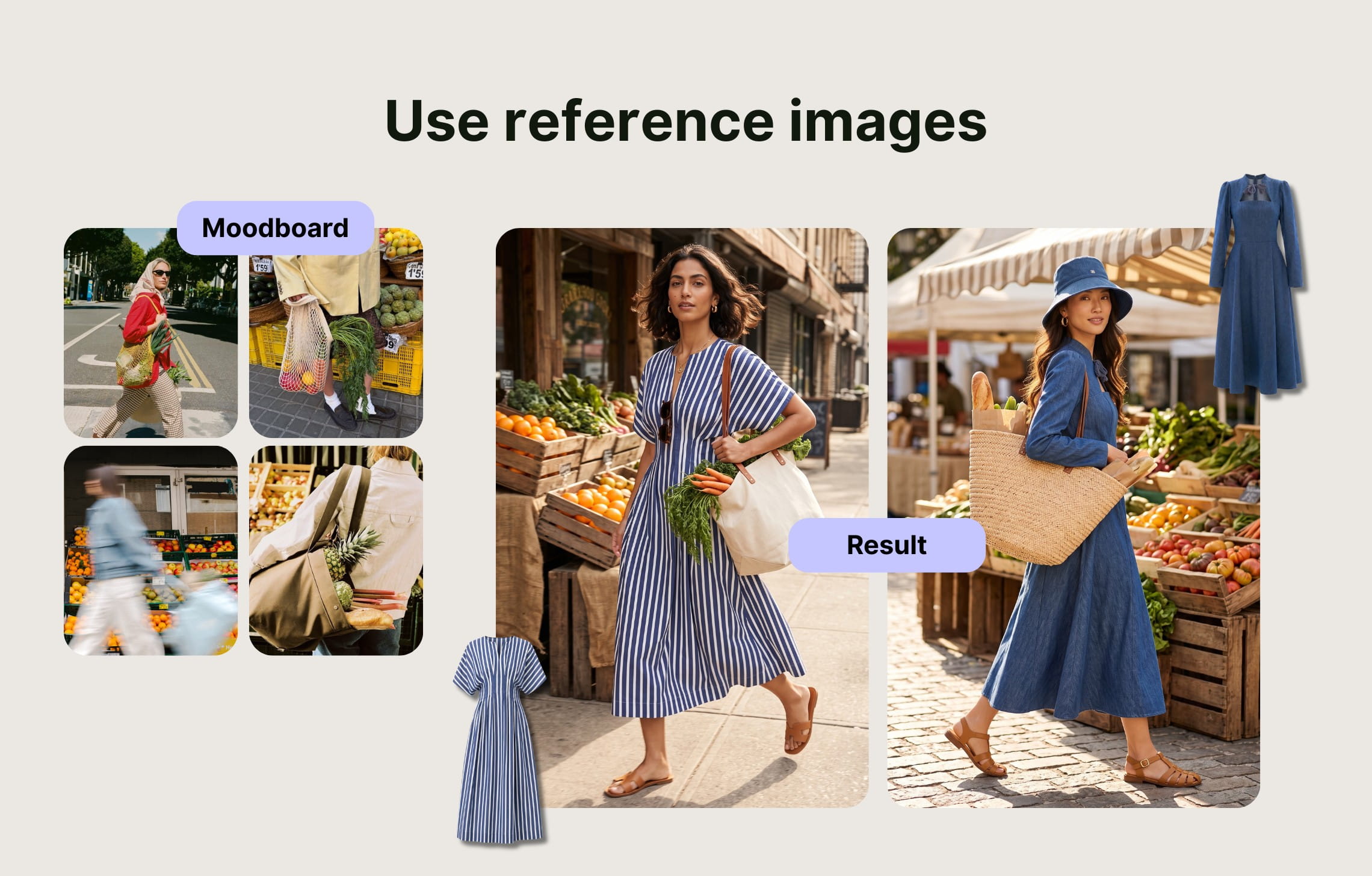
While you can direct your lookbook’s location, vibe, and photography style in the prompt in AI Fashion Models, you can also navigate generation by using reference images in AI Edit.
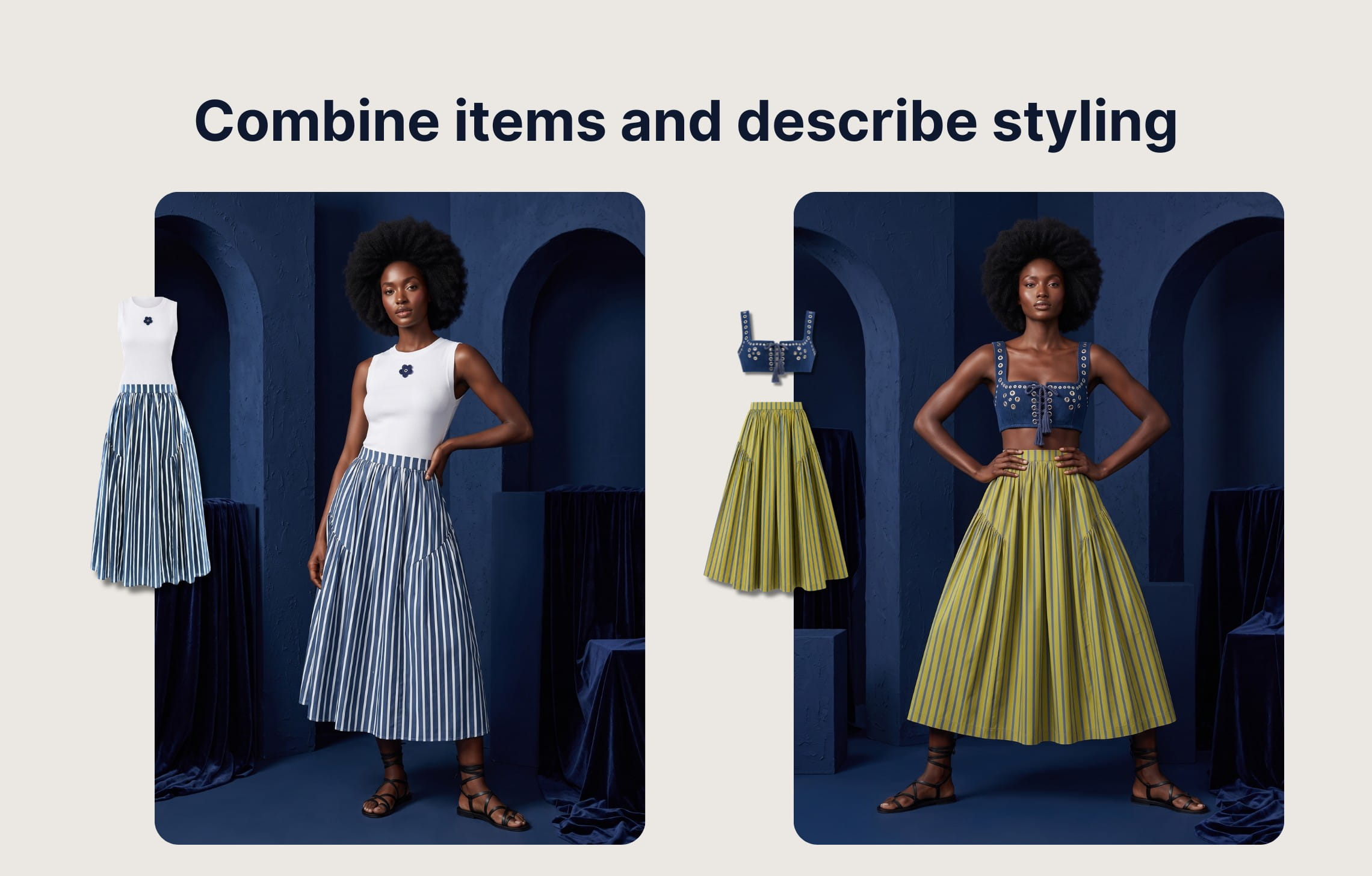
5. Style complete outfits
A fashion lookbook should show how the collection works together.
Combine each garment with complementary tops, bottoms, outerwear, shoes, and selected accessories. You can either upload the exact products or describe supporting items when they are not part of the collection.
Claid supports full-outfit generation using multiple apparel inputs and can add matching shoes when none are supplied.
6. Refine poses and model variations
Once the core looks are approved, add enough variation to keep the final sequence visually interesting.
Use a controlled pose list, for example:
- Straight full-body catalog pose
- Three-quarter standing pose
- Walking pose
- Seated editorial pose
- Medium crop for garment detail
- Back or side view where relevant
Not every product needs every pose. Assign poses based on what customers need to understand about the garment and generate images accordingly.
You can also adapt existing fashion photos without reshooting. For instance, you can swap model faces (via Claid’s API or in AI Edit) to refresh or localize existing images without changing anything about the styling and composition. AI Edit can also help you generate close-ups or other angles from the photo you already created.
7. Create short fashion videos
You can turn selected lookbook images into short clips for social media, paid ads, collection landing pages, product-page galleries, or email campaigns. A small camera push, fabric movement, a shift in posture, or a short walk will help you better present your garments and help customers understand how it behaves.
To create fashion videos, choose images with clear silhouettes and natural starting poses, and go to the Image-to-video tool. Describe one simple movement or use the auto-generated prompt.
NB! AI videos in Claid now support simple sounds. Add synced effects, ambience, fabric movement, or even short spoken lines to your fashion clips directly from the prompt. Focus on natural sounds rather than music to generate the most reliable videos with sound.
8. Curate and assemble the final lookbook
Generation is not the final step. Curation is what turns the outputs into a collection.
First, remove images that are individually attractive but inconsistent with the rest. Look for repeated mistakes, distracting props, changes in the model’s identity, and garments that no longer match the source product.
Then, arrange the sequence deliberately:
- Open with a strong collection image.
- Introduce the model and visual setting.
- Alternate full-body and closer compositions.
- Group related colors or product stories.
- Use occasional detail shots to control pacing.
- End with another clear hero look or group image.
Export the lookbook according to where it will be used. Claid supports multiple image formats, but if you need other formats or you want to automate export or integrate with your asset management system, reach out to us for pipeline customization.
Finally, keep your files and production settings. The approved model cast, prompt structure, styling rules, and scene direction can become the starting point for the next drop.
Create your lookbook with Claid
Claid brings the main stages of AI fashion lookbook production into one fashion studio. You can generate individual assets and adjust them to produce a cohesive lookbook around your collection, brand direction, and delivery requirements.
Try AI Fashion Models to create on-model looks or drop us a line to discuss custom AI lookbook production.
FAQ
What is an AI fashion lookbook?
An AI fashion lookbook is a coordinated collection of fashion photos created or extended with generative AI. Product images such as flatlays or ghost mannequin photos are converted into on-model images and presented with consistent models, styling, poses, backgrounds, and art direction.
How much does it cost to make an AI fashion lookbook?
The cost depends on the number of products, images per product, models, backgrounds, video outputs, and the amount of manual creative work required.
A traditional 20-image shoot can easily cost several thousand dollars once the photographer, model, studio, makeup, styling, and retouching are included. AI reduces the need to recreate the physical production for each look, making additional variations and recurring collections less expensive.
Can I use AI-generated models commercially?
Claid’s synthetic models are intended for commercial uses such as ecommerce, advertising, social media, and print without separate model licensing fees. You must still own or license any product photos, logos, reference images, and real-person likenesses you upload.
Will the garments look realistic?
Modern fashion generation is significantly better at fabric texture, skin, lighting, and garment construction than earlier systems, but quality still depends on the input. Clear product images, additional detail references, controlled styling, and systematic QA are essential.
Will we lose control of our brand?
AI reduces brand control only when the workflow has no rules. Define the model cast, styling system, environment, lighting, composition, and approval criteria before scaling. Generate a small pilot, approve it, then apply that direction across the collection.
For important campaigns, a hybrid approach often works best: use a traditional shoot to establish the season’s visual identity, then use AI to extend it into additional SKUs, formats, and markets.
Does AI replace photoshoots?
Not entirely. Many brands still use traditional photography for their most important brand campaigns, then use AI to extend that direction across long-tail SKUs, regional variants, product pages, social content, and recurring collection drops.
Can I create a full seasonal collection with AI?
Yes. The best approach is to approve a model cast, styling system, backgrounds, poses, and sample images before generating the complete collection. The same system can then be reused for future seasonal drops, colorways, regional campaigns, and channel-specific formats.
What to look for in an AI lookbook generator?
A strong AI lookbook generator should do more than create one attractive image. It needs to maintain the same model identity, visual direction, and garment accuracy across an entire collection.
Look for:
- A diverse model library, plus the option to reuse or upload a custom model
- Consistent faces, body proportions, poses, and styling across multiple images
- Reliable preservation of garment shape, color, texture, patterns, seams, and logos
- Support for full outfits, backgrounds, pose control, and reference images
- High-resolution output suitable for PDP zoom, campaigns, and print
- Image-to-video options for extending the lookbook into social content
- Batch processing, API access, or managed production for larger collections
- Clear commercial-use terms and transparent pricing
Test the tool with your most difficult garments before committing to full lookbook production.
We can build this for you
Send us your collection and style guide, and we'll create a full lookbook with consistent model identities and realistically rendered garments.


Claid.ai
August 21, 2026