Tech
Migrate from the remove.bg API to Claid


The self-service remove.bg API stops accepting requests on December 1, 2026, as background removal moves to Leonardo.Ai. Enterprise API contracts continue as normal. If you're on a self-service plan, now is the time to test your next integration.
Move to Claid to remove backgrounds, improve image quality, and standardize product photos in one image-editing request. Start with the cutout your application needs today, then add the steps your catalog team handles separately.
This guide shows how to migrate a background-removal integration from remove.bg to Claid, including request changes, unsupported settings, and rollout checks.
How to migrate from remove.bg to Claid.ai
Start by matching your current output. Add enhancement or other operations after the replacement works reliably.
1. Create your API key
Your remove.bg API key won’t authenticate requests to Claid.
Create a Claid account, then generate a key from Overview or API keys. Store it on your server as CLAID_API_KEY. Use the free API credits to test representative images before moving production traffic.
2. Update the request and response handling
Claid uses a different API contract. Change the authentication header, translate your parameters into JSON operations, and download the image from the returned URL. The Python adapter in the appendix returns image bytes, which can help preserve an existing save or upload step.
| Integration detail | remove.bg | Claid |
|---|---|---|
| Authentication | X-Api-Key: <key> | Authorization: Bearer <key> |
| Local file | POST /v1. | POST /v1/image/edit/upload |
| Image URL | image_url form field | POST /v1/image/edit with JSON input |
| Editing options | Flat form fields | JSON inside the upload’s data field |
| Result | Usually image bytes | JSON with data., or output saved to connected storage |
| Transparent output | Common default workflow | Explicitly set transparent background and PNG, WebP, or AVIF |
Claid endpoints use https://api.. See the upload reference and image-editing reference.
3. Compare your output, then switch traffic
Test ordinary catalog photos alongside your hardest images: fine hair, fur, glass, transparent packaging, and white products on light backgrounds. Check edges, dimensions, transparency, and padding in the application where the result will appear.
Move a small share of traffic first. Monitor failures, processing time, and credit use before completing the switch. Plan for your expected peak volume, not just your daily average.
Moving a large catalog or several integrations? Plan the migration with our team.
Your first request: before and after
This example requests full resolution, a white background, a crop around the subject, and JPEG output. Without size, remove.bg returns a preview of up to 0.25 megapixels, so the remove.bg call sets size=full to match Claid, which processes at full resolution unless you resize. Maximum resolutions differ between the services, and the segmentation itself may differ too.
Before: remove.bg
curl --fail-with-body --silent --show-error \
  https://api.remove.bg/v1.0/removebg \
  -H "X-Api-Key: $REMOVE_BG_API_KEY" \
  -F 'image_file=@/path/to/image.jpg' \
  -F 'size=full' \
  -F 'crop=true' \
  -F 'bg_color=FFFFFF' \
  -F 'format=jpg' \
  -o result.jpg
After: Claid
Save these settings as edit.. The general category is a starting point for mixed images; use products when evaluating product, grocery, or food photos.
{
  "operations": {
    "background": {
      "remove": {"category": "general", "clipping": true},
      "color": "#FFFFFF"
    },
    "resizing": {"fit": "bounds"}
  },
  "output": {"format": "jpeg"}
}
Submit the file and settings, then download the result. This shell example requires jq and an exported CLAID_API_KEY.
set -e
curl --fail-with-body --silent --show-error \
  https://api.claid.ai/v1/image/edit/upload \
  -H "Authorization: Bearer $CLAID_API_KEY" \
  -F 'file=@/path/to/image.jpg' \
  -F 'data=<edit.json;type=application/json' \
  -o response.json

result_url=$(jq -er '.data.output.tmp_url // empty' response.json)
curl --fail --silent --show-error --location \
  "$result_url" -o result.jpg
Need a transparent cutout? Change background. to "transparent" and output. to "png". Set both explicitly.
Already have image URLs? Send JSON to /v1/image/edit, add "input": "https://your-domain. alongside operations and output, and use Content-Type: application/json. The image must be accessible to Claid.
Map your existing parameters
The paths below are relative to the request body. They show the closest migration settings, not a promise of identical output.
| remove.bg setting | Claid setting or migration action |
|---|---|
image_file | Upload as multipart file; include editing JSON in data. |
image_url | Use top-level input with the JSON image-editing endpoint. |
image_file_b64 | Decode to bytes, then upload a file. |
type=auto, person, animal, graphic | Start with operations.. |
type=product / type=car | Use category "products" / "cars". |
crop=true | Set operations. and operations.; omit width and height to retain the clipped size. |
crop_margin=10% or 30px | Set operations. to "10%" or "30px". remove.bg measures percentage margins from the subject, while Claid measures percentage padding from the whole image, so the same number can give different margins. Compare the results. |
bg_color=FFFFFF | Set operations.. |
| Transparent background | Set operations. and choose an output format with alpha support. |
format=png, jpg, webp | Set output. to "png", "jpeg", or "webp". |
size=preview, full, auto, 50MP | Claid returns full resolution unless you resize, and has no size presets. remove.bg defaults to preview (up to 0.25 megapixels) when size is omitted, so calls without it return much larger images on Claid. Set explicit dimensions with operations. if you need smaller output. |
scale, position | Rebuild the layout with resizing, canvas fit, and padding; compare output placement. |
See the background settings, resizing options, and padding reference.
Check these dependencies before switching
The image-editing endpoint has no direct equivalent for remove.bg’s ZIP output, alpha-only response, drop-shadow settings (shadow_type, shadow_opacity, and the deprecated add_shadow), roi, semitransparency, or type_level controls. If your application relies on these, plan and test the replacement behavior first.
Existing background images supplied through bg_image_url or bg_image_file also need a separate compositing step or a redesigned workflow. AI background generation creates a new scene; it does not guarantee an exact copy of a supplied backdrop.
Update code that reads remove.bg-specific headers such as X-Foreground-*, X-Type, or X-Credits-Charged. They are not part of Claid’s response contract. Review the response schema.
Settings to get right before launch
1. Transparency must be explicit
Claid defaults to JPEG output and a white background. For a transparent cutout, set background. to "transparent" and use PNG, WebP, or AVIF. JPEG cannot preserve transparency. Output formats.
2. Cropping and resizing work together
With clipping enabled, an unspecified resizing fit and no dimensions can scale the cropped subject back to the input dimensions. Set resizing. to "bounds" and leave width and height unspecified to retain the clipped region’s size. Clipping behavior.
3. Temporary URLs are for delivery, not permanent storage
The upload response contains JSON, not the finished image bytes. Download data. and save the file. Temporary output lasts 24 hours. For persistent delivery, configure your own connected storage instead. Input and output guide.
A production checklist for the switch
- Find each integration. Search for
api.and inventory the parameters, output formats, and downstream assumptions. Include scheduled jobs and no-code tools.remove. bg - Build a representative test set. Include normal images and edge cases. Start with up to 25 background-removal tests using the free credits; budget more credits for a larger comparison or added operations.
- Validate the files. Check that outputs decode correctly and meet your requirements for edges, color, transparency, dimensions, and margins.
- Handle both rate limits. Claid defaults to 120 requests per minute and 4 per second. Pace requests, handle
429responses with bounded backoff, and use the rate-limit headers. Agree higher limits before launch if needed. Rate-limit documentation. - Handle failures and delivery. Check both the processing response and image download. Treat
402as a credit issue; save results before temporary links expire. API errors. - Roll out gradually. Watch a full production cycle and keep a tested recovery path. A remove.bg fallback is useful only while your existing service remains available.
- Prepare for the transition date. Aim to complete testing in November. Download account records you need and check remove.bg’s account notices. If you have an enterprise contract, confirm its arrangements with your account manager.
Give your catalog a clean background and more
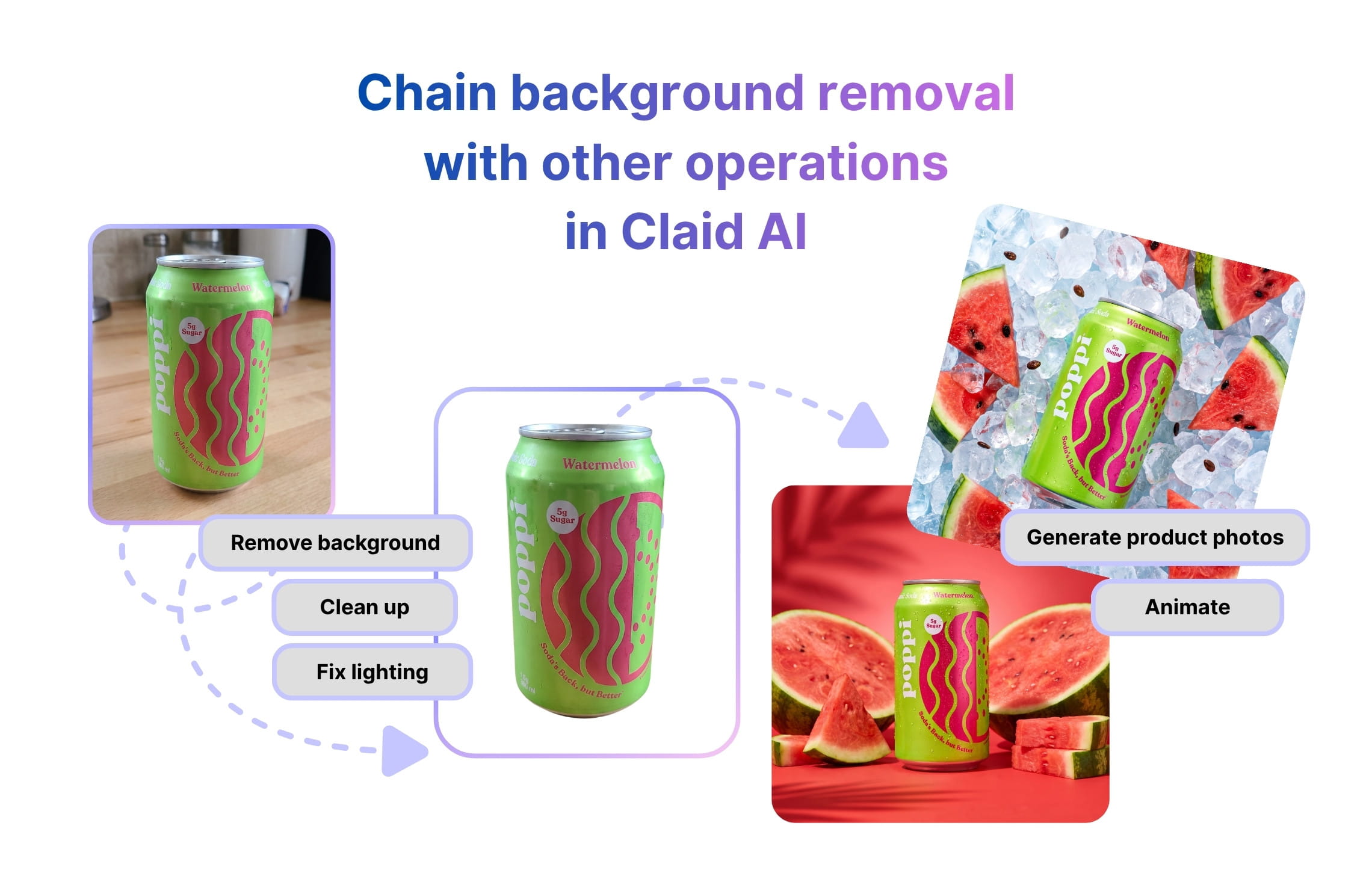
Background removal is often one part of preparing a product image. You may still need to resize it, fix poor lighting, or adjust the space around the subject. As a remove.bg alternative and a wider AI photography platform, Claid brings these steps into the same image-editing request.
- Make every product fit the frame. Remove the background and set the output dimensions and padding together. Give images from different suppliers a consistent presentation across your catalog, without a separate resizing step.
- Improve the image before it goes live. Add upscaling, JPEG artifact removal, or light and color adjustments to your editing request. Prepare low-quality supplier photos for publication without passing each image through a separate enhancement service.
- Keep the product you actually want. Use product-specific background removal for catalog imagery, or name the object to keep with selective removal.
- Send finished images to your storage. Read from and write to connected AWS S3 or Google Cloud Storage.
Moving thousands of images? Build around your catalog
A high-volume migration involves more than changing a request. Your team may need higher throughput, storage integration, specific image rules, and support during rollout.
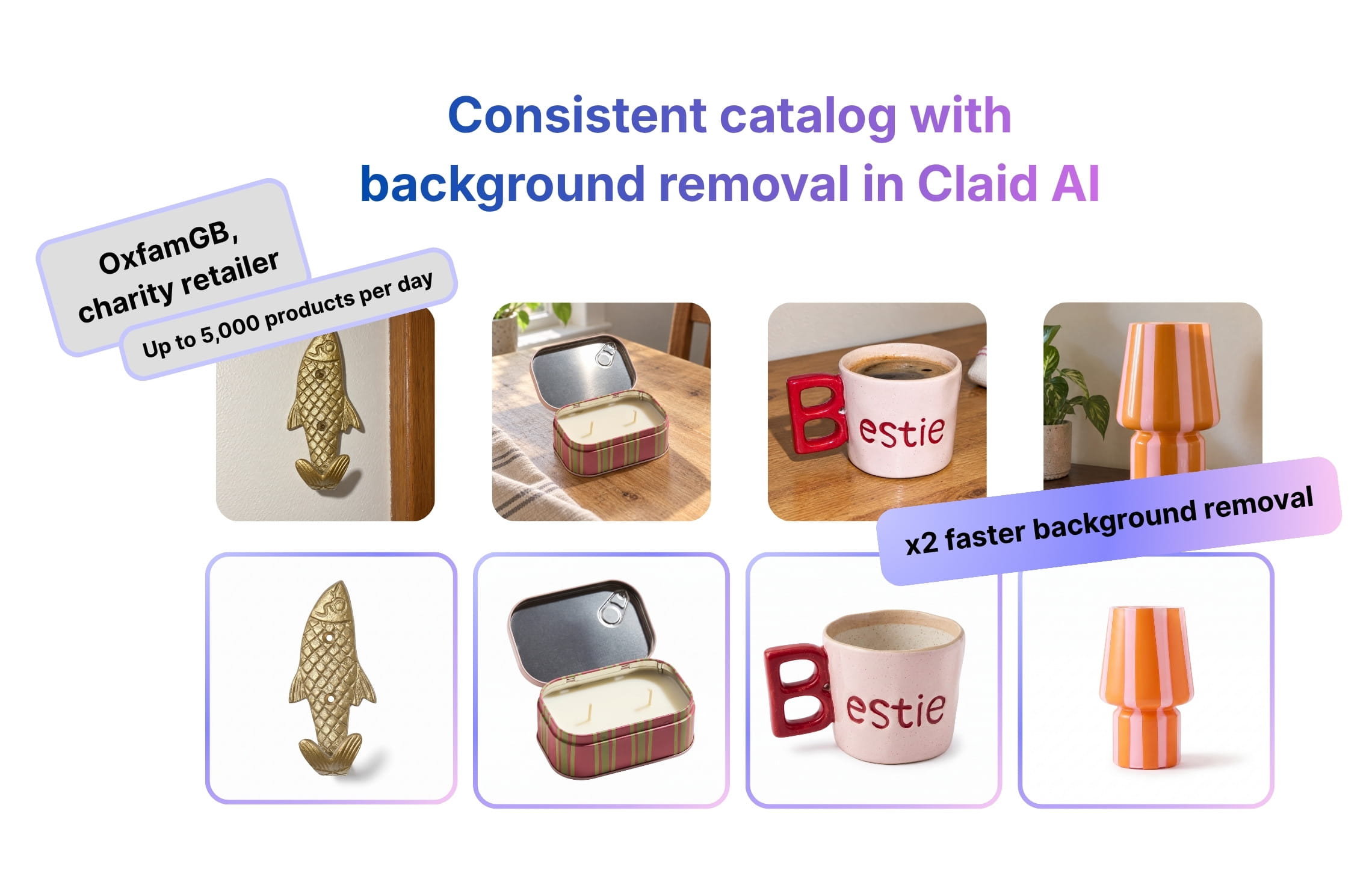
Claid’s APIs are built for catalog work at scale. Oxfam GB uses Claid’s background removal API to standardize imagery for an online shop publishing 4,000–5,000 products a day. In their listing workflow, the team cut average background removal time per image from 33 seconds to 15 seconds, helping listers prepare consistent product photos with less manual work.
Claid’s enterprise options include volume pricing, custom SLAs, and a team that can help build, integrate, or run your workflow. Bring your current request examples, monthly volume, peak request rate, and output requirements so we can scope the move around your production needs.
Once background removal is in place, you can expand into generated product scenes, AI fashion imagery, or video through Claid’s other APIs. These use their own endpoints and operation pricing.
Move your background removal before remove.bg shuts down
Get a free API key, run the helper on your hardest images, and cut over with time to spare. Migrating a high-volume pipeline or a custom workflow? Our team can plan the move with you, including higher rate limits from day one.
Start with your own images or discuss volume pricing with our team.
FAQ
Is Claid a drop-in remove.bg alternative?
Not byte-for-byte. Auth, request format, and response format differ, so you can't just change the URL. The Python adapter in the developer appendix returns image bytes, which may let you retain your existing save or upload step. Review unsupported parameters and test the output before switching.
How long will migration take?
The examples cover the request changes for a basic integration. Your rollout time depends on how many call sites you have, which parameters you use, and how much output testing your application needs. Test quality and throughput before setting the production switch date.
How much does Claid's background removal API cost?
Background removal costs 2 API credits per image, and resizing or cropping in the same request is free. Volume pricing is available on enterprise plans; see API pricing.
Compare remove.bg API pricing with a Claid quote based on your image volume and processing requirements.
Can I test before I pay?
Yes. A new account includes 50 API credits. At 2 API credits per background removal, that covers up to 25 background-removal images if you use the trial only for that operation. Standard resize and crop operations add no extra credit cost in the same request. Other paid operations consume additional credits.
If you’re comparing remove.bg API pricing with Claid, include the cost of any additional editing operations your workflow needs.
Can I keep receiving transparent PNGs?
Yes. Set operations. to "transparent" and output. to "png". The examples make those settings explicit.
Can Claid save results directly to my bucket?
Yes. After connecting S3 or Google Cloud Storage, set an output destination such as storage://catalog/results/image.. Use a unique destination for each result and retain the stored object reference. Check out our storage guide.
What if I need batch or asynchronous processing?
Claid documents asynchronous and batch image-editing endpoints. Review their contracts separately from the synchronous examples here, and confirm batch access and capacity with our team.
Is my remove.bg API key going to keep working?
Self-service API keys stop working on December 1, 2026. Enterprise API contracts continue as normal; check with your remove.bg account manager.
Developer appendix: Python adapter
This example accepts a subset of remove.bg-style arguments and returns image bytes. It supports a local file path or image URL, the listed categories, cropping, padding, hex background colors, and PNG/JPEG/WebP output. It is not a full remove.bg SDK replacement. Requires the requests package.
format="auto" deliberately chooses PNG. For JPEG with no background color, the adapter chooses white. Unsupported format and category values raise an error instead of silently falling back.
import json
import os
import re
from pathlib import Path
import requests

BASE = "https://api.claid.ai/v1/image/edit"
CATEGORIES = {
    "auto": "general", "person": "general",
    "animal": "general", "graphic": "general",
    "product": "products", "car": "cars",
}
FORMATS = {"auto": "png", "png": "png", "jpg": "jpeg",
           "jpeg": "jpeg", "webp": "webp"}

def remove_bg(api_key, image_file=None, image_url=None,
              type="auto", crop=False, crop_margin=None,
              bg_color=None, format="auto"):
    if bool(image_file) == bool(image_url):
        raise ValueError("Pass one image_file path or image_url")
    if type not in CATEGORIES or format not in FORMATS:
        raise ValueError("Unsupported type or format")
    if not isinstance(crop, bool):
        raise ValueError("crop must be a Boolean")
    if crop_margin is not None and not crop:
        raise ValueError("crop_margin requires crop=True")

    out_format = FORMATS[format]
    color = "#FFFFFF" if out_format == "jpeg" else "transparent"
    if bg_color is not None:
        hex_color = bg_color.lstrip("#")
        if not re.fullmatch(r"[0-9a-fA-F]{6}", hex_color):
            raise ValueError("Use a six-digit hex background color")
        color = "#" + hex_color

    remove = {"category": CATEGORIES[type]}
    operations = {"background": {"remove": remove, "color": color}}
    if crop:
        remove["clipping"] = True
        operations["resizing"] = {"fit": "bounds"}
    if crop_margin is not None:
        # remove.bg: top right bottom left; Claid: top bottom left right
        sides = crop_margin.split()
        if len(sides) == 2:
            sides = [sides[1], sides[0]]
        elif len(sides) == 4:
            if any(side.endswith("%") for side in sides):
                raise ValueError("Four crop_margin values must be in px")
            sides = [sides[0], sides[2], sides[3], sides[1]]
        elif len(sides) != 1:
            raise ValueError("crop_margin takes 1, 2 or 4 values")
        operations["padding"] = " ".join(sides)

    body = {"operations": operations,
            "output": {"format": out_format}}
    headers = {"Authorization": f"Bearer {api_key}"}
    if image_url:
        body["input"] = image_url
        response = requests.post(
            BASE, json=body, headers=headers, timeout=(10, 120))
    else:
        with open(image_file, "rb") as source:
            response = requests.post(
                BASE + "/upload", headers=headers,
                files={"file": (Path(image_file).name, source)},
                data={"data": json.dumps(body)}, timeout=(10, 120))

    response.raise_for_status()
    result_url = response.json()["data"]["output"]["tmp_url"]
    image = requests.get(result_url, timeout=(10, 120))
    image.raise_for_status()
    return image.content

if __name__ == "__main__":
    png = remove_bg(os.environ["CLAID_API_KEY"],
                    image_file="/path/to/image.jpg", crop=True)
    Path("no-bg.png").write_bytes(png)
Developer appendix: Node.js
This Node.js 20+ example uploads a local image and saves a transparent PNG. It checks both HTTP responses and sets timeouts. Store your API key in the CLAID_API_KEY environment variable and save the example as an . file.
import { openAsBlob } from "node:fs";
import { writeFile } from "node:fs/promises";
import { basename } from "node:path";

async function removeBg(apiKey, filePath) {
  if (!apiKey) throw new Error("Set CLAID_API_KEY first");
  const data = {
    operations: {
      background: {
        remove: { category: "general" },
        color: "transparent",
      },
    },
    output: { format: "png" },
  };

  const form = new FormData();
  form.append("file", await openAsBlob(filePath), basename(filePath));
  form.append("data", JSON.stringify(data));

  const response = await fetch(
    "https://api.claid.ai/v1/image/edit/upload",
    {
      method: "POST",
      headers: { Authorization: `Bearer ${apiKey}` },
      body: form,
      signal: AbortSignal.timeout(120_000),
    }
  );
  if (!response.ok) {
    throw new Error(`Claid ${response.status}: ${await response.text()}`);
  }
  const { data: result } = await response.json();
  const url = result?.output?.tmp_url;
  if (!url) throw new Error("No temporary output URL returned");

  const image = await fetch(url, {
    signal: AbortSignal.timeout(120_000),
  });
  if (!image.ok) {
    throw new Error(`Image download failed: ${image.status}`);
  }
  return Buffer.from(await image.arrayBuffer());
}

const png = await removeBg(
  process.env.CLAID_API_KEY, "/path/to/image.jpg"
);
await writeFile("no-bg.png", png);
These examples demonstrate synchronous migration. Add application-specific queuing, monitoring, credit handling, and bounded retries before production. Test on your own images; matching request settings does not guarantee pixel-identical results.
Need this at scale?
Process thousands of images via API, or let our team handle it for you.


Claid.ai
November 2, 2026