Tech
Grok Imagine product video guide: prompts, sound, and image-to-video tips


This guide gives you 13 Grok Imagine prompts you can paste and adapt for product video, plus a practical guide to getting better clips from the photos you already have: how to choose the right starting image, write a prompt that protects the product, control sound, and avoid the limits that break ecommerce videos.
We tested Grok Imagine on the ecommerce cases this guide is built for: ASMR-style product close-ups, food and drink motion, on-model fashion, home goods, and short UGC-style clips. These are the prompt patterns that held up inside Claid, where Grok Imagine powers image-to-video. But the prompting advice works wherever you run the model.
How Grok Imagine image-to-video works
Grok Imagine is xAI's generative model for images and video. It generates images and video from a text prompt, edits images, and animates a still photo into video. The video it makes, including image-to-video, comes with native sound.
This guide uses that last mode, image-to-video: it takes one starting image plus a short text prompt and generates a few seconds of video, with sound generated together with the picture. That last part is what sets it apart: because the audio is created in the same pass, effects tend to land with the action on screen and a spoken line is lip-synced to the picture rather than added afterward.
Pro tip: The read, sync, and volume levels still vary between takes, so treat the sound as a strong draft you finish in post, not a final mix.
Three things follow from how it works, and they shape every prompt below:
- The starting image carries the look. Subject, cowmposition, lighting, and style all come from the still. It becomes the first frame. So most of your quality is decided before you write a single word of prompt.
- The prompt directs change, not appearance. Camera, motion, what stays stable, and sound. Don't waste it re-describing what's already in the photo.
- Sound is part of the output. You name it or you suppress it, but it's always in the generation. More on controlling that below.
Why product video needs a different prompt
A cinematic prompt optimizes for motion and mood. A product prompt optimizes for truth and restraint. The model is happy to reframe your scene, swap the camera angle, add lens flare, and invent a second cut. For an ad that's fun. For a product listing it's a problem, because the job is to show this product, with its real label and shape, doing one thing a shopper believes.
So product prompts do four things cinematic prompts don't bother with:
- Keep the product shape, label, and material stable and sharp.
- Direct one main action and its natural results (e.g., a pour brings its own fizz and condensation), not several unrelated actions.
- Give the important sound a visible source in the frame.
- Suppress the defaults that break a clean clip: extra cuts, fades, captions, music, particles.
Get those right and the model is really good at the satisfying stuff: the click, the pour, the fizz, the swish.
Start with the right photo
The clip inherits everything from the source image, including its flaws. A soft or low-res frame becomes a soft, smeared clip, and video is the expensive step to redo. This is the one habit that pays off most: fix the photo before you animate it.
A starting frame that animates well usually has:
- One clear hero subject, sharp, with clean separation from the background. Push any softness into the background, never onto the product or its label.
- Room to move. Leave empty space in the direction of the pour, spray, zip, or camera push. Don't pin the product against the frame edge.
- The action already staged. Start a pour already tilted, a zipper pull at its top stop. Make the motion you're about to ask for physically plausible from frame one.
- A visible source for the sound. A sizzle needs food visibly mid-cook; a zip needs a zipper ready to move. Sound with nothing to attach to comes out vague.
- For sprays, aim the nozzle into open frame. Point it at empty space inside the shot, away from the camera, so the mist has somewhere believable to travel.
When a clip comes out soft or loses focus on the product, the source frame is usually the reason, not the model. Clean input, cleaner output.
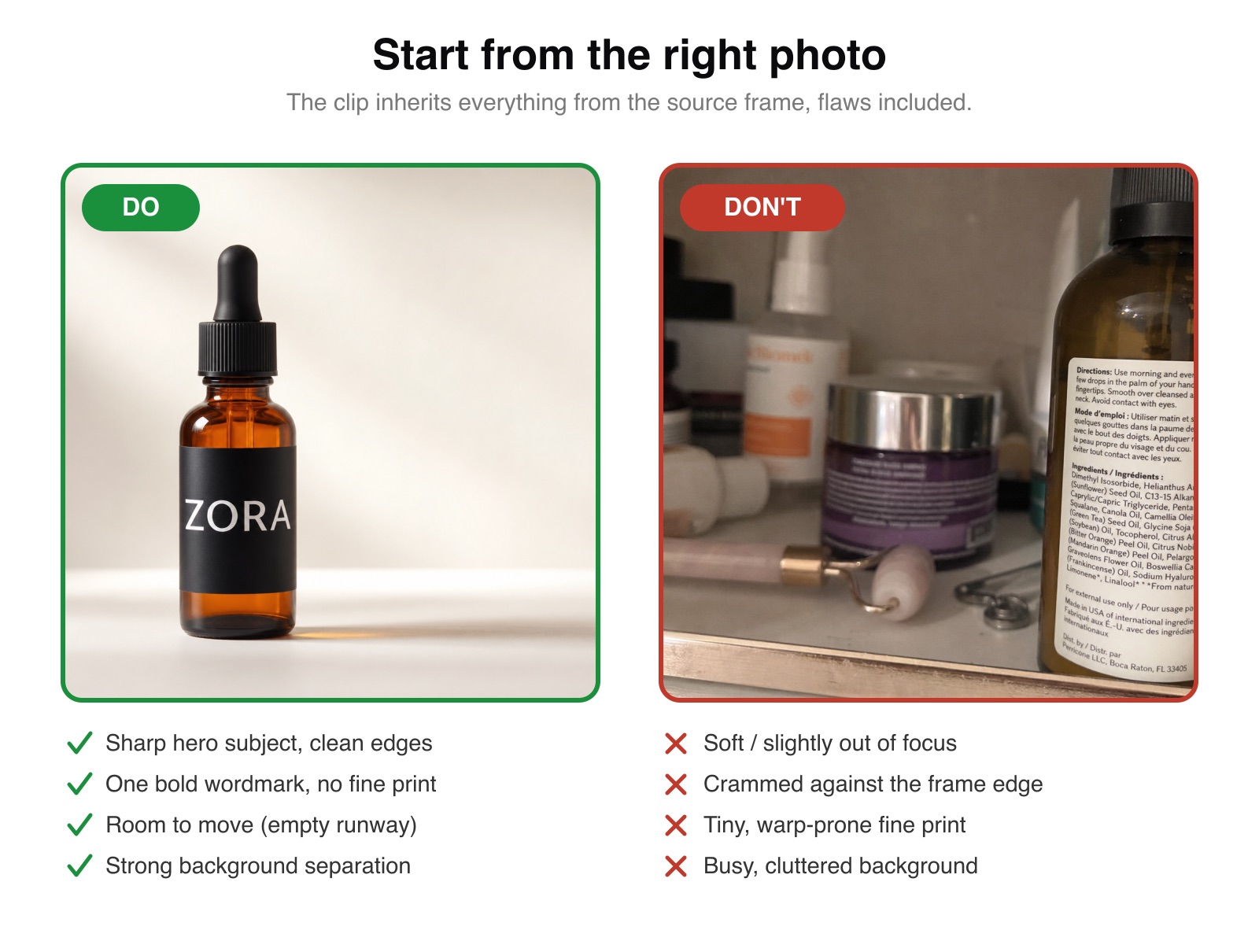
Pro tip: Fine print, dosage text, and small secondary copy can blur or garble as the clip moves, while a large wordmark usually survives. Whether that matters depends on the use: in a small feed or display ad the tiny text isn't legible anyway, so it's often a non-issue. But for regulated or must-read text (dosage, ingredients, claims), don't rely on the AI video to keep it accurate; add it in post.
The prompt formula
Write the prompt like a short shoot brief, in this order:
[Shot size, camera move, direction, pace. "One continuous shot, no cuts."]
[One main action, plus at most one supporting motion]
[What must stay stable: product shape, label, material, lighting]
Sound: [the specific sound, tied to the visible action]. [Quiet ambience]. No music.
The Sound: block on its own line matters. It's where you name the effect, tie it to the moment it happens, and say whether you want ambience and music. Keeping it separate from the visual direction gives you cleaner, more controllable audio.
A few rules that can save you takes:
- Change one thing per iteration, and generate a few takes before deciding a wording works. The same prompt produces different results each run.
- Name the shot and the motion precisely. "Slow push-in" and "one smooth pull" beat "make it cinematic."
- Lead with what you want, then suppress only the specific default that would break it. A short targeted negative ("no captions," "no music") works better than a long generic dump.
- Spell out numbers in spoken lines, writing "number seven" rather than "No. 7". It's a common precaution with voice models, so we spell them out by default. To stress a word, describe the emphasis in the voice direction rather than typing it in capitals.
- Match the clip length to the action. A can crack lands in about three seconds, a pour wants four or five, a spoken line needs longer. Padding a short action just buys you a dead, staring tail.
13 prompts to copy
Each one follows the formula. Adapt the product details to yours, keep the structure. The starting-frame note tells you what the photo needs; "watch for" is the thing most likely to go wrong.
ℹ️About the examples: The visuals in this guide are illustrative assets created for testing. The starting frames, products, people, labels, and testimonial lines are AI-generated or hypothetical. They show prompt patterns and video behavior, not claims about a real product, person, or brand.
Beauty and skincare
1. Skincare serum dropper prompt
A single drop is the most-handled gesture in skincare. It reads as precision and potency, the reason serums sit at the top of a routine.
Start from: a macro of the dropper poised over the bottle, the bulb and fingers in frame, room below for the drop to fall.
One continuous macro shot, static locked-off camera, no cuts.
The rubber bulb squeezes and one golden drop falls from the dropper tip into the bottle.
Keep the dropper, bottle, and label stable and sharp. Fingers natural.
No captions, added particles, or lens flare.
Sound: a soft rubber squeeze, then a tiny droplet plip as it lands. Quiet room tone. No music.
Watch for: the hand and the timing of the drop. Keep the squeeze short, with the fingers already resting on the bulb so it's a small motion. The audio comes out faint here, so normalize it in post. The same recipe covers a cream-jar dip (a thick squelch) or a perfume cap seating with a weighty clink. Best for product-page (PDP) loops and skincare Reels.
2. Cream jar lid reveal prompt
For creams and balms, the lid-off reveal is the moment.
Start from: a jar with the lid slightly ajar, label facing camera.
One continuous close shot, slow push-in, no cuts.
A hand lifts the lid straight off the jar to reveal the cream surface, then sets it down beside it.
Keep the jar, label, and texture sharp and unchanged.
No captions or added particles.
Sound: a soft lid release and a light tap as it sets down. Quiet room tone. No music.
Watch for: the lid drifting or warping mid-lift. Keep the motion short and vertical. Best for hero PDP images and ad b-roll.
3. Makeup powder brush swirl prompt
For color cosmetics, the brush is the ritual. A swirl through pressed powder is instantly recognizable and tactile, the makeup equivalent of the skincare drop.
Start from: a macro of an open compact, the brush resting on or just above the powder, label visible.
One continuous macro shot, static locked-off camera, no cuts.
The brush swirls once through the pressed powder, then taps lightly on the edge of the compact.
Keep the compact, powder, and brush stable and sharp. Hand natural.
No captions, added particles, or lens flare.
Sound: a soft bristle swish through the powder, then a light tap on the compact rim. Quiet room tone. No music.
Watch for: the bristles smearing or denting the powder unnaturally. Keep the swirl to one short pass. The audio is faint, so normalize it. Best for makeup PDPs and beauty-counter social.
Food and drink
4. Food sizzle product video prompt
The clearest case for sound in a menu photo. A static dish becomes something people feel in their stomach.
Start from: a plated dish or pan, food visibly mid-cook, steam already present helps.
One continuous close-up, slow push-in, no cuts.
Steam rises off the plate, oil shimmers, the surface sizzles gently as if it just left the kitchen.
Keep the food, plating, and colors stable and appetizing.
No captions or added text.
Sound: a steady, gentle sizzle. Faint kitchen ambience. No dialogue. No music.
Watch for: over-dramatized steam. Keep it gentle; ask for "steady," not "intense." Best for delivery listings and menu tiles, one render per dish.
5. Beverage pour over ice prompt
Three seconds of fizz and condensation, made for sound-on feeds.
Start from: a clean glass with ice, bottle or can poised, room above the glass for liquid to fall.
One continuous close shot, static camera, no cuts.
Cola pours over the ice in a steady stream, the glass fills, fizz rises, condensation builds on the glass.
Keep the glass, liquid color, and label stable and sharp.
No captions or lens flare.
Sound: liquid pouring, ice crackle, a soft fizz. Quiet ambience. No music.
Watch for: the stream bending unnaturally. Stage the pour already started in the frame. Best for CPG ads and social loops.
6. Coffee milk pour prompt
Softer cousin of the cola, for cafes and coffee brands.
Start from: a cup on a saucer, milk pitcher tilted toward it.
One continuous close shot, slight slow push-in, no cuts.
A slow stream of milk pours into the cup, a soft swirl forms on the surface, thin steam wisps rise.
Keep the cup, crema, and color stable and sharp.
No captions.
Sound: a gentle liquid pour, very soft. Quiet cafe ambience. No music.
Watch for: the pour overshooting the cup. Keep it slow and centered. Best for cafe socials and lifestyle shots with no branded packaging in frame.
7. Soda can opening hiss prompt
Close to a full ad in three seconds, and easy to loop.
Start from: a close-up of the can, top in clear view.
One continuous macro shot, static camera, no cuts.
Right on the first frame, the tab lifts and the can cracks open, a sharp hiss escapes, fine mist rises from the opening.
Keep the can shape and wordmark stable and sharp.
No captions or added debris.
Sound: a crisp can crack on the first frame, a sharp hiss, light fizz. Quiet room tone. No music.
Watch for: the tab mechanics, and a late crack. Start the pop on the very first frame; if the can waits a beat to open, half a three-second clip is gone. Keep the camera locked and the can centered. Best for beverage launches and three-second social hooks.
Fashion
8. Fashion zipper pull prompt
For bags and outerwear, the zip is the sound of quality hardware.
Start from: a macro on the zipper, pull at its top stop, fabric flat and lit to show texture.
One continuous macro shot, static camera, no cuts.
A hand pulls the zipper smoothly straight down, the fabric shifts and settles.
Keep the fabric texture, stitching, and hardware sharp and unchanged.
No captions or added particles.
Sound: a crisp zipper sound tracking the pull, a soft fabric shift at the end. Quiet room tone. No music.
Watch for: the hand and the zipper path. Keep the pull short and straight. Best for leather goods and outerwear PDPs.
9. On-model clothing detail prompt
Bring a flat-lay or ghost-mannequin garment to life as an on-model clip. This pairs directly with AI Fashion Models: generate the on-model still first, then animate it.
Start from: an on-model still, front or shallow three-quarter, with a textured collar or knit detail in reach.
One continuous medium shot, static camera, no cuts.
A hand reaches in and gently tugs and smooths the chunky knit collar, the wool settles.
Keep the model's face, the garment color, and the knit texture stable and true.
No captions or scene changes
Sound: a soft, cozy wool rustle as the collar is tugged. Quiet room tone. No dialogue. No music.
Watch for: fast spins and complex limb motion. Keep it to one small, contained gesture. Best for fashion PDPs and lookbook social.
Home and furniture
10. Furniture soft-close drawer prompt
For furniture, that cushioned click is the sound of good build quality.
Start from: a dresser or nightstand, one drawer slightly open, no hands needed.
One continuous close shot, static camera, no cuts.
The drawer glides shut on its own and lands with a soft, cushioned click.
Keep the wood grain, finish, and hardware stable and sharp.
No captions.
Sound: a smooth wooden glide and a soft cushioned click as it closes. Quiet room. No music.
Watch for: the drawer jittering. Stage it mostly closed already so the motion is short. Best for furniture listings where build quality is the sell.
11. Rocking chair creak prompt
Slow, looping, calming. The gentle wooden creak reads cozy and handmade.
Start from: a chair on a wood floor, a throw over the back, side angle.
One continuous wide shot, static camera, no cuts.
The rocking chair tips slowly back and forth, the knit throw sways gently.
Keep the wood, weave, and proportions stable and sharp.
No captions or scene changes.
Sound: a soft, rhythmic wooden creak matched to the rocking. Quiet room tone. No music.
Watch for: the rhythm speeding up. Ask for "slow" and keep the clip short. Best for home-goods social and lifestyle PDPs.
Large products and camera motion
12. Parked car dolly shot prompt
Proof that "one render per listing" isn't just for small goods. Cars, appliances, anything big, where the camera does the work and the product holds still.
This is the example where our tests overruled the obvious approach. We tried fast tracking shots with the car driving and the wheels turning, and those were the warp-prone takes every time. The one that consistently came out cleanest did the opposite: the car stays parked, and the world moves over it. Rain falls, neon reflections slide across the paint, the camera glides slowly along the body. All the motion, with far less of the risk.
Start from: a hero shot that already carries the mood, a rain-slicked, neon-lit scene with wet, reflective paint, and room in the frame for the camera to travel. Asking a dry daytime photo to suddenly rain is the harder path.
One continuous shot, a slow dolly gliding along the side of the parked car, no cuts.
The car stays still. Light rain falls, neon reflections slide across the wet paint, water beads trickle down the bodywork.
Keep the body shape, color, and badges stable and sharp.
No captions or lens flare.
Sound: steady light rain on metal, a low distant city hum, the soft idle thrum of the engine. Quiet ambience. No music.
Watch for: the temptation to make the car drive. A moving tracking shot with the vehicle in motion can look great, but fast subject motion is the most failure-prone kind, so treat it as something to attempt and pick the best of a few takes, not your default. Keeping the car still and moving the camera, light, and weather is the lower-risk approach. Best for automotive and large-format catalog clips.
Talking and testimonials
13. UGC testimonial video prompt
A person in a single photo speaks your line, lip-synced to the audio. This is the most ambitious mode here: the voice is convincing, but the read varies between takes, so it suits UGC-style variations better than a locked studio deliverable.
Start from: an AI-generated starting frame with one person, front-facing or shallow three-quarter, eye contact, a calm closed mouth. Use a hypothetical product, not a real market product. One bold product label if it's in frame.
One continuous tight phone-selfie shot, gentle handheld sway, no cuts.
She is already speaking to the lens from the first frame, with one small nod on the key word.
Keep her face, the product, and the label consistent. Mouth stays visible. No captions.
Sound: a casual, warm voice, lightly hushed: "okay, I did not think this would work, but my skin actually calmed down in about a week." Quiet room tone. No music.
Watch for: a slightly synthetic read, or a shifted word. Generate three or four takes and pick the one that sounds right. Best for UGC-style ad variations and founder clips.
Need polished talking-head videos, or the same line in several languages without a reshoot? That's something we tune in custom pipelines.
How to control sound in Grok Imagine video
Sound is generated with every clip, so controlling it is mostly about being specific:
- Name the source and tie it to a visible action. "A crisp click on the frame the lid pops" beats "satisfying sound."
- Use ambience sparingly. One quiet bed under the main sound is usually enough.
- Say "no music" when you don't want music. And when you do want a track, add it in post. The model can attempt music, but a requested music bed is the least reliable part of the audio; real effects and ambience are the dependable part.
- For quiet clips, ask for silence explicitly. The model always generates audio; say nothing and it improvises its own. To push it to near-silence, name that as the target: near-total silence, only a barely audible neutral room tone, no dialogue, no music, no sound effects. (In Claid, the Prompt Assistant writes this near-silence direction for you by default whenever your description doesn't ask for sound.)
- If you need guaranteed silence, not just near-silence, strip the audio track after you download the file. In an automated pipeline that's one step you add once.
Limits to plan around
A few limits to design around:
- Fine text can warp. Large wordmarks hold up; small print can blur or shift; add legal copy and captions in post.
- Fast or articulated motion is the hard part. A camera move or a rigid object holds together cleanly; a fast human spin, a finger press, or a car at speed is where things distort. Design these out where you can, pre-stage the result, and keep the motion to one slow axis. When in doubt, move the camera and the environment, not the subject.
- Voice varies. No voice picker, and the read changes between takes. Generate a few.
- Music on demand is unreliable. Ask for specific sound effects; add the track yourself.
- Audio often lands quiet. Levels vary between takes and frequently render soft, especially delicate sounds like a fabric swish or a single drop. Plan a quick loudness pass after you download (any video editor's normalize tool, or an ffmpeg loudnorm step in a pipeline).
- In Claid today, Grok Imagine product clips use 720p mode, which fits the places these assets usually go: feeds, product pages, menu tiles, and short ads. If you run Grok Imagine outside Claid, check the model and resolution you’re using; xAI also offers 1080p for image-to-video on Grok Imagine Video 1.5. For multi-shot stories, generate separate clips and edit them together instead of asking one generation to do everything.
For feeds, product pages, and menu tiles, these limits are usually finishing steps, not blockers. For large desktop heroes or polished campaign assets, plan for editing, upscaling, or a multi-clip workflow.
Powered by Grok Imagine, inside Claid
The prompt craft above works wherever you run Grok Imagine. Here's what changes when you run it inside Claid, which is built for product and ecommerce video specifically:
- Clean the photo first, in the same place. The clip is only as good as its source frame. In Claid you can enhance and upscale the product photo, generate the scene around it, or create the on-model shot, then animate it. One workflow, no exporting between tools.
- A Prompt Assistant tuned for product and fashion video. Describe what you want in plain words and it writes the full prompt for you, motion and sound direction included, built around the formula above. Because it's tuned for commerce, it directs the satisfying product sounds when you ask for them and keeps clips quiet when you don't, so you're not fighting unexpected audio.
- At catalog scale through the API. If you're a marketplace, a delivery app, or a brand with thousands of listings, the same photo-to-sounded-clip runs across the whole catalog, with the retries and pick-the-best step built into the pipeline instead of done by hand. Custom pipelines add localized voice variants, specific motion types, and guaranteed-silent delivery where a destination needs it.
That last point is the one that matters most for high-volume sellers. Shooting a dozen short product videos a day by hand is slow and costly; the same dozen run through an API built for catalogs in one batch, with the enhancement, generation, and sound steps chained into a single automated workflow.
Try image to video in Claid · Talk to us about catalog-scale product video
FAQ
What is Grok Imagine?
Grok Imagine is xAI's AI model for generating images and video. Its image-to-video mode turns a single still image plus a text prompt into a short video, with sound generated together with the picture. Claid uses Grok Imagine as the engine behind its image-to-video feature.
How do you use Grok Imagine?
To use Grok Imagine for image-to-video, start from one sharp photo, then write a short prompt that names the camera move, the single main action, what must stay stable, and a `Sound:` line. Generate a few takes and keep the best. In Claid, the Prompt Assistant builds that prompt structure for you from a plain-language description, so you can skip the formula.
Can Grok Imagine turn a photo into a video?
Yes. You give it one starting image and a prompt describing the motion and sound, and it animates the image into a few seconds of video. The starting image becomes the first frame, so it decides most of the look.
Does Grok Imagine have sound?
Yes. Sound is generated in the same pass as the video, so effects and ambience land in sync, and spoken lines are lip-synced to the audio. The model always produces audio: you name the sound you want to direct it, or write an explicit near-silence instruction to keep a clip quiet. (In Claid, the Prompt Assistant adds that near-silence direction by default when you don't ask for sound.)
How long can the clips be, and what resolution?
Clips are short, best kept to a few seconds for product work, and top out at 720p, which covers feeds, product pages, and menu tiles. For longer pieces, generate separate clips and edit them together.
Is Grok Imagine free, and where do I use it?
Grok Imagine is xAI's own tool, available through xAI's apps and API; pricing and free access are set by xAI and change over time, so check xAI for current terms. For product and ecommerce video specifically, Claid runs the same engine with a Prompt Assistant tuned for product and fashion video, plus photo cleanup and a catalog-scale workflow, on Claid credits. New accounts include free credits, enough to clean up a photo and make your first clip, so you can see the output on your own product before choosing a plan.
What makes a good product-video prompt?
Keep the product stable and true, direct exactly one believable motion, give the important sound a visible source, and suppress the defaults that break a clean clip (extra cuts, captions, music). Start from a sharp, well-lit photo; the clip inherits everything from it.
Need this at scale?
Process thousands of images via API, or let our team handle it for you.


Claid.ai
September 10, 2026