Tech
7 AI lifestyle photo generators for ecommerce in 2026


Lifestyle photography helps shoppers understand how a product looks, feels, and fits into everyday life. It is also expensive to produce conventionally. Every new setting can require another location, prop list, lighting setup, photographer, and round of retouching.
It’s much easier with AI lifestyle photo generators. Depending on the platform, a team can generate seasonal PDP imagery, localize campaign concepts, place garments on models, or build hundreds of catalog variations without photographing every combination.
In this guide, we’ll review the most prominent AI lifestyle photo tools. Some of them are lightweight background generators, while others provide reusable brand systems, batch production, APIs, and custom AI product photography services.
AI lifestyle photo generators at a glance
The right choice depends on the value you need from the images: faster creative testing, a consistent catalog, integration into an existing content pipeline, or a managed production process that delivers approved files.
| Tool | Where it creates value | Control and scale | Starting price |
|---|---|---|---|
| Claid | Turns product inputs into lifestyle, catalog, fashion, and campaign assets, with a managed option for teams that want production handled for them | Brand references, reusable compositions, batch tools, API workflows, custom pipelines, and human-reviewed production | Free trial; from $9/month |
| Bria AI | Gives product and engineering teams commercially safer visual-generation infrastructure built on licensed training data | Product-shot APIs, PIM/DAM integration, custom capacity, on-premises or private-cloud deployment | 100 free generations; usage from $0.018 per generation |
| Photoroom | Moves product images from cutout to marketplace-ready lifestyle content with batch creation and optional visual QA | Batch editing, Shopify integration, team spaces, API, enterprise fidelity checks | From $7.50/month |
| Kive | Stores products, visual references, and brand direction so approved creative systems can be reused across campaigns | Saved products, Studios, brand-style training, asset management, team workspaces | From $15/month |
| Nightjar | Applies an approved photography direction across recurring products and collections | Reusable Products and Recipes, batch generation, shared library, Shopify, API on paid plans | From $25/month |
| Mokker | Gives smaller businesses a quick path from clean packshots to large volumes of template-led lifestyle scenes | Category templates, custom prompts, team accounts, high-volume allowances | From $13/month |
| Pippit AI | Connects product imagery with ads, short-form video, publishing, and social-commerce workflows | Batch product photos, image and video creation, product library, publishing and analytics | Free plan; annual plans from $120 |
We’re going to review the tools in three groups based on how they fit into a production workflow: platforms for enterprise automation and managed production, creative systems for maintaining a repeatable brand style, and self-serve tools for producing lifestyle content quickly.
Need AI product photography at scale?
Scale product image production without stretching your team. Use our API to automate image workflows, or let our team deliver a custom pipeline built around your operations.
Production systems and enterprise workflows
These platforms can support more than individual image generation. They offer APIs, higher-volume production paths, governance features, or services that can sit inside an ecommerce operation.
1. Claid: self-serve creation, automation, and managed production
Claid is built around ecommerce product imagery. AI Photoshoot places an uploaded product into a new environment while giving the user control over composition, placement, aspect ratio, and creative direction. You can use different modes to create PDP layouts, banner compositions, and lifestyle images.
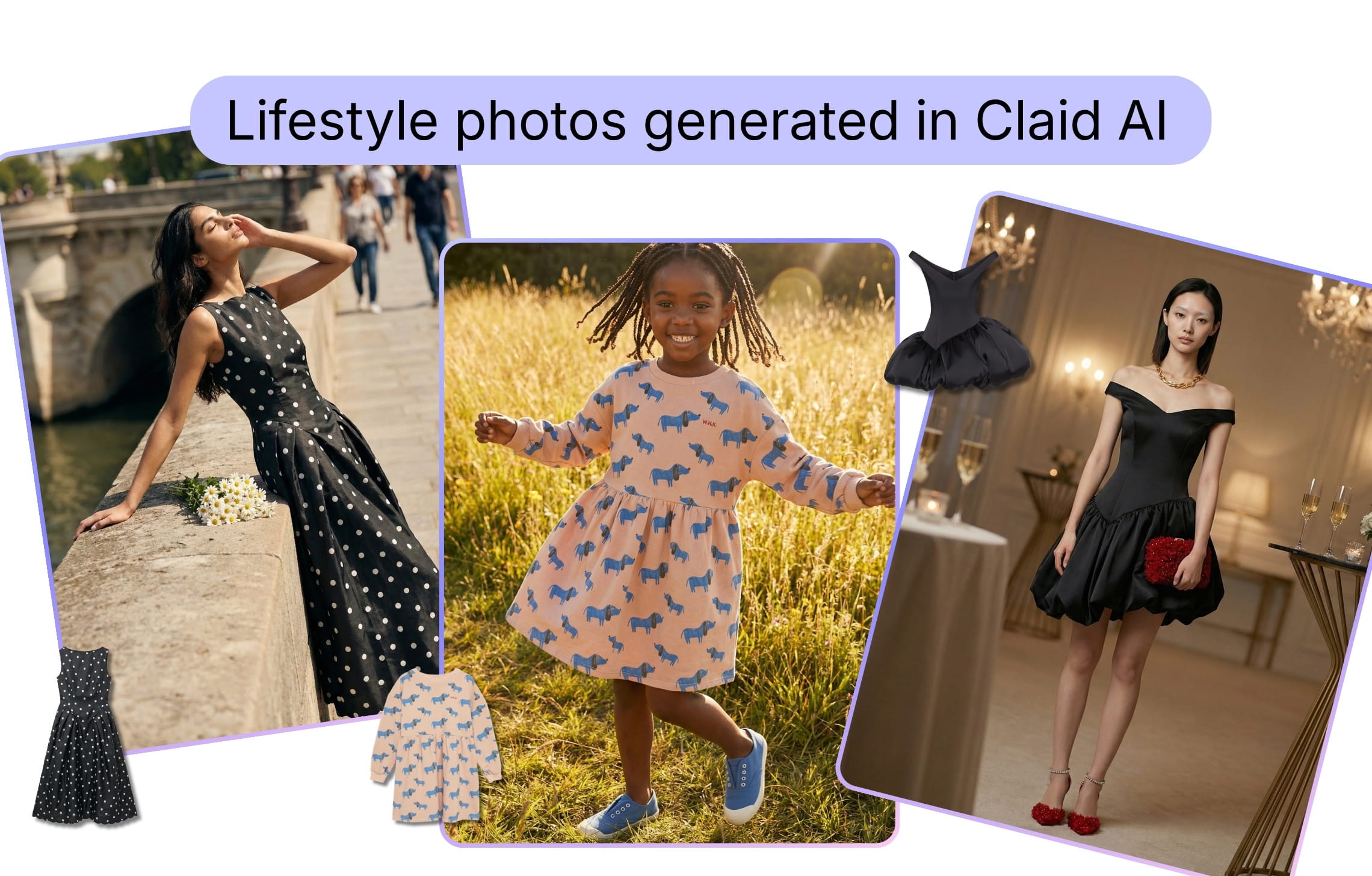
Apart from photo generation, Claid offers a broader production suite. Teams can remove or generate backgrounds, add shadows, improve lighting, upscale images, create on-model fashion photos, expand compositions, and turn approved stills into short videos. The same tools can be used interactively, combined in API workflows, or incorporated into a custom pipeline.
If you don’t want to run generation and quality control, Claid’s product photography service works from a brief, product references, brand guidelines, shot lists, and output specifications. Claid’s creative team establishes the visual direction, produces the image set, checks labels and product details, and delivers files in the required formats.
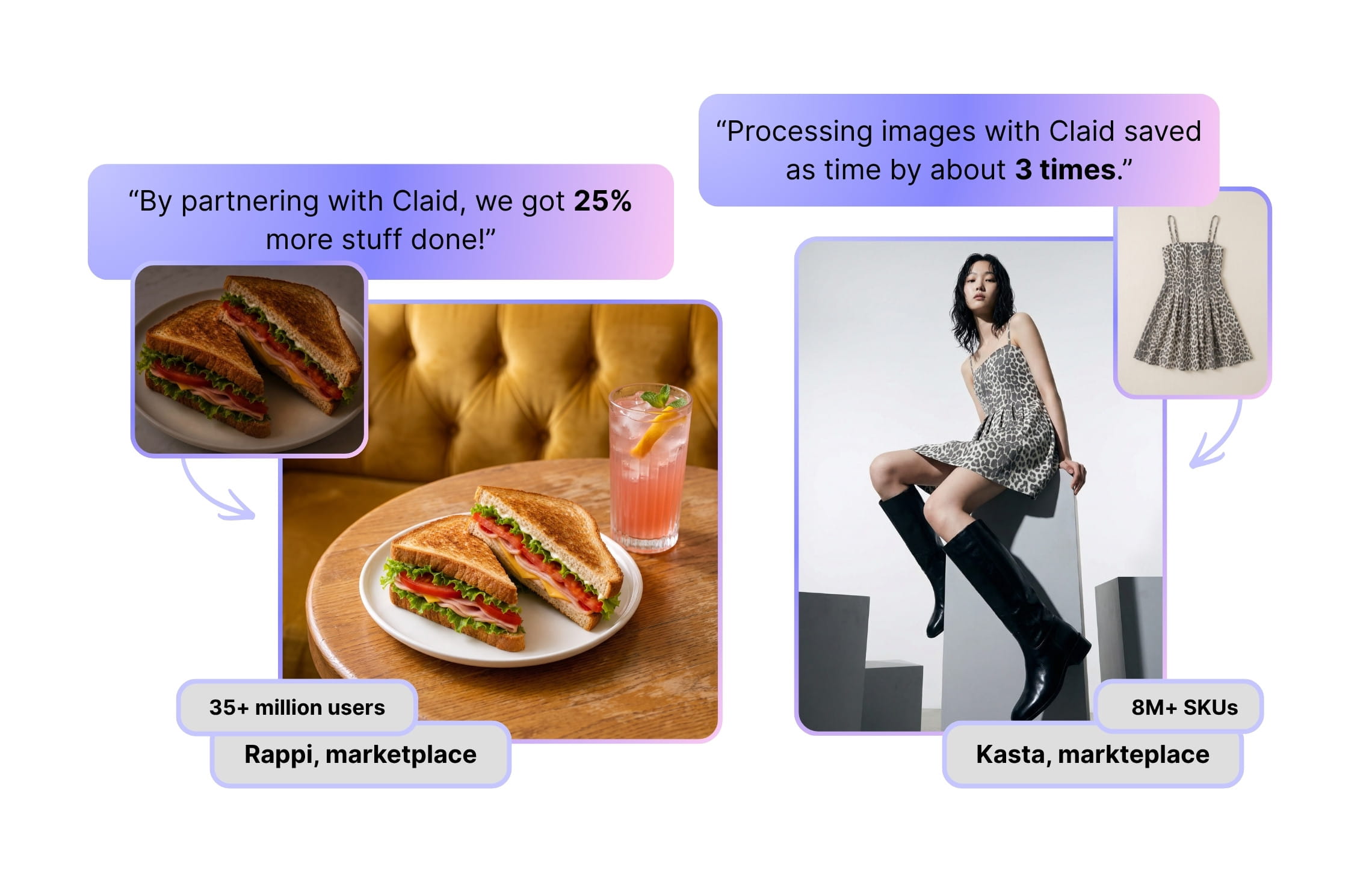
With Claid’s custom workflows, a fashion marketplace Kasta achieved a 3 times faster photo production, while delivery marketplace Rappi improved productivity by 25%.
Key capabilities
- Lifestyle scenes created from product images and written or visual references
- Fashion workflows for flatlays, ghost mannequins, and on-model imagery
- Background removal, shadows, enhancement, outpainting, upscaling
- Product and fashion videos
- Batch processing and brand kits
- APIs for generation, enhancement, resizing, and other operations
- Custom workflows with brand rules, automated routing, integrations, and quality control
- Fully managed production for lifestyle sets, PDPs, campaigns, lookbooks, and short videos
Useful for
- Ecommerce brands that need both routine catalog assets and more expressive lifestyle content
- Fashion teams producing PDP, on-model, social, and campaign imagery from the same garment inputs
- Marketplaces and platforms that need image generation or enhancement inside an existing pipeline
Pricing
- Free trial: 50 web credits and 50 API credits
- Paid subscriptions starting from $15/month, or $9/month billed yearly, with 500 credits
- Managed production and custom workflows: quoted according to volume, complexity, review requirements, and deliverables
2. Bria AI: licensed-data infrastructure for product imagery
Bria AI is aimed primarily at developers and enterprise product teams. Instead of centering the experience on a visual editor, it supplies APIs and deployment options for adding visual generation to an ecommerce platform, creative system, or internal production workflow.
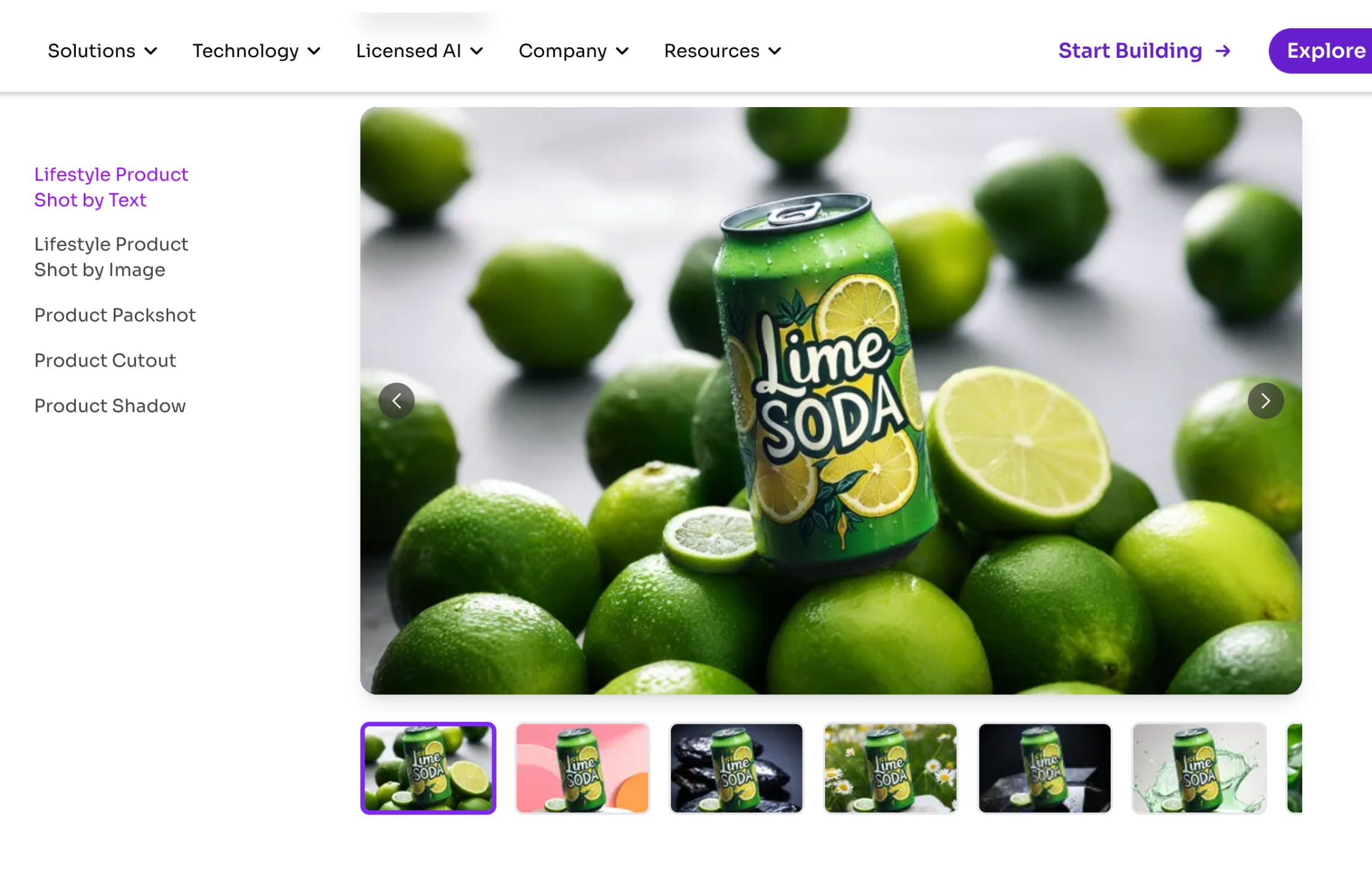
Its Product Shots suite includes lifestyle generation from text, lifestyle generation from a reference image, packshots, cutouts, shadows, and product embedding. Teams can choose automatic placement, preserve the product’s original position, or send placement coordinates. Reference-image controls make it possible to carry a room, surface, lighting direction, or campaign style into new product shots.
Bria also addresses an enterprise concern that most product-photo tools treat only briefly: training-data provenance. Its models are trained on licensed data, with attribution technology and commercial protection available by plan.
Key capabilities
- Lifestyle product shots guided by text or reference images
- Product cutout, packshot, shadow, embedding, and product-holding APIs
- Control over position, scale, aspect ratio, padding, and generation mode
- PIM, DAM, CMS, and automated workflow integration
- Custom throughput, dedicated capacity, private-cloud, bring-your-own-cloud, and on-premises deployment
- SSO, audit logs, custom DPAs, and enterprise indemnification options
Useful for
- Product teams embedding lifestyle generation into their own software
- Retailers connecting image creation to a PIM or DAM
- Enterprises with formal requirements around training data, provenance, privacy, or deployment
Pricing
- Free: 100 generations with access to the API and integrations
- Pay as you go: from $0.018 per generation
- Lifestyle (by text or by image): $0.03 per image
- Enterprise: custom pricing for security, deployment, capacity, support, and indemnification
3. Photoroom: batch lifestyle production with visual QA
Photoroom combines accessible product-photo editing with increasingly sophisticated production controls. A seller can remove a background on a phone, while a larger team can connect a product library, generate backgrounds in batches, and pass outputs through enterprise visual-quality checks.
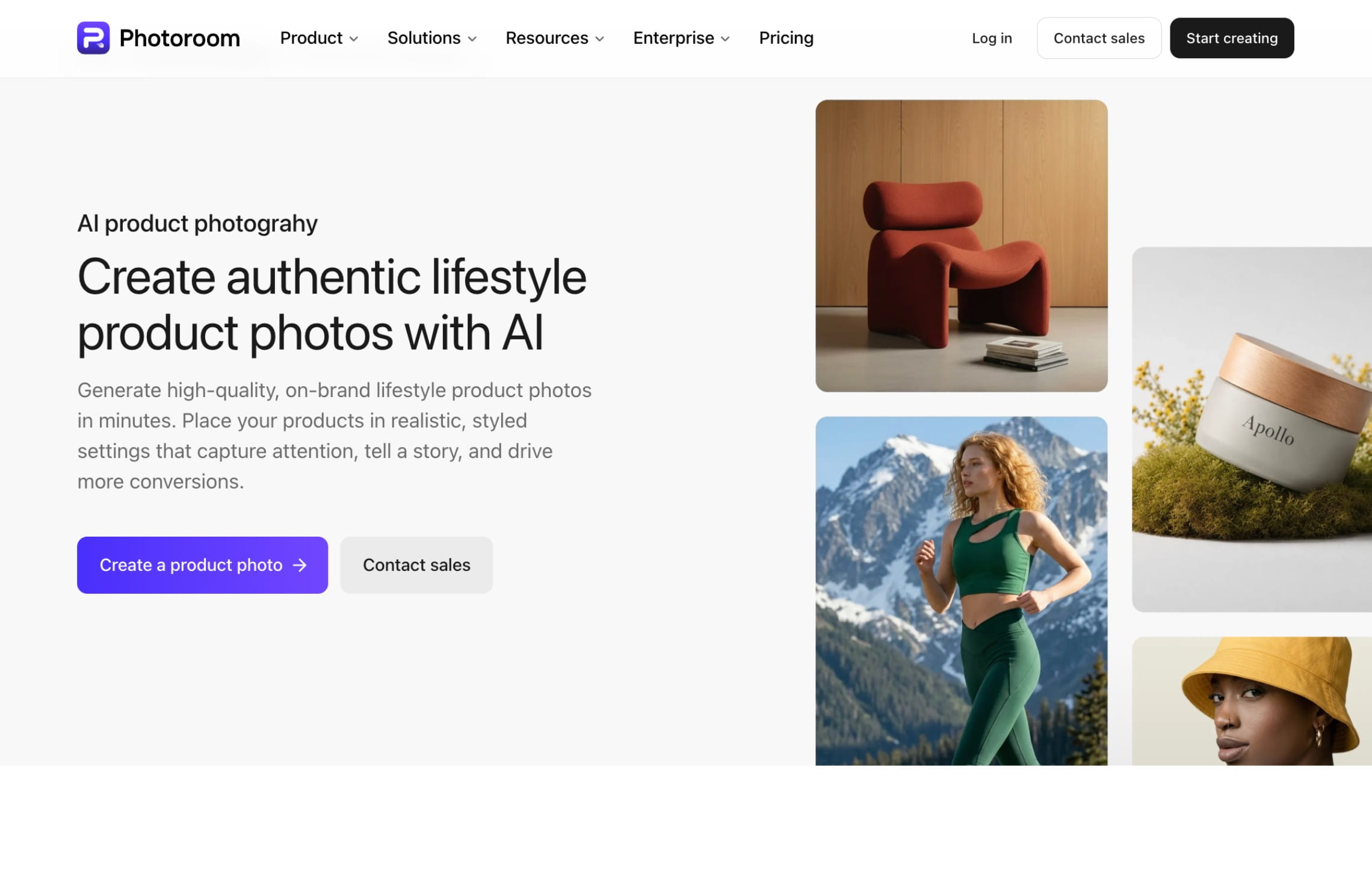
Its AI Backgrounds Studio creates product scenes from prompts, references, and relighting controls. The broader platform includes cutouts, shadows, retouching, image expansion, product fixes, virtual fashion models, video, brand kits, and shared workspaces. Shopify integration becomes available on the Max plan.
For enterprise operations, Visual QA evaluates generated assets for product fidelity and can identify issues such as altered labels, incorrect colors, or hallucinated details. That creates a more measurable review layer than simply asking a production team to inspect every candidate manually.
Key capabilities
- AI-generated product backgrounds with reference-image guidance
- Batch editing and catalog exports
- Background removal, retouching, shadows, resizing, and product fixes
- Virtual fashion models and product video
- Brand kits and shared Spaces for teams
- Separate API plans for automated workflows
- Enterprise Visual QA, adjustable shadows, SLA, SSO, and dedicated onboarding
Useful for
- Marketplace sellers producing clean listing images and lifestyle alternates
- Teams that want mobile, web, and Shopify workflows in one product
- Brands processing many straightforward product cutouts and background variations
Pricing
- Free access with limited features and exports
- Paid subscriptions starting from $12.99/month, or $7.50/month billed yearly, with 8,000 AI credits and 1,000 exports
- Custom enterprise pricing
- API usage is priced separately from app credits and exports
Brand-controlled creative systems
These tools are useful when the recurring challenge is maintaining an approved product identity or visual direction, not simply producing more backgrounds.
4. Kive: reusable products, studios, and brand styles
Kive approaches lifestyle production as a reusable creative system. Teams save products as persistent assets, organize references in a visual library, and create Studios that bundle a setting, lighting direction, composition, and photographic style.
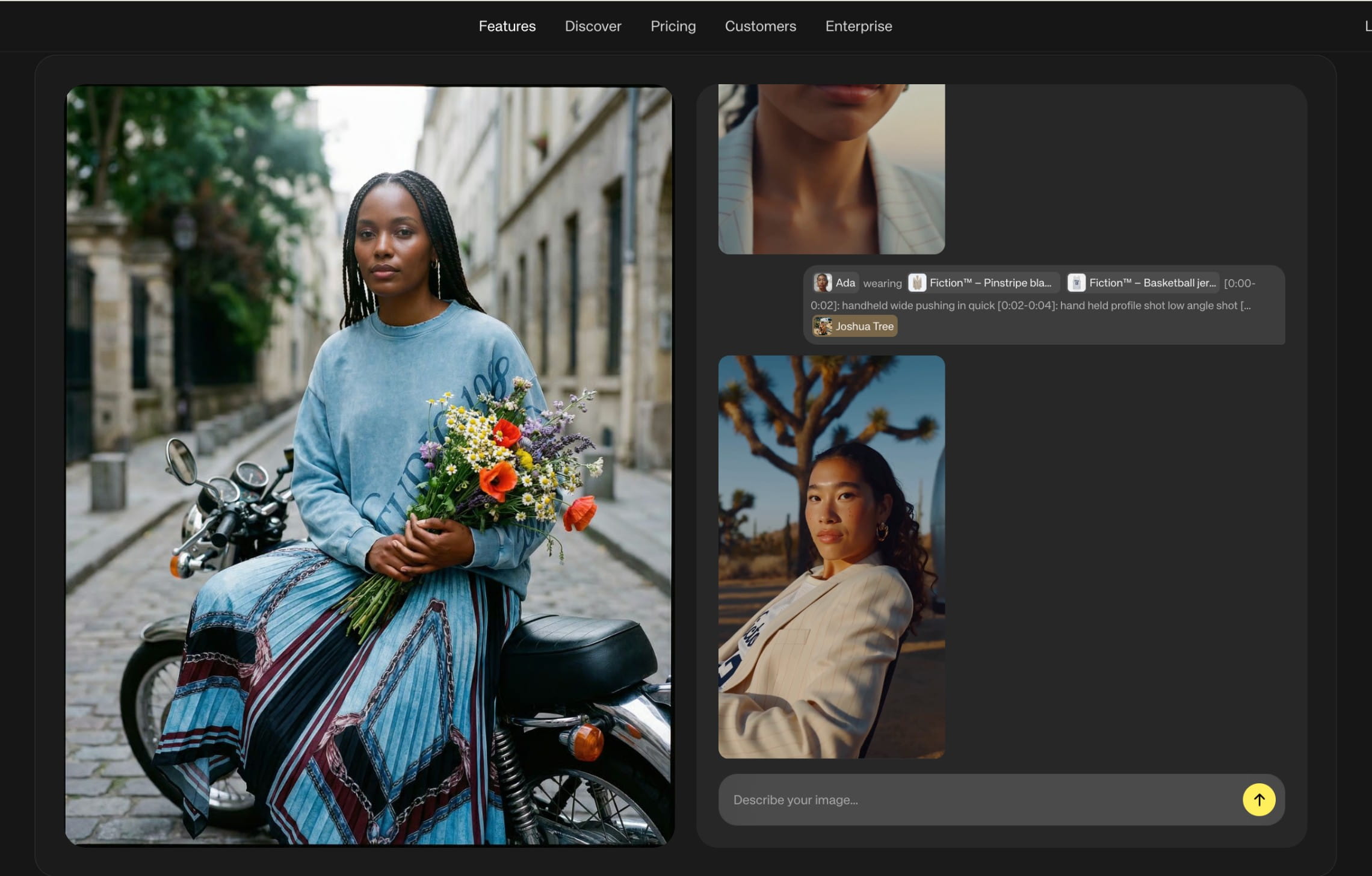
This matters when a product must appear repeatedly across launch images, seasonal campaigns, paid ads, social posts, and video. Instead of rebuilding the same prompt for every asset, the approved creative direction becomes part of the workspace.
Kive’s Pro plan adds custom brand training and unlimited AI products. Its surrounding asset-management features, boards, search, versioning, and collaboration make it particularly relevant to creative departments that want generated content to live beside the rest of their visual library.
Key capabilities
- Saved product models that can be reused across generations
- Studios for repeatable lighting, framing, props, and environments
- Product-reference and identity-preservation controls
- Asset library, boards, AI search, sharing, and version history
- Image editing, upscaling, and image-to-video
- TIFF, GIF, video, and high-resolution asset support on paid plans
- Custom presets, security controls, onboarding, and support for enterprise teams
Useful for
- Premium consumer brands with a defined visual identity
- Creative teams producing multiple campaigns around the same products
- Organizations that want generation and asset management in one workspace
Pricing
- Free: 40 credits
- Paid subscriptions starting from $20/month, or $15/month billed yearly, with 1,000 credits and 3 users
- Custom enterprise pricing
5. Nightjar: repeatable photography recipes for growing catalogs
Nightjar separates product identity from photographic direction. A Product stores reference photos, physical dimensions, and descriptive information. A Recipe stores the model, pose, composition, scene, lighting, and output settings. Teams can then apply the same Recipe to new products without recreating the brief.
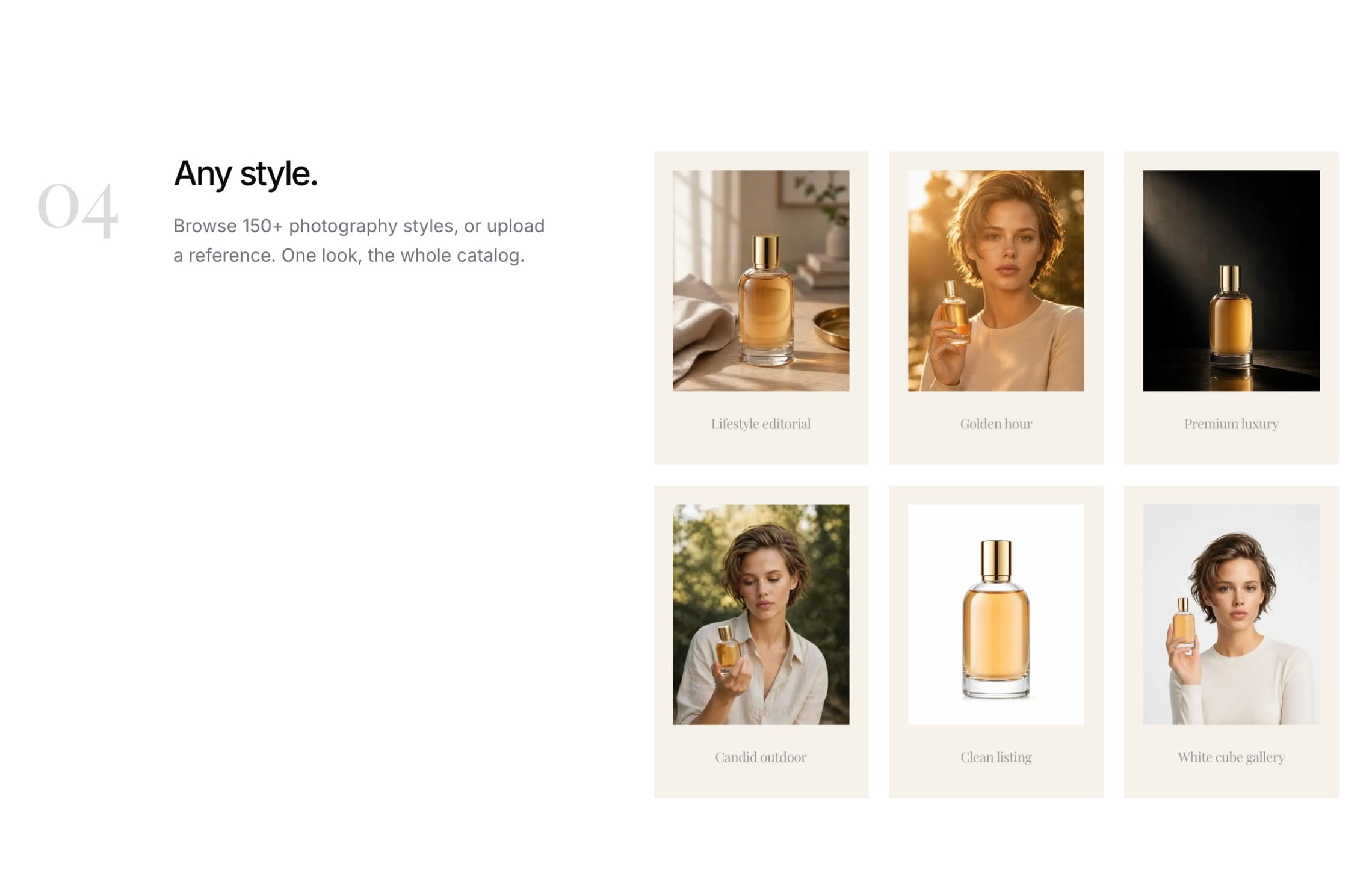
This structure is valuable for recurring launches and catalogs that must look like one continuous photoshoot. Products can be imported from a store link, generated on white, placed in lifestyle environments, shown on models, edited, recolored, and upscaled to 4K.
Nightjar also provides a shared team library, embedded Shopify workflow, batch processing, and API access on every paid subscription. Its web app and API work from the same saved products and visual ingredients, which reduces the chance that automated outputs drift away from the direction approved by the creative team.
Key capabilities
- Recipes that preserve model, composition, scene, lighting, and format
- Lifestyle, packshot, fashion-model, and multi-image photoshoot workflows
- Product-preserving edits, recoloring, reframing, and 4K upscaling
- Shared library and unlimited team seats
- Shopify app and store-link product imports
- Batch generation with sample approval
- API access with paid plans
Useful for
- Brands with recurring launches, variants, or seasonal catalog additions
- Teams that already have a strong photography direction and need to reproduce it
- Ecommerce operations that want the web app and API to share the same product data
Pricing
- Free trial: 6 credits
- Paid subscriptions starting from $25/month with 150 credits
- Higher-volume and custom plans
Fast self-serve and campaign production
The following tools reduce setup and are easier to adopt for small teams, product tests, social content, or rapid promotional work.
6. Mokker: high-volume, template-led product scenes
Mokker transforms packshots into product scenes through category templates and custom prompts. A user uploads one or more product images, selects an environment, and generates finished options without building a composition manually.
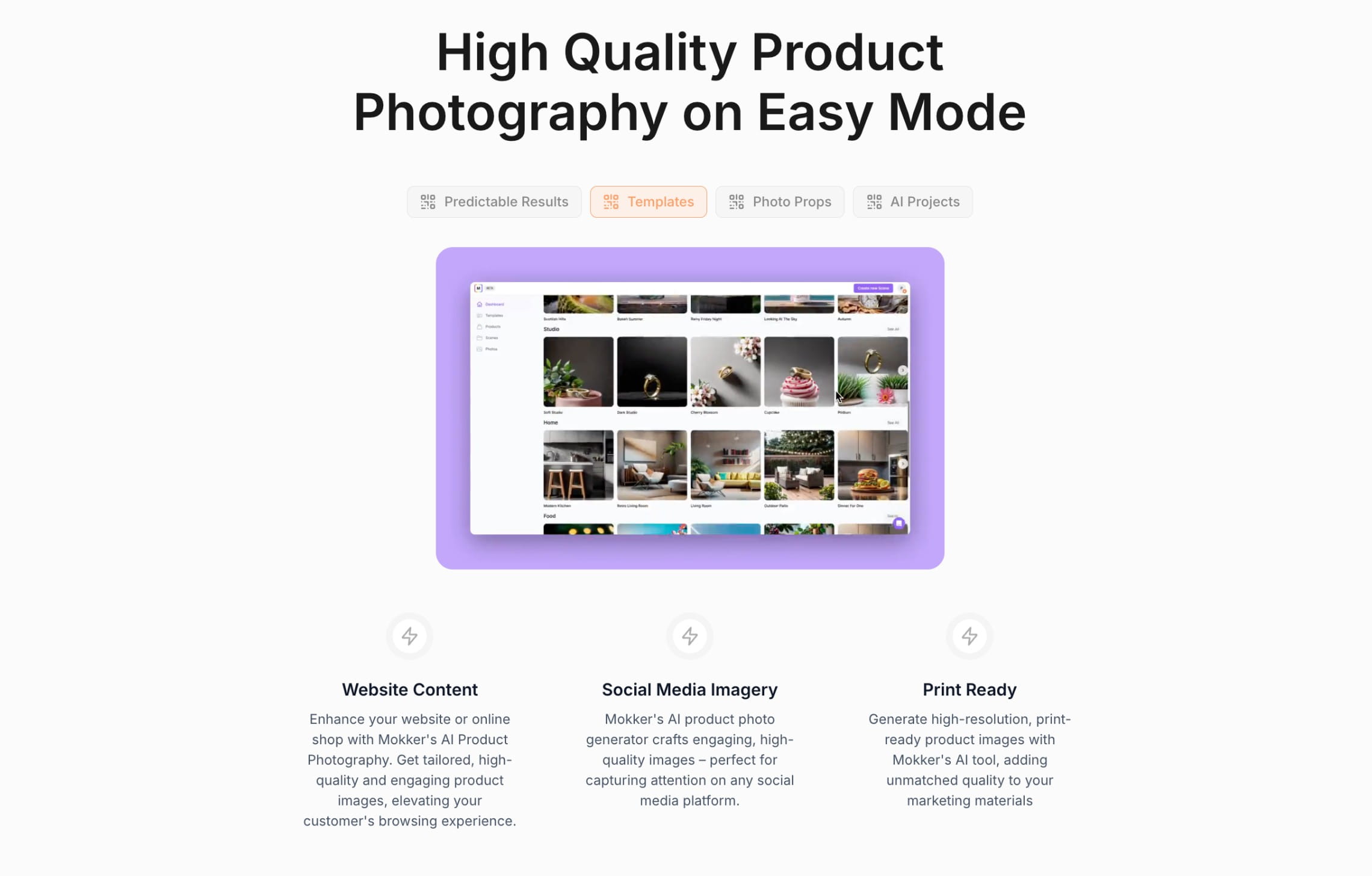
Its templates cover common commercial categories such as beauty, furniture, food, electronics, jewelry, and outdoor products. The Starter plan includes 500 photos per month, while the Team plan removes the photo limit and adds a shared account.
Mokker’s straightforward workflow makes it practical for businesses that need more visual variety but do not yet require trained brand models, sophisticated asset governance, or a custom production pipeline.
Key capabilities
- Automated product cutout and background replacement
- Category-specific templates with props and lighting
- Custom prompts and higher-quality exports
- Multiple source images for additional product context
- Large monthly image allowances
- API access for programmatic generation
Useful for
- Small ecommerce businesses refreshing product listings
- Teams that prefer templates to detailed prompting
- Brands producing many simple seasonal or category-specific scenes
Pricing
- Free: 20 photos
- Paid subscriptions starting from $13/month with 500 photos
Mokker is part of Soona, a product photography platform that combines AI tools with physical studios and post-production services. Brands can use Mokker independently for generated product scenes or place it within a broader Soona workflow that includes original photography and human-led production.
7. Pippit AI: lifestyle images connected to video and distribution
Pippit AI is a broader ecommerce content platform powered by CapCut. Product imagery is one part of a workflow that also includes short-form video, avatars, ad creative, publishing, product management, and performance analytics.
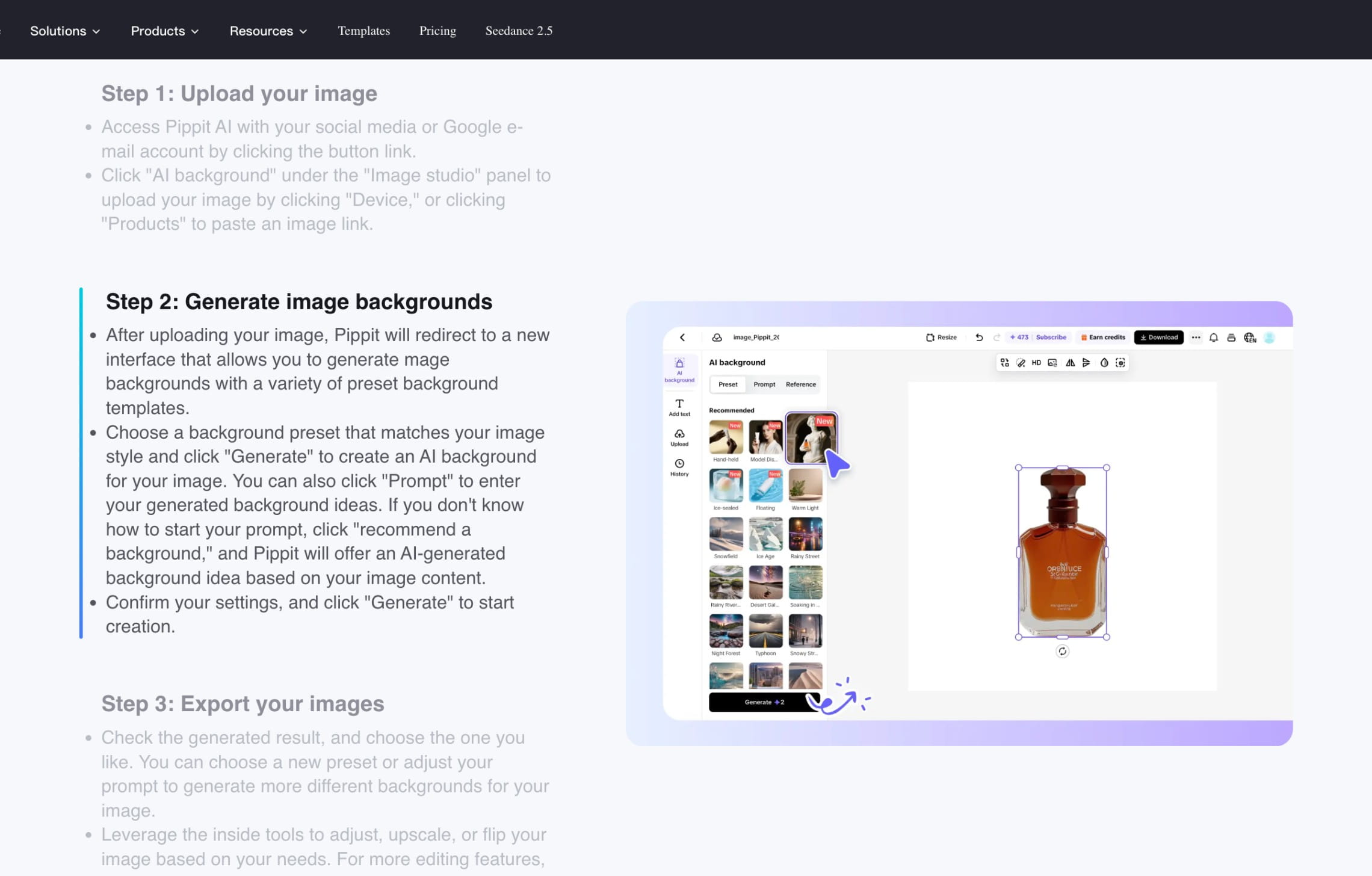
Its Product Photos workflow can import a listing or uploaded product image, remove the background, apply a generated or template-based scene, and add shadows. Batch tools help produce marketplace images across multiple products, while the wider editor turns approved stills into posters, promotional graphics, and short videos.
This makes Pippit particularly relevant to social-commerce teams. A product image can move from a listing asset into TikTok-oriented video and campaign content without being exported to a separate creative suite.
Key capabilities
- Lifestyle scenes and marketplace-oriented product photos
- Background removal, generated settings, and shadow controls
- Product imports from ecommerce listings
- Batch image creation and editing
- Marketing posters and ad creatives
- Image-to-video, product video, avatars, and UGC-style formats
- Product library, publishing, scheduling, and analytics
- Connections to TikTok Shop and other commerce channels
Useful for
- Social-commerce teams producing images and video together
- Brands publishing heavily to TikTok, Reels, and marketplace channels
- Marketers that want product assets, ads, publishing, and analytics in one environment
Pricing
- Free plan with daily credits and watermarked outputs
- Paid subscriptions starting from $20/month
How to choose an AI lifestyle photo generator
The quality of a single demonstration image says little about how a platform will perform across a real catalog. A useful evaluation should reproduce the conditions under which the content will actually be produced, reviewed, and published.
Start with the deliverable, not the tool
Define exactly what the team must ship. A social concept, a collection of PDP alternates, an Amazon gallery, and 5,000 localized marketplace images require different levels of control.
List the expected assets per SKU, aspect ratios, resolutions, channels, launch frequency, and number of regional or seasonal versions. This prevents a visually impressive tool from being selected for a workflow it cannot support economically.
Build a category-specific test set
Test several products that represent the difficult parts of the catalog:
- Small packaging text and detailed labels
- Transparent, glossy, metallic, or reflective surfaces
- Fine fabrics, patterns, straps, and textured materials
- Products whose physical scale must be obvious
- Color variants with very small differences
- Bundles containing several separate items
- Unusual shapes or source-image angles
A platform that handles one simple bottle may behave differently with glass, jewelry, printed packaging, furniture, or clothing.
Define what the AI must not change
Write down the product invariants before generating anything. These may include logo shape, label copy, stitching, closures, dimensions, color, number of components, material, or garment construction.
Review every candidate against those facts. Claid, Bria, Photoroom, Kive, and Nightjar provide different forms of product preservation or quality control, but no generation system removes the need for approval on commercially sensitive assets.
Measure repeatability across products
Generate the same visual direction for at least ten representative SKUs. Compare framing, camera height, shadows, product scale, color treatment, negative space, and scene density.
Kive’s Studios, Nightjar’s Recipes, Claid’s custom workflows, and Photoroom’s batch systems address this problem in different ways. The important question is whether a creative lead can approve a direction once and have other people or automated processes reproduce it.
Evaluate the complete production path
Generation is only one stage. Check how the platform handles background preparation, image enhancement, aspect-ratio changes, edits, upscaling, naming, storage, review, and delivery.
A cheap generator can become expensive if every output must be corrected in another application. A higher-priced platform may cost less per approved SKU if it reduces manual preparation, review, and rework.
Test the operating model at your expected volume
For a few weekly images, a web editor may be sufficient. For recurring collections, investigate reusable products, presets, batch processing, and shared libraries. For marketplace or platform volumes, evaluate APIs, asynchronous processing, rate limits, webhooks, retries, and volume pricing.
Also ask who will handle failed images. A large catalog needs exception queues, approval rules, and a way to rerun only the items that failed. Claid offers self-serve, API, and managed production; Bria emphasizes infrastructure and deployment; Photoroom adds enterprise Visual QA; Kive and Nightjar focus on persistent creative systems.
Calculate cost per approved asset
Subscription prices are not directly comparable. One platform meters images, another meters credits, and another counts exports separately.
Estimate:
- Inputs processed each month
- Candidates generated for each approved image
- Credits required by resolution or feature
- Edits and upscales
- Exports or API calls
- Human review time
- Rework rate
- Additional software or agency costs
The useful number is the total cost of the images that pass review, not the advertised cost of one generation.
Review rights, data handling, and governance
Confirm commercial-use rights, retention policies, whether customer uploads can be used for training, and which subprocessors receive the images. Enterprise buyers may also need SSO, audit logs, DPAs, regional hosting, indemnification, or private deployment.
Bria makes licensed training data and provenance central to its offering. Claid, Photoroom, Kive, and other vendors provide different business and enterprise controls, so procurement requirements should be checked before a large catalog is uploaded.
Decide whether the team needs software or delivered production
Self-serve software works when the team has time and expertise to write briefs, generate alternatives, inspect details, correct failures, and prepare exports.
An API is appropriate when those rules are stable and engineering resources are available. A managed service becomes useful when the company wants a partner to translate brand requirements into a repeatable workflow and remain responsible for production and quality control.
These models can be combined. A brand might use a web app for experimentation, an API for routine catalog work, and custom product photography production for a collection launch or a workflow with stricter review requirements.
Need a repeatable lifestyle photo production?
With Claid, you can generate and edit images yourself, automate recurring operations through an API, or use our AI product photography service to receive reviewed, channel-ready lifestyle, catalog, fashion, and campaign assets.
FAQ
What is an AI lifestyle photo generator?
An AI lifestyle photo generator places an existing product into a new, contextual environment. It can turn a clean packshot into an image of a serum on a bathroom counter, a chair in a furnished room, or a garment worn by a model outdoors.
More advanced systems also control product placement, lighting, shadows, brand style, models, output formats, and recurring catalog production.
How is a lifestyle photo generator different from an AI background tool?
A background tool mainly replaces the area behind the product. A lifestyle system may also adjust lighting, scale, perspective, contact shadows, reflections, nearby props, human interaction, and composition so that the product appears to belong in the scene.
The distinction is especially important for transparent products, reflective packaging, furniture, fashion, and images showing someone holding or using an item.
Can AI lifestyle images be used on Shopify or Amazon?
Yes, provided the images accurately represent the product and meet the channel’s technical and content requirements. Marketplaces commonly require a clean main listing image but allow lifestyle images in secondary gallery positions.
Claid can deliver channel-specific assets through self-serve, API, or managed workflows. Photoroom and Nightjar offer Shopify integrations, while Pippit supports marketplace-oriented formats and product imports.
Which tools are suited to large catalogs?
Claid, Bria, Photoroom, and Nightjar provide documented API or automation paths. Kive supports reusable products, brand systems, and larger team workspaces. The right option depends on whether the company needs an API component, a creative workspace, automated quality checks, or a team to manage production.
Large-volume buyers should test throughput, exception handling, repeatability, review time, and cost per approved SKU rather than relying on the maximum generation allowance alone.
Can the same lifestyle style be applied to hundreds of products?
Yes, but repeatability differs by platform. Kive stores Studios and brand styles, Nightjar stores Recipes, and Claid can apply custom workflow rules across a catalog. Photoroom supports batch creation, while Bria can connect generation directly to product-data systems.
Run a multi-SKU test before committing. Consistent prompts do not automatically produce consistent camera angles, product scale, shadows, or scene density.
How can a brand protect product accuracy?
Start with clear source images, preferably from multiple angles when the product has important side, rear, or label details. Define which elements cannot change, generate several candidates, and compare them closely with the physical product or source photography.
Products with fine text, transparency, metallic finishes, intricate patterns, or unusual geometry should receive additional review. Enterprise teams may also use automated fidelity scoring, workflow rules, or human quality control.
Do these platforms support fashion lifestyle imagery?
Claid, Photoroom, Nightjar, Kive, and Pippit include fashion or human-model capabilities to varying degrees. Claid additionally supports fashion workflows that can turn flatlays or ghost-mannequin images into on-model assets and extend them into lifestyle, campaign, and video content.
Test garment shape, print placement, neckline, sleeve construction, drape, and fit. A convincing model does not guarantee that the garment remains commercially accurate.
When is a physical photoshoot still preferable?
Use a physical shoot when the image must document an unseen product detail, demonstrate exact fit or performance, show a real person using the item, satisfy regulated evidence requirements, or capture materials that the AI cannot reproduce reliably.
A hybrid workflow is often practical: photograph the product accurately once, then use AI to create additional settings, crops, formats, seasonal versions, and campaign variations.
Need AI product photography at scale?
Scale product image production without stretching your team. Use our API to automate image workflows, or let our team deliver a custom pipeline built around your operations.


Claid.ai
October 23, 2026