Tech
8 AI face and model swap tools for fashion photos in 2026


Sometimes, fashion teams need to change model identity while protecting the product, pose, lighting, proportions, and overall composition of the original image. This is where AI face swap tools come into the picture.
For an individual campaign image, this can be a self-serve editing task. Across hundreds or thousands of products, model replacement becomes a production workflow involving approved identities, input preparation, automated processing, quality review, corrections, and catalog delivery. Teams can handle these steps internally through software and APIs or use a custom AI fashion production service when they need finished assets without operating the entire workflow themselves.
This guide compares 8 fashion-relevant face and model swap platforms based on product preservation, identity control, supporting tools, pricing, and their ability to support recurring production.
AI face and model swap tools at a glance
The platforms below range from targeted face-swap applications to wider fashion-production suites. The right choice depends on whether the team needs a few campaign variations, repeatable catalog identities, or an automated production pipeline.
| Tool | Best for | Type of replacement | Customization and scale | Starting price |
|---|---|---|---|---|
| Claid | Fashion brands and marketplaces that need controlled identity changes across catalog production | Face replacement and fashion-model generation | Model library, custom references, API, image finishing, custom production | Free trial; paid plans from $15/month |
| Botika | Brands that want model replacement with assisted corrections and retouch support | AI model replacement | Model and background libraries, retouch rounds, team workspace, enterprise service | From $55/month, or $46/month billed yearly |
| FASHN AI | Creative and technical teams combining model swap, try-on, and model creation | Face and model replacement | Custom face references, batch capacity, web app, mobile app, API | From $19/month |
| Modelia | Fashion teams that need reusable characters and broader styling tools | Full model replacement | Consistent characters, batch generation, 4K output, API | Free plan; one-time project from $12 |
| WeShop AI | Smaller brands that want reusable identities across images and mobile workflows | Face swap and AI model generation | Mobile and desktop apps, Shopify integration, API on higher plans | Free trial; from $9.99/month |
| Snappyit | Ecommerce sellers that want direct face swaps and Shopify-connected editing | Targeted face replacement | Batch upload, mobile apps, Shopify, supporting product-photo tools | 6 free credits; from $8.20/month billed yearly |
| SellerPic | Sellers creating regional model variations from product imagery | AI fashion-model replacement | Model presets, uploaded models, batch generation, Shopify, API | 20 free credits; from $29/month |
| Fashion Diffusion | Design-led teams combining face swap with virtual try-on and fashion ideation | Face replacement within a wider fashion suite | Try-on, garment editing, design tools, higher-volume plans | From $12/month |
NB! Pricing can change, and higher-resolution outputs, video, retries, or API processing may consume additional credits.
Need AI fashion photography at scale?
Produce high volumes of on-model and product visuals without slowing down launches. Use our API to automate fashion image workflows or work with our team on a custom pipeline tailored to your operations.
Now, let’s review these face swap tools in closer detail.
1. Claid: fashion identity replacement with custom production options
Claid places face replacement inside a wider AI fashion suite. Teams can replace the face in an existing model photograph while retaining the model’s pose, body shape, garment, lighting, and composition.
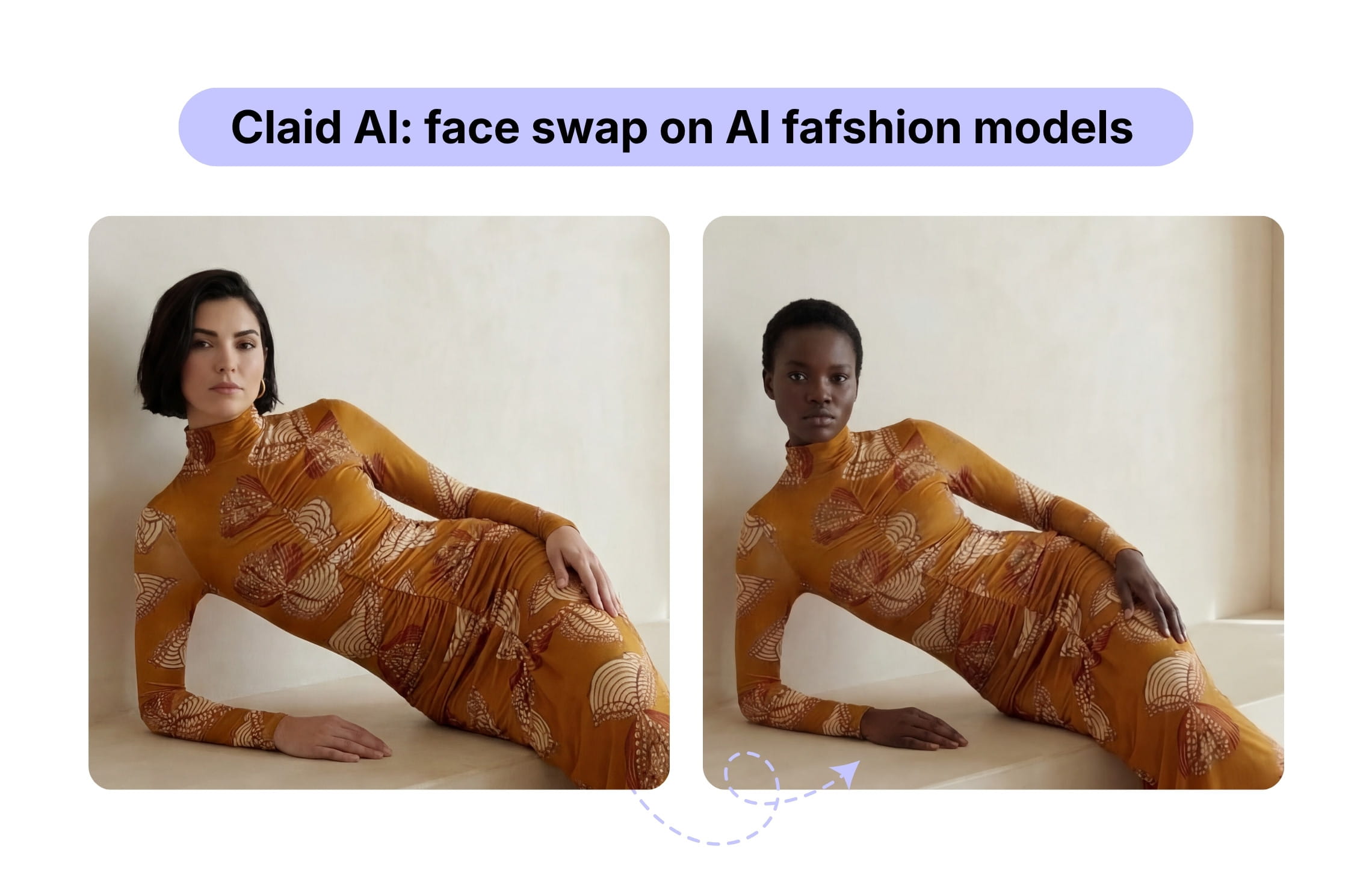
This gives brands several ways to use the same source photography: refresh an existing model, introduce regional representation, create a consistent identity across a collection, or derive additional catalog assets without repeating the original shoot.
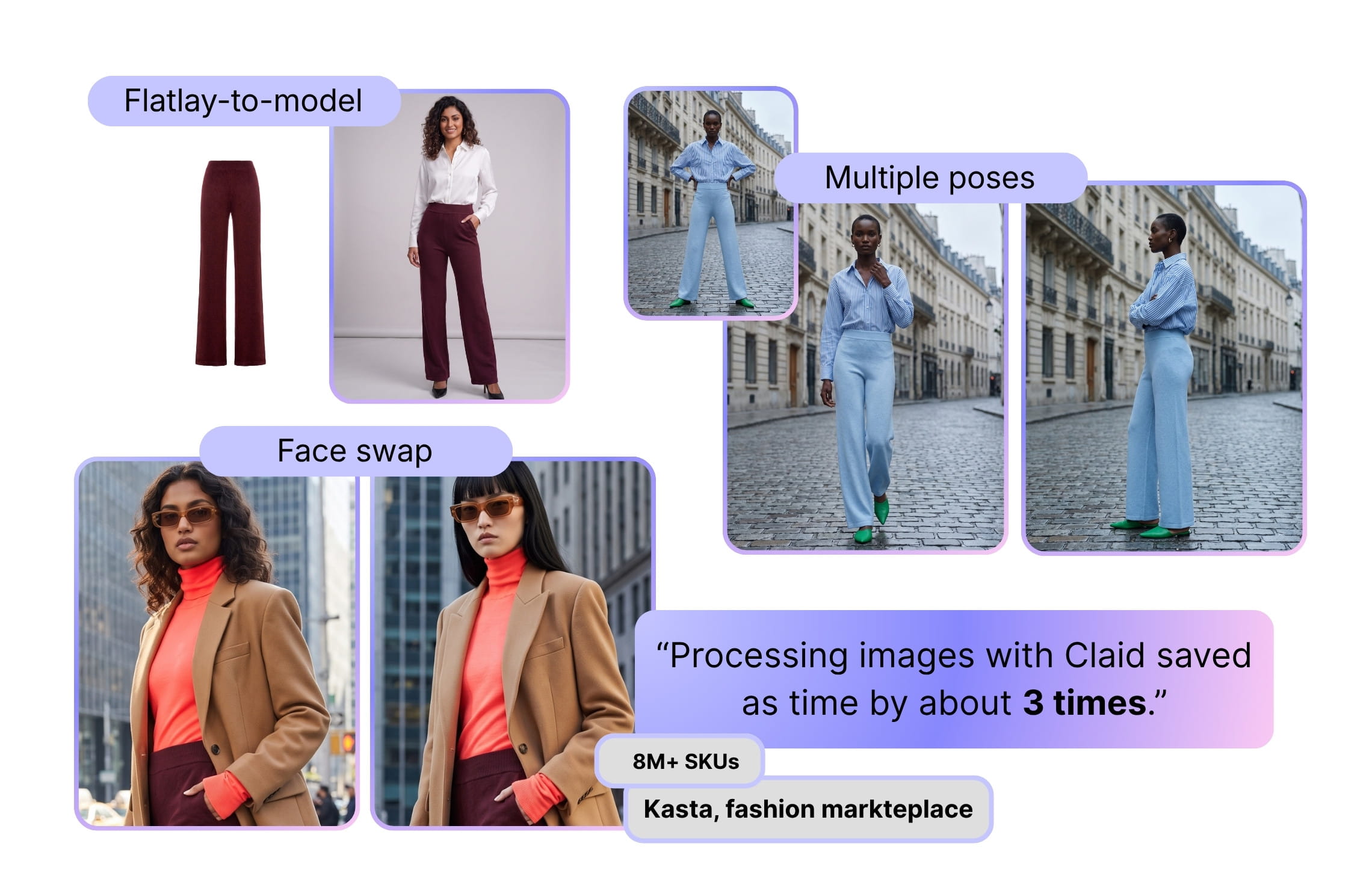
Face swap can be combined with other production steps, including flatlay-to-model generation, pose expansion, background editing, resizing, upscaling, and fashion videos. This is useful for building a complete PDP or campaign set.
While you can use the web studio for testing, image creation, and supporting edits, you can also connect Claid’s APIs to automate approved fashion-image workflows or order a custom AI fashion production service for tailored pipelines, quality control, finishing, and asset delivery.
For a large fashion marketplace Kasta, Claid built a workflow combining flatlay-to-model generation, face replacement, pose expansion, and delivery back into existing catalog structure. The workflow made fashion-image processing 3 times faster while preserving product details across the generated assets.
Useful for
- Fashion brands localizing existing catalog photography
- Marketplaces processing large numbers of vendor images
- Teams that need face replacement as part of a wider PDP workflow
Pricing
- Free trial with 50 credits
- Paid subscriptions from $15/month, or $9/month billed yearly
- Custom production pricing based on volume and workflow
2. Botika: model swap with an assisted correction process
Botika can swap the model in existing fashion photography while preserving the product and original pose. Teams can select an AI model and background, submit the source image, and generate a new version without organizing another shoot.
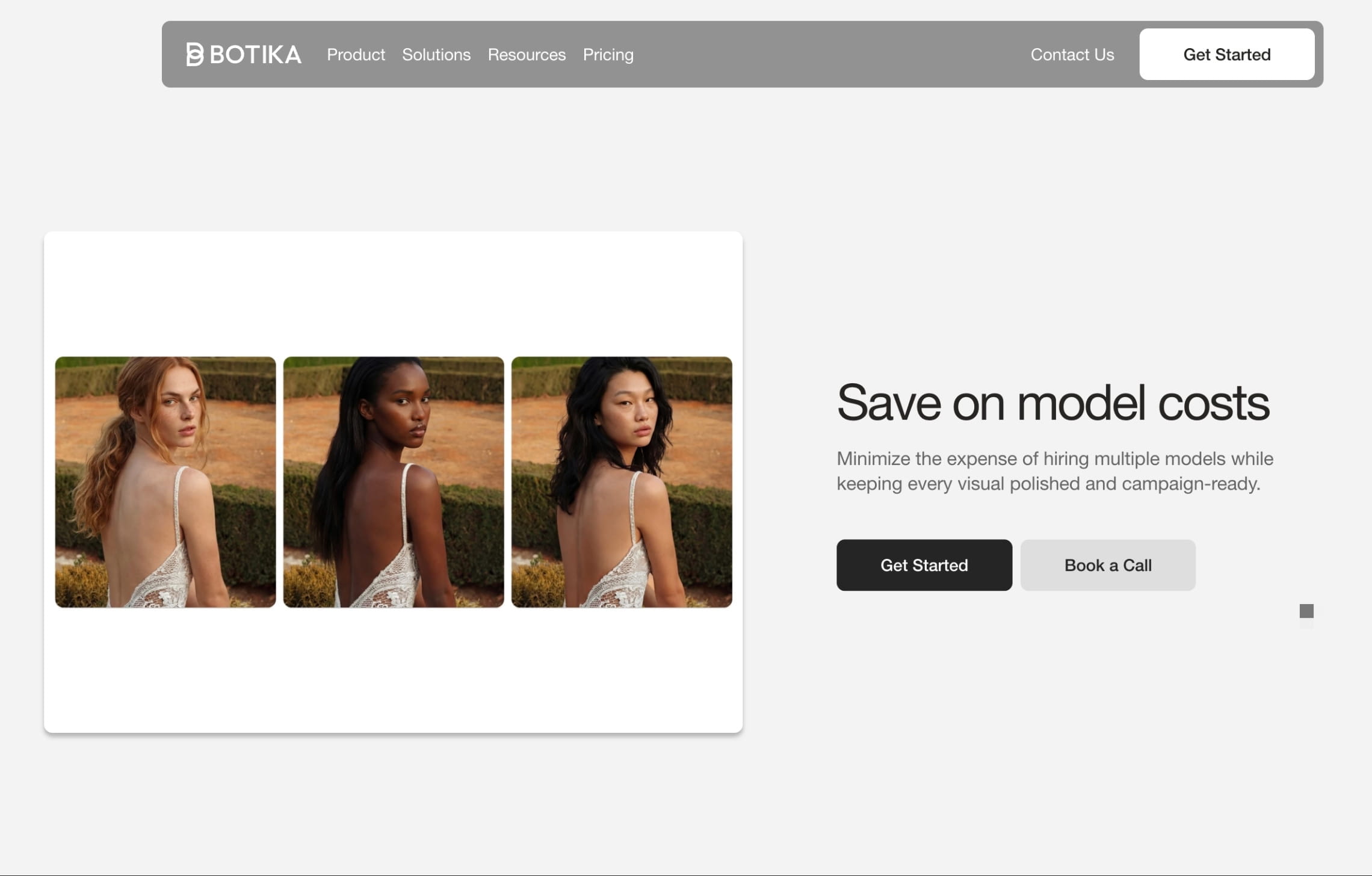
The platform is particularly relevant when generated images need a correction path. Annual plans include retouch rounds, allowing users to mark an area that needs adjustment and send it through Botika’s review process.
Pro includes two retouch rounds per photo and a stated two-day correction window. Advanced increases the retouch allowance, shortens the correction window, unlocks the full model and background libraries, supports 4K output, and adds team collaboration.
The enterprise service adds exclusive models, brand-specific backgrounds, white-glove quality review, and reusable retouching briefs. These features make Botika suitable for organizations that need assistance maintaining a visual standard across repeated production.
Useful for
- Brands replacing models in existing catalog images
- Ecommerce teams that want human-assisted corrections
- Companies working with mixed-quality source photography
Pricing
- Paid subscriptions starting from $55/month, or $46/month billed yearly
- Higher-volume pricing with additional retouching, 4K output, and collaboration
- Custom enterprise pricing
3. FASHN AI: model swap, try-on, and reusable identities
FASHN AI combines model replacement with product-to-model generation, virtual try-on, model creation, packshots, image editing, upscaling, and fashion video.
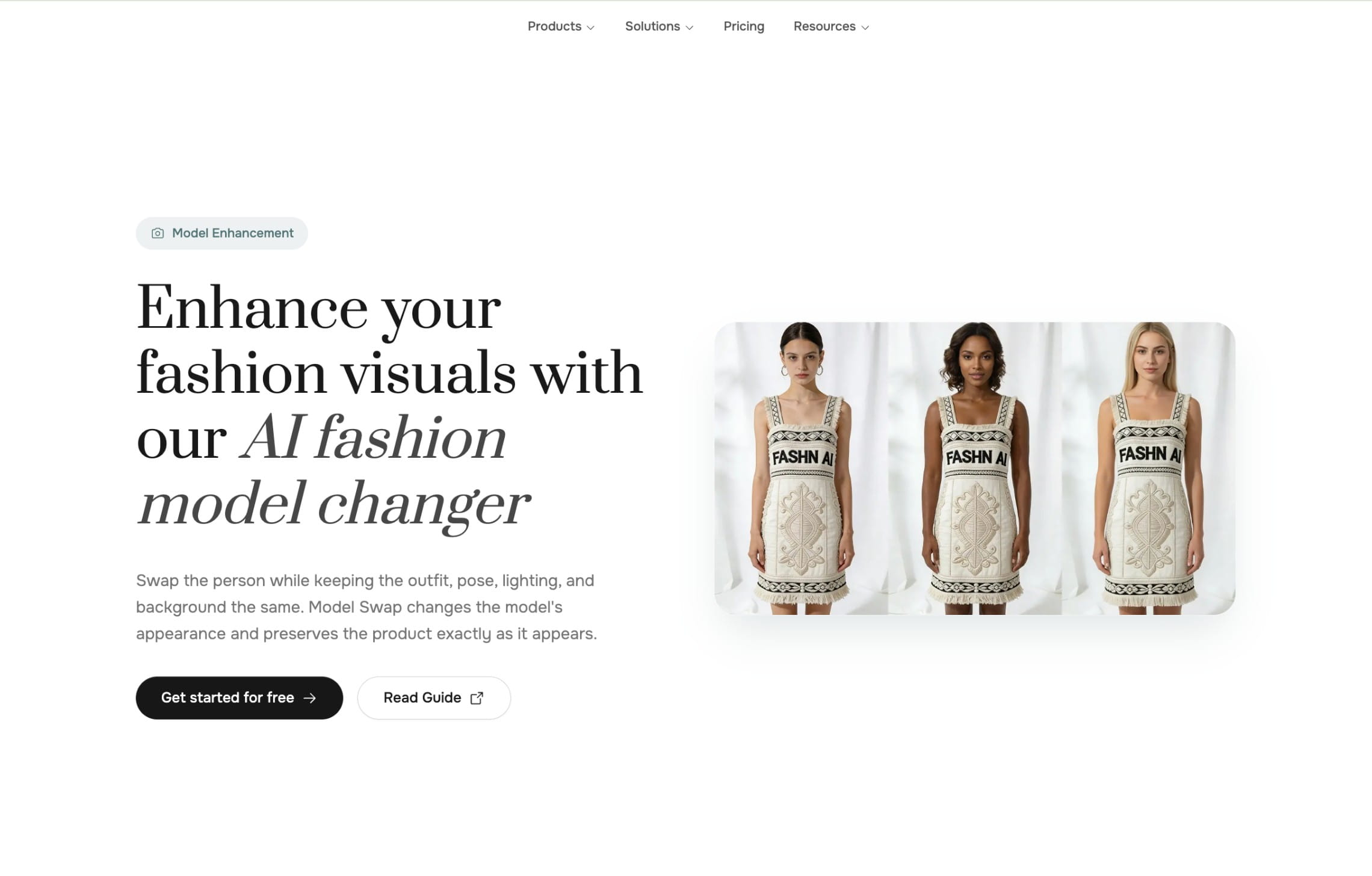
Its model swap feature changes the person in an existing image while attempting to retain the garment, pose, and composition. Face-reference tools can capture an identity from a source image and reuse it across other fashion assets.
This gives teams several possible workflows. A brand can change the face in an existing photograph, build a reusable model identity, place new garments on that identity, or convert completed images into short videos.
The platform is available through web and mobile applications, while a separate developer API supports programmatic integration. This makes FASHN relevant to teams that begin with manual experimentation but may later incorporate generation into an internal tool or customer-facing product.
Useful for
- Fashion teams combining model replacement and virtual try-on
- Brands building reusable model identities
- Agencies producing catalog, campaign, and social assets
Pricing
- 10 complimentary credits for new accounts
- Paid subscriptions starting from $19/month (200 monthly credits and 2 users)
- Separate API pricing
4. Modelia: full model swap with consistent characters
Modelia’s model swap replaces the person in an existing fashion photograph while retaining the outfit, lighting, and overall composition. Users upload an on-model product image and choose or generate a replacement model. The result can then be used for catalog pages, campaigns, or regional content.
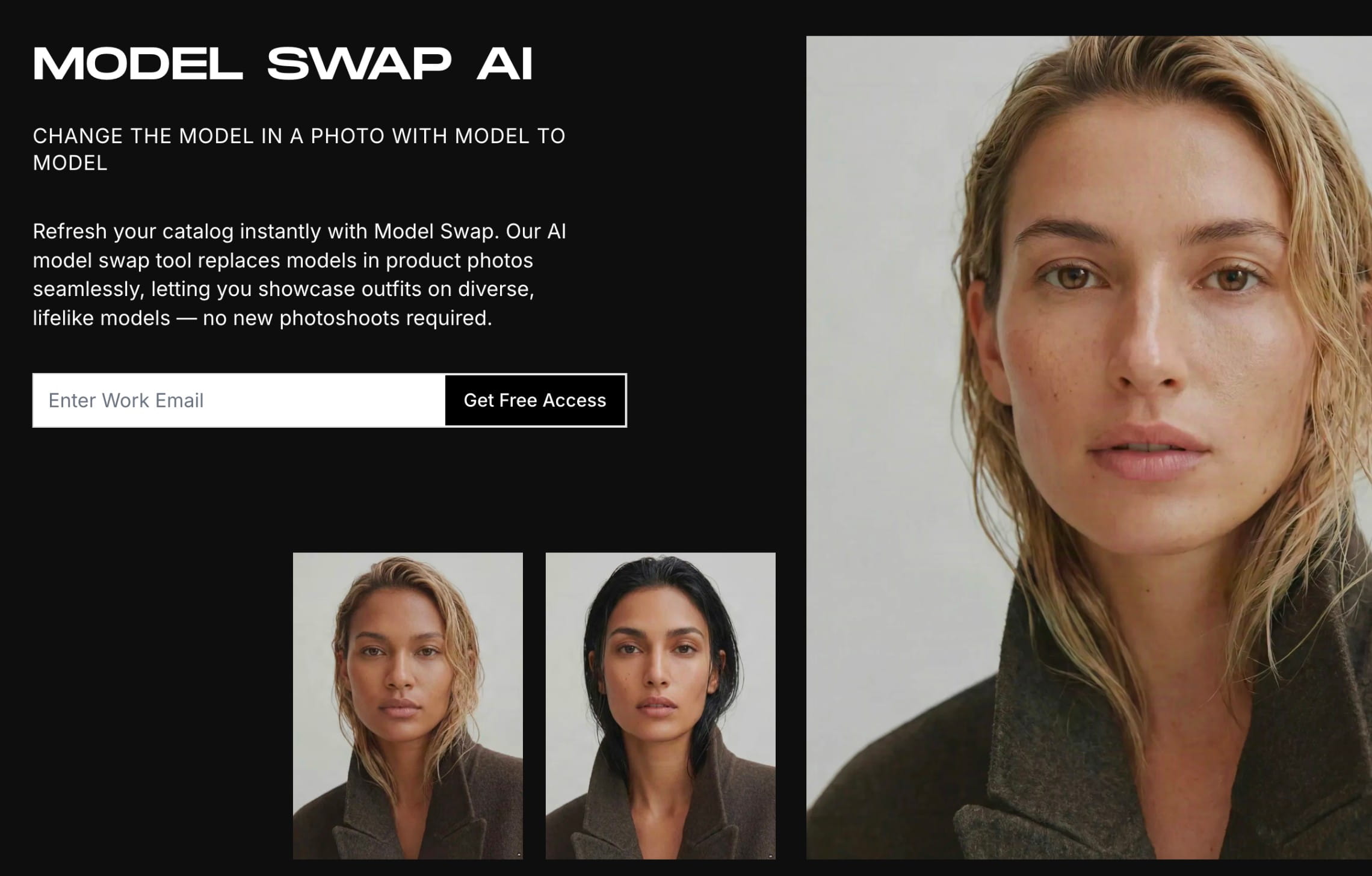
Modelia’s consistent-character functionality is useful when the same identity needs to appear across several products. It can also support broader workflows involving flatlay conversion, mannequin conversion, pose changes, virtual try-on, outfit generation, accessory placement, recoloring, backgrounds, and fashion video. This means a model swap does not have to remain an isolated edit. A merchandising team can create a recurring identity, use it across multiple garments, adjust the pose or styling, and derive additional content from the same production environment.
Batch generation and public API access are included in paid subscriptions. Higher tiers add more credits, characters, and production capacity.
Useful for
- Brands replacing a model while retaining an existing composition
- Teams creating recurring AI model identities
- Fashion marketers generating regional catalog variations
Pricing
- Free with 20 monthly credits and watermarked, non-commercial output
- Credit packs starting from $12 for 50 credits
- Paid subscriptions starting from $35/month (250 credits)
5. WeShop AI: reusable faces across desktop and mobile production
WeShop AI offers face swap, virtual try-on, AI model generation, pose changes, background creation, and ecommerce image editing. A user can begin with one face image, create an AI model identity, and reuse that identity across different outfits, scenes, and product categories. This is useful for smaller teams that want a recognizable model without repeatedly casting or training a new identity.
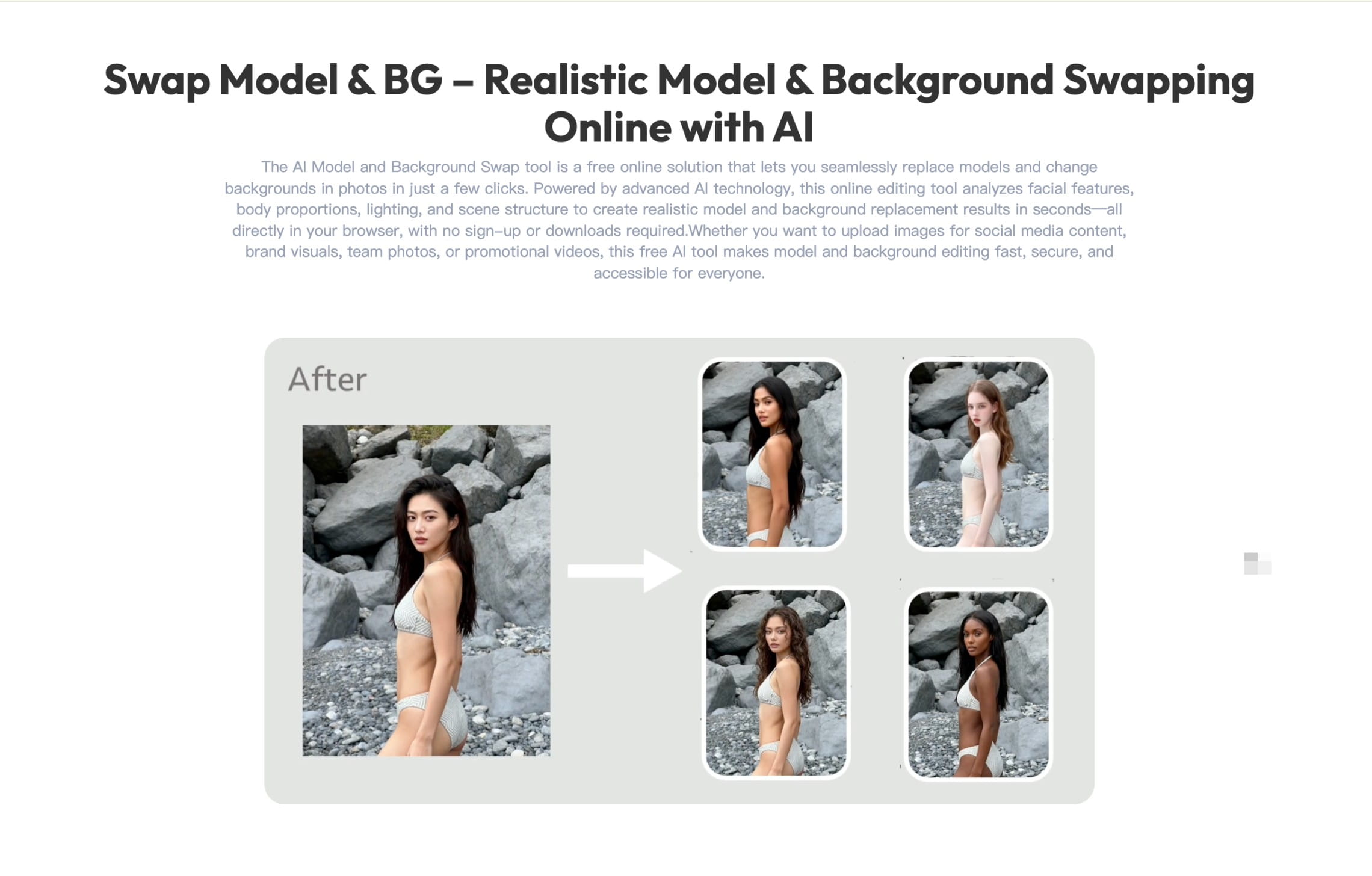
WeShop provides a large model and scene library alongside desktop and mobile applications. Shopify support helps merchants move between store imagery and content creation without relying on a conventional retouching workstation.
The platform is broader than a dedicated face-swap tool. That gives users more creative options, but teams producing product-page imagery should establish clear rules for models, backgrounds, crops, and acceptable garment variation.
Useful for
- Shopify merchants creating regular product and campaign content
- Creator-led labels working primarily from mobile devices
- Teams that want one identity reused across several outfits
Pricing
- Free trial with 200 points
- Paid subscriptions starting from $9.99/month, or $7.99/month billed yearly
- Higher plans add more points, concurrent jobs, generation models, and API access
- Custom enterprise plans for larger teams
6. Snappyit: targeted fashion face swaps for ecommerce sellers
Snappyit’s face swap is designed around a direct instruction: replace the model’s face while keeping the outfit, pose, and background consistent.
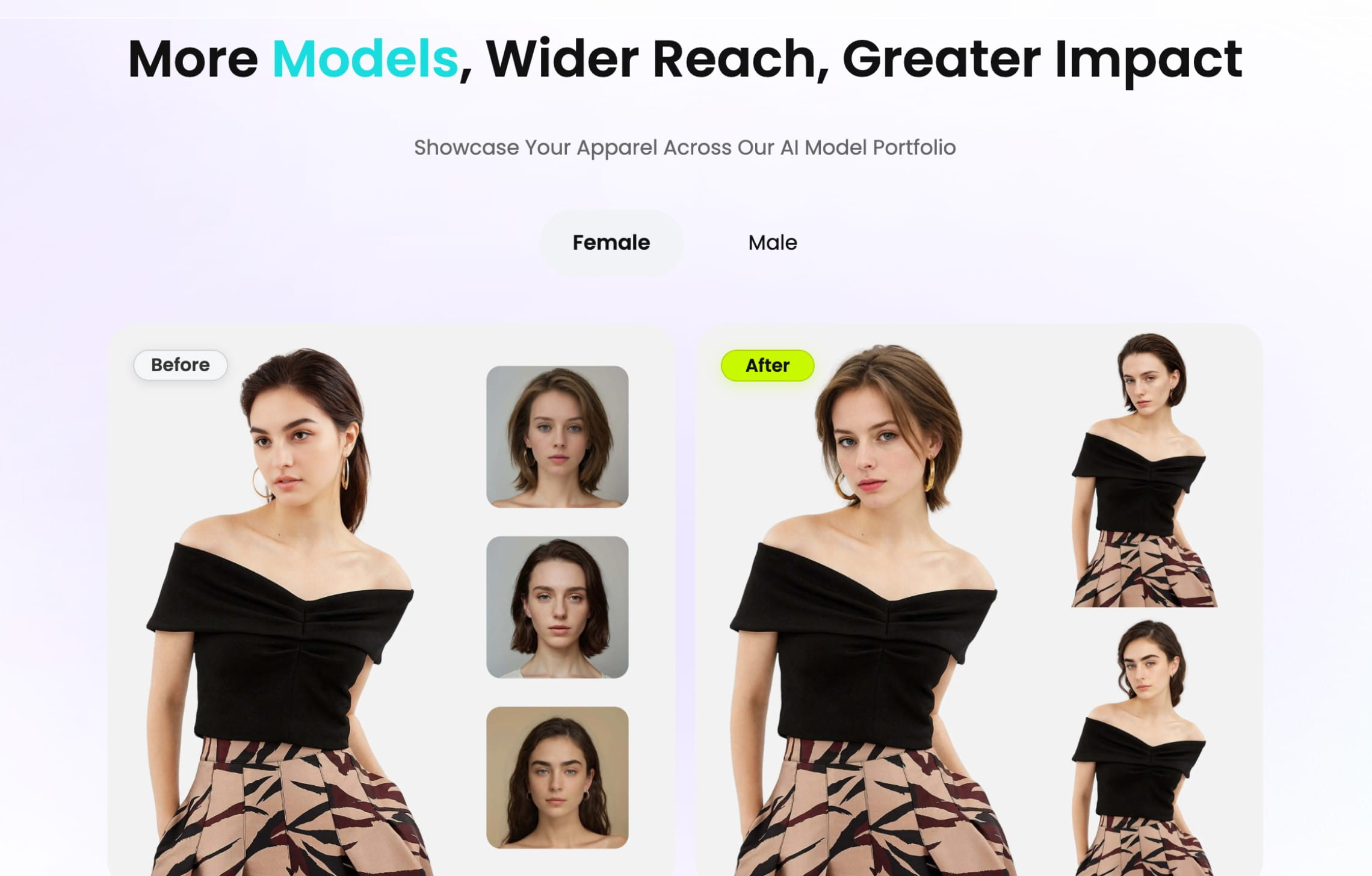
The focused workflow is useful when the source image is already suitable for ecommerce and only the visible identity needs to change. Teams can create localized campaign variations, test different model appearances, or refresh existing product imagery without rebuilding the complete photograph.
Snappyit also includes fashion-model generation, flatlay workflows, ghost-mannequin editing, recoloring, jewelry tools, image-to-video generation, and marketplace-oriented formatting. Shopify integration can import product images and return finished assets to the store.
Batch uploads and mobile applications make the platform accessible to smaller sellers handling regular production themselves.
Useful for
- Ecommerce teams that need targeted face replacement
- Shopify merchants editing existing product images
- Brands preparing localized campaign variations
Pricing
- 6 free credits for new users
- Paid subscriptions starting from $8.20/month billed yearly (120 monthly credits)
7. SellerPic: regional fashion-model generation from product images
SellerPic’s fashion model swap creates fashion-model variations across ages, body types, poses, and regional appearances.
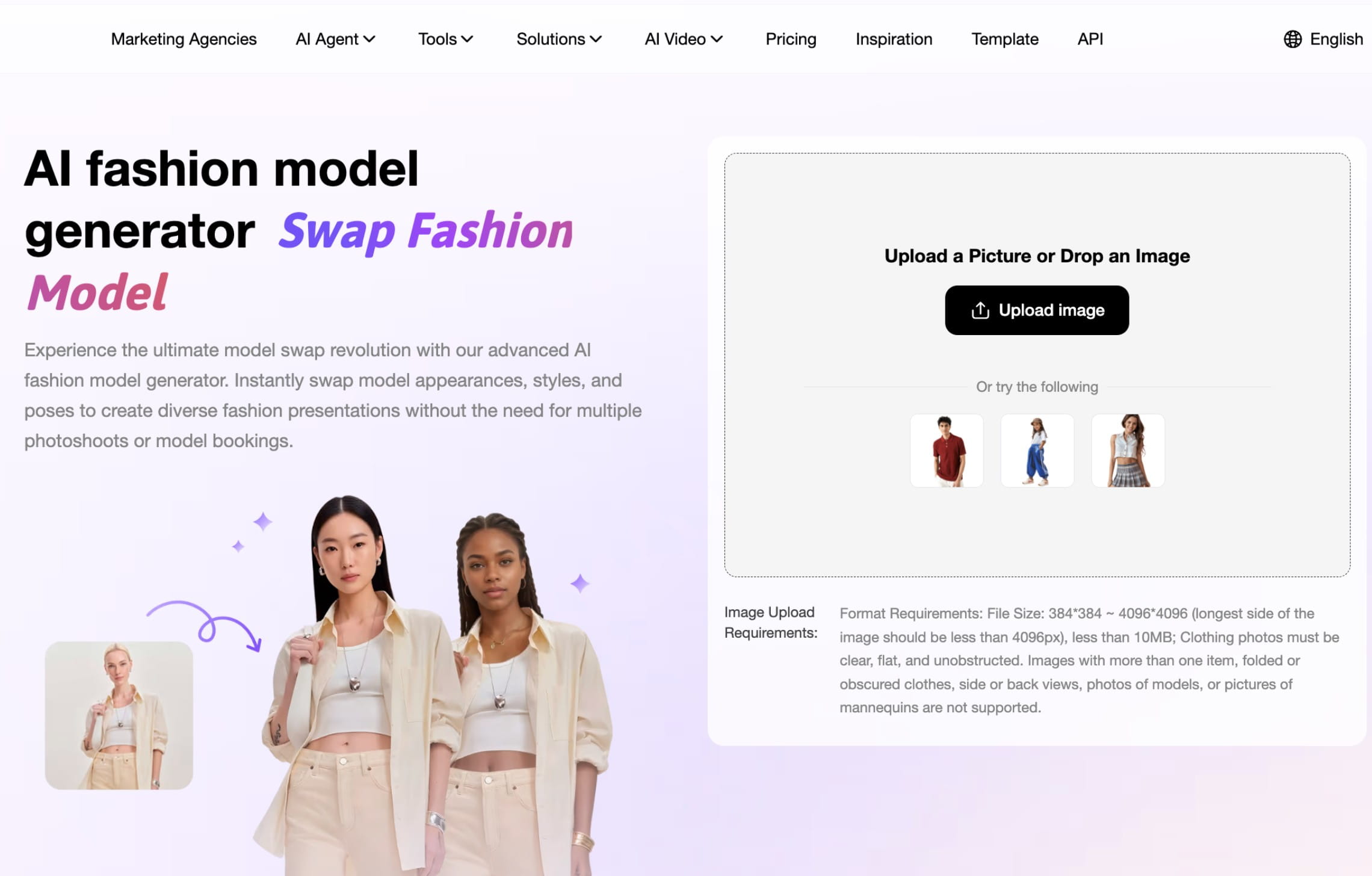
The platform includes a large royalty-free model library and allows users to work with presets or uploaded models. Batch mode supports creating several outputs from the same product, while related tools cover virtual try-on, multi-angle shots, lifestyle images, retouching, recoloring, backgrounds, and video.
SellerPic is particularly relevant to sellers that want model localization inside a wider ecommerce content product. Shopify integration and API access extend that workflow beyond individual manual generations.
Useful for
- Sellers producing localized model imagery for several regions
- Shopify merchants that need a wider ecommerce content suite
- Brands testing different model ages, body types, and appearances
Pricing
- 20 one-time credits for new accounts
- Paid subscriptions starting from $29/month
- API pricing is credit-based and quoted separately
8. Fashion Diffusion: face swap within a design-focused fashion platform
Fashion Diffusion combines face swap with virtual try-on, garment generation, fashion design, fabric application, recoloring, backgrounds, sketches, and image enhancement.
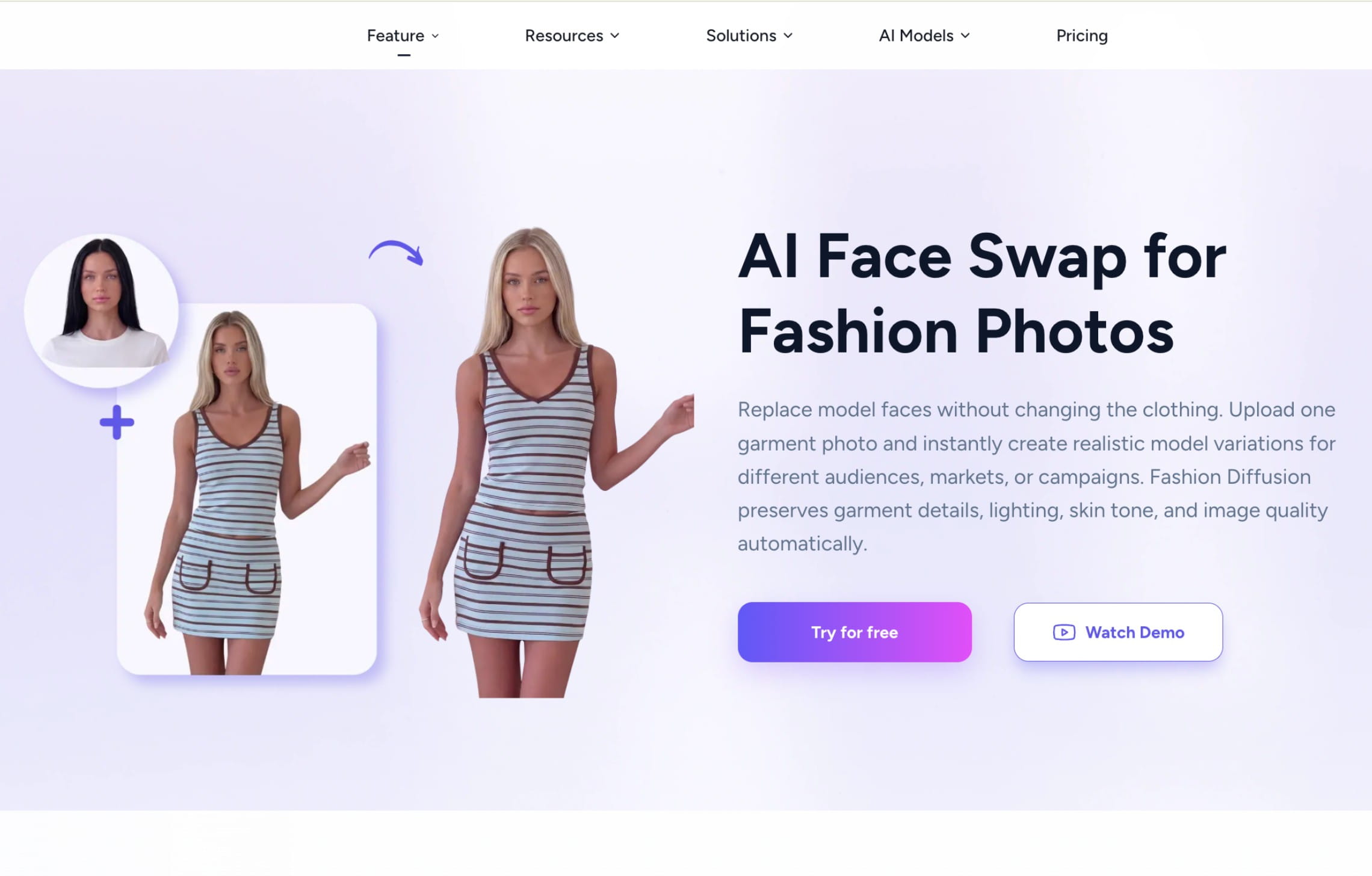
Its face-swap tool can alter the identity in an AI-generated or uploaded fashion image while retaining the surrounding styling. This is useful when model replacement is part of concept development rather than a standalone catalog task.
A design team can move from a sketch or garment concept to an on-model visualization, test demographic variations, adjust the fabric or color, and prepare campaign directions in the same environment. The platform therefore sits closer to fashion ideation and creative development than a specialized catalog-processing system. Teams should confirm how well its identity consistency, resolution, and API options match larger production requirements.
Useful for
- Brands testing model representation during early campaign development
- Teams that also need sketches, fabrics, recoloring, and design tools
- Smaller teams producing concept and ecommerce imagery in one product
Pricing
- Paid subscriptions starting from $12/month (100 credits)
- One-time credit packs start at $10
- Enterprise arrangements for larger requirements
How to choose an AI face or model swap tool for fashion
A useful evaluation begins with what the workflow is allowed to change. Some teams only need a new face on an otherwise approved photograph. Others want to replace the full model, change demographic representation, or create a reusable identity across an entire catalog.
The tool also needs to fit the expected production volume. A convincing result on one campaign image does not prove that the same platform can process hundreds of SKUs while preserving garments, identities, metadata, and delivery requirements.
Decide between face swap and full model replacement
Use targeted face replacement when the body, pose, garment presentation, lighting, and composition are already approved.
Choose full model replacement when the objective includes changing body type, age, proportions, hair, or the complete wearer. This offers more creative control, but it also increases the likelihood that the garment’s fit, drape, or silhouette will be reinterpreted.
Build a representative test set
Test the platform with the variety found in the real catalog, not only simple front-facing images.
Include:
- Front, side, and three-quarter faces
- Close crops and full-body photographs
- Different hairstyles and skin tones
- Glasses, hats, jewelry, and other accessories
- Layered garments and unusual necklines
- Logos, typography, prints, and reflective fabrics
- Different lighting conditions and backgrounds
- Both high-quality campaign photography and ordinary supplier images
Processing several images of the same person will also show whether the replacement identity remains recognizable across poses, expressions, and camera angles.
Define what must remain unchanged
Document the elements that cannot be altered before testing begins. Depending on the image, these may include:
- Garment color and silhouette
- Print and logo placement
- Stitching, fasteners, and trim
- Necklines, collars, sleeves, and hems
- Jewelry and accessories
- Body pose and proportions
- Camera angle and crop
- Background, lighting, and shadows
Face-only replacement usually presents less risk to the product than changing the full model. Both outputs still require review around hairlines, collars, jewelry, hands, and the boundary between skin and fabric.
Test consistency across a collection
A strong individual result does not establish production consistency. Apply the same identity to a full product group and compare:
- Facial features and skin tone
- Hair and expression
- Lighting and sharpness
- Body proportions
- Garment preservation
- Crop and camera distance
- Background treatment
If a brand intends to reuse the identity across seasons or markets, confirm whether the platform can save approved models, references, or character profiles.
Evaluate input preparation and exception handling
At scale, source images will not all be equally suitable. A production workflow should detect images with obscured faces, low resolution, difficult angles, heavy shadows, facial accessories, or incomplete garments before generation begins.
Difficult inputs should move into a correction or manual-review queue rather than stopping the full batch. Ask whether failed generations return credits and whether the platform supports targeted repair, retouch requests, or automated retries.
Plan identity governance and usage rights
Maintain a controlled library of approved identities with documented consent and commercial rights. The workflow should record:
- Where each identity may be used
- Which countries and channels are covered
- How long the usage rights remain valid
- Whether the likeness may be altered with AI
- Whether the identity may appear in video
- What disclosure or labeling is required
This becomes particularly important when the same model is reused across many products, regions, or campaigns.
Review automation, QA, and catalog delivery
Generating the image is only one stage of catalog production. Larger workflows may also need:
- Batch processing
- API access
- Automated garment comparison
- Face and identity validation
- Resolution and format checks
- Human approval queues
- File naming and SKU mapping
- Marketplace-specific dimensions
- Delivery into a PIM, DAM, storefront, or seller portal
Automated checks can identify obvious garment changes or malformed faces, while human reviewers focus on exceptions and brand-sensitive decisions.
Measure approval rate, not generation volume
The number of generated images says little about production efficiency if many require retries or retouching.
Track:
- Percentage approved without correction
- Average generations per approved image
- Product-detail failure rate
- Identity-consistency failure rate
- Manual review time
- Retouch frequency
- Turnaround time by garment category
These figures reveal whether the workflow remains efficient as volume grows.
Calculate the complete cost per approved image
Include more than the advertised credit price:
- Generation credits
- Alternative outputs and retries
- Retouching
- Human review
- Upscaling and image finishing
- Metadata preparation
- Catalog delivery
- Software integration and maintenance
A platform with a low per-generation cost may become more expensive if each accepted image requires several attempts.
Choose the right operating model
Self-serve software works when an internal team can generate, review, correct, and deliver the assets.
An API is appropriate when the workflow is stable, production must be triggered from another system, and the company has technical resources to operate it.
Custom production is more suitable when the business needs finished catalog assets without taking responsibility for every operational step. This can include identity setup, workflow design, generation, quality review, corrections, formatting, and delivery.
Need model variations across a full catalog?
We can combine face swap with flatlay-to-model, image editing, and video generation in a custom workflow built around your brand and visual standards.
FAQ
What is the difference between AI face swap and model swap?
Face swap changes the visible identity while attempting to retain the original head position, body, pose, garment, and background.
Model swap can replace more of the person, including body type, proportions, hair, and pose. It offers more creative control but can introduce greater risk to garment accuracy.
Can I upload my own model or face?
Yes. Claid, FASHN AI, Modelia, WeShop AI, Snappyit, SellerPic, and Botika support custom identities, model references, or uploaded faces on selected plans. Confirm that the company owns the image or has written permission to use and alter the person’s likeness.
Can face swap be automated across a large catalog?
Yes, provided the platform offers an API or a custom production route. Claid, FASHN AI, Modelia, SellerPic, and some enterprise plans support programmatic or customized workflows. Automation should include input validation, identity selection, output review, retries, and delivery back to the correct SKU.
What is the difference between an API and custom AI fashion production?
A face swap API gives a technical team the tools to run a defined workflow programmatically.
Custom production adds creative and operational ownership around the technology. This can include model selection, workflow design, batch processing, quality review, corrections, image finishing, metadata, and asset delivery.
Can model swapping help localize a fashion catalog?
Yes. A brand can show the same product using models selected for different regional audiences without reshooting the complete collection. Localization should follow an intentional representation strategy rather than treating identity as a superficial regional preset.
Will the garment remain exactly the same?
Fashion- and product-specific tools like Claid AI are designed to preserve garment details. However, logos, text, prints, and complex fabric patterns require close review.
A face-only swap usually introduces less garment risk than a full model replacement.
Can AI face swap be used for product videos?
Some platforms, including Claid, Botika, and Modelia, include fashion video tools. Confirm whether the model identity remains stable across frames and whether the garment changes during movement.
Can brands use the same AI model across a collection?
Yes. Several platforms provide reusable characters, custom model references, or saved identities. Test consistency across different angles, poses, expressions, garments, and lighting before approving an identity for a full collection.
Need AI fashion photography at scale?
Produce high volumes of on-model and product visuals without slowing down launches. Use our API to automate fashion image workflows or work with our team on a custom pipeline tailored to your operations.


Claid.ai
September 29, 2026