Tech
Best AI image API for ecommerce in 2026


For high-volume ecommerce teams, choosing an AI image API comes down to output quality, product accuracy, throughput, pricing predictability, and workflow fit. Below, we compare seven strong options by API features, technical limits, pricing, and customization depth.
Best APIs for AI image generation: brief comparison
Here’s the quick summary before we get into the full reviews.
| Tool | Type | Best for | Strengths | Limitations |
|---|---|---|---|---|
| Claid AI | Managed API | Ecommerce image workflows, product photos, enhancement, batch processing | Strong ecommerce focus, API workflows, product fidelity, named customer scale, custom enterprise limits | Not the cheapest option for one narrow task |
| Photoroom | Managed API | Background removal plus quick editing | Broad editing endpoint, strong tooling, polished product ecosystem | Less focused on custom enterprise visual pipelines |
| remove.bg | Managed API | Fast background removal | Simple, mature, easy to integrate | Narrower feature set beyond cutouts |
| Bria | Managed API | Commercially safe generative product visuals | Licensed-data positioning, product shot APIs, transparent per-image examples | May require more workflow assembly around ecommerce ops |
| Adobe Firefly Services | Managed API | Enterprise creative production in Adobe ecosystem | Brand-safe enterprise creative workflows, Adobe integration | Heavier platform, less lightweight for simple API jobs |
| AWS Bedrock | Model platform for custom workflows | Cloud-native image generation infrastructure | Strong for AWS teams, model access, governance | Generic model platform, not ecommerce-specialized |
| Gemini Enterprise Agent Platform | Model platform for custom workflows | Google Cloud image generation and model infrastructure | Strong generative models, batch options, cloud governance | Requires more engineering to build ecommerce-specific workflows |
| fal.ai | Model platform for custom workflows | Fast image and video model infrastructure | Fast inference, broad model access, developer-friendly APIs | Generic model platform, not ecommerce-specialized |
| Replicate | Model platform for custom workflows | Flexible hosted AI model infrastructure | Large model library, easy prototyping, flexible deployment options | Requires more engineering to build ecommerce-specific workflows |
1. Claid: best overall AI image API for ecommerce workflows
Claid offers AI image APIs built specifically for ecommerce visual workflows. It’s best suited for teams that need to improve, standardize, generate, and adapt product images at scale, not just run one isolated edit.
For ecommerce platforms, marketplaces, fashion brands, and delivery apps, Claid is strongest when product accuracy matters: preserving labels, packaging, textures, garment details, image quality, and consistent formatting across large catalogs.
Claid API integration and custom workflow orchestration have translated into results like 3x faster on-model photo production (for a fashion marketplace Kasta), 42% time saved on photo editing (for a Latin American super app Rappi), and 78% fewer quality complaints about printed images (for a global printing platform Mixam).
Features available via API
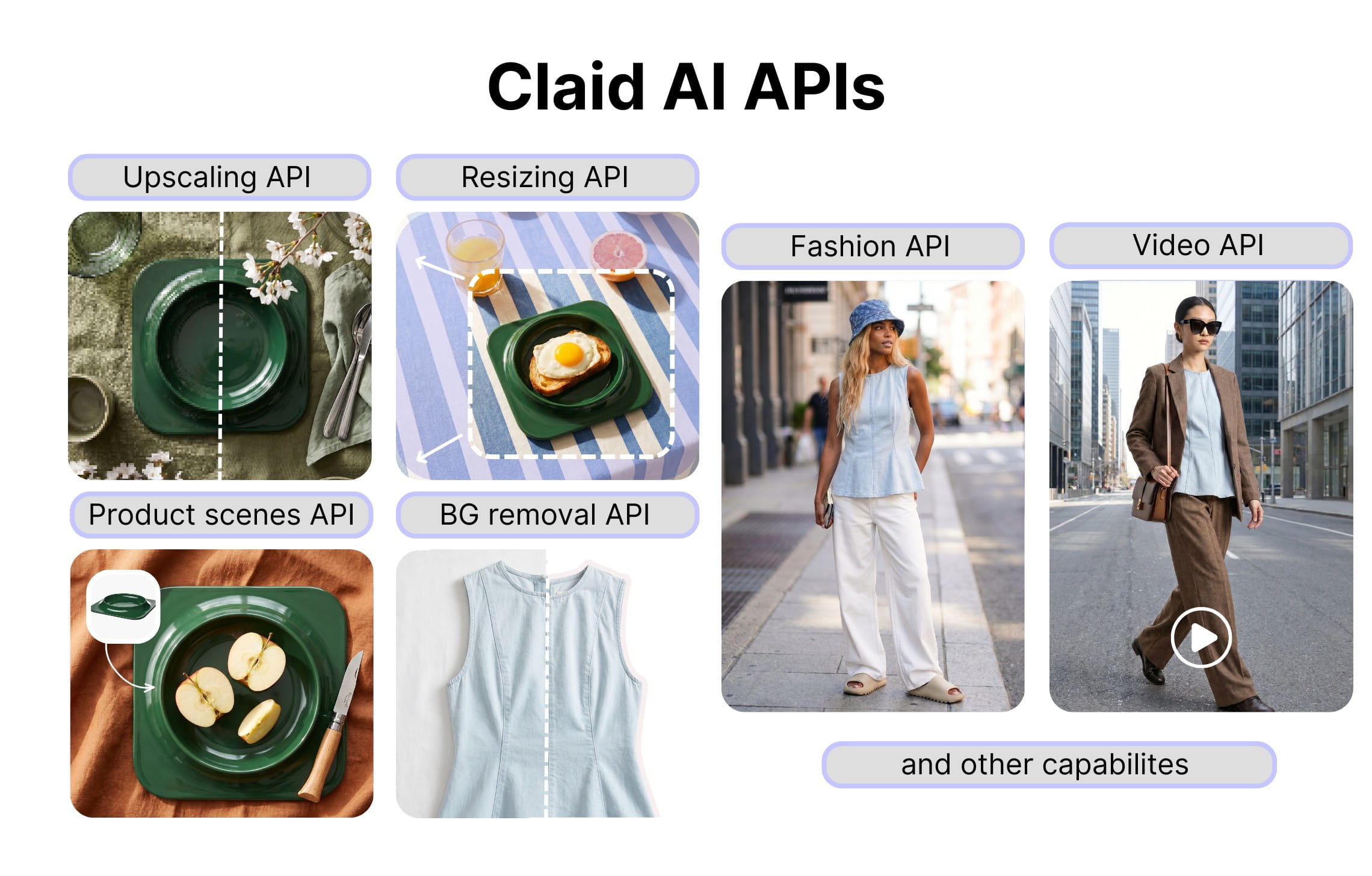
Claid’s API can support a full ecommerce image workflow, from basic cleanup to AI-generated product visuals.
- Background removal: Remove messy, inconsistent, or distracting backgrounds from product photos and prepare clean assets for PDPs, marketplaces, seller uploads, or downstream editing.
- Image upscaling: Increase image resolution so product photos stay sharp across ecommerce use cases, including zoomable PDP images, marketplace listings, print-adjacent formats, and high-resolution campaign assets.
- Product photo generation: Generate new product visuals from existing assets, including clean studio shots, lifestyle scenes, seasonal campaign images, reference-inspired images, and product shots adapted for different channels.
- Fashion photo production: Create on-model fashion photos from garment images, generate different model and pose variations, complete outfits, produce PDP-ready studio shots, and adapt fashion visuals for campaigns or marketplace requirements.
- AI editing: Modify product photos with prompt-based edits, such as changing backgrounds, adjusting product presentation, adding or removing elements, testing colorways, placing logos, or adapting an image to a new creative direction.
- Image expansion and resizing: Extend image borders, create more negative space, adapt crops to different aspect ratios, and prepare the same product image for PDPs, ads, social media, marketplaces, and banners.
- Video generation: Animate product and fashion photos to create realistic short clips.
Throughput and technical fit
- Default API limits: 4 requests per second and 120 requests per minute.
- Higher-volume usage: Enterprise customers can discuss custom limits through custom contracts, which is important for teams processing large catalogs, seller uploads, seasonal drops, or recurring marketplace batches.
- Batch processing: Claid can support batch-oriented workflows for teams that need to process many assets at once instead of sending occasional single-image requests.
- Latency expectations: Processing time depends on the operation. Simpler edits such as background removal, enhancement, or resizing are easier to fit into faster production flows. Generative jobs such as product scenes, fashion model images, and 2K/4K outputs should be treated as heavier production tasks.
- Output quality: Claid supports 2K and 4K generation in selected workflows, with improved texture preservation, more realistic materials, and cleaner outputs.
Pricing
Claid is best evaluated by workflow, volume, and output requirements rather than only by one public per-call number. For enterprise API customers, pricing can be shaped around higher-volume usage, custom limits, batch processing, and dedicated support.
Custom workflows
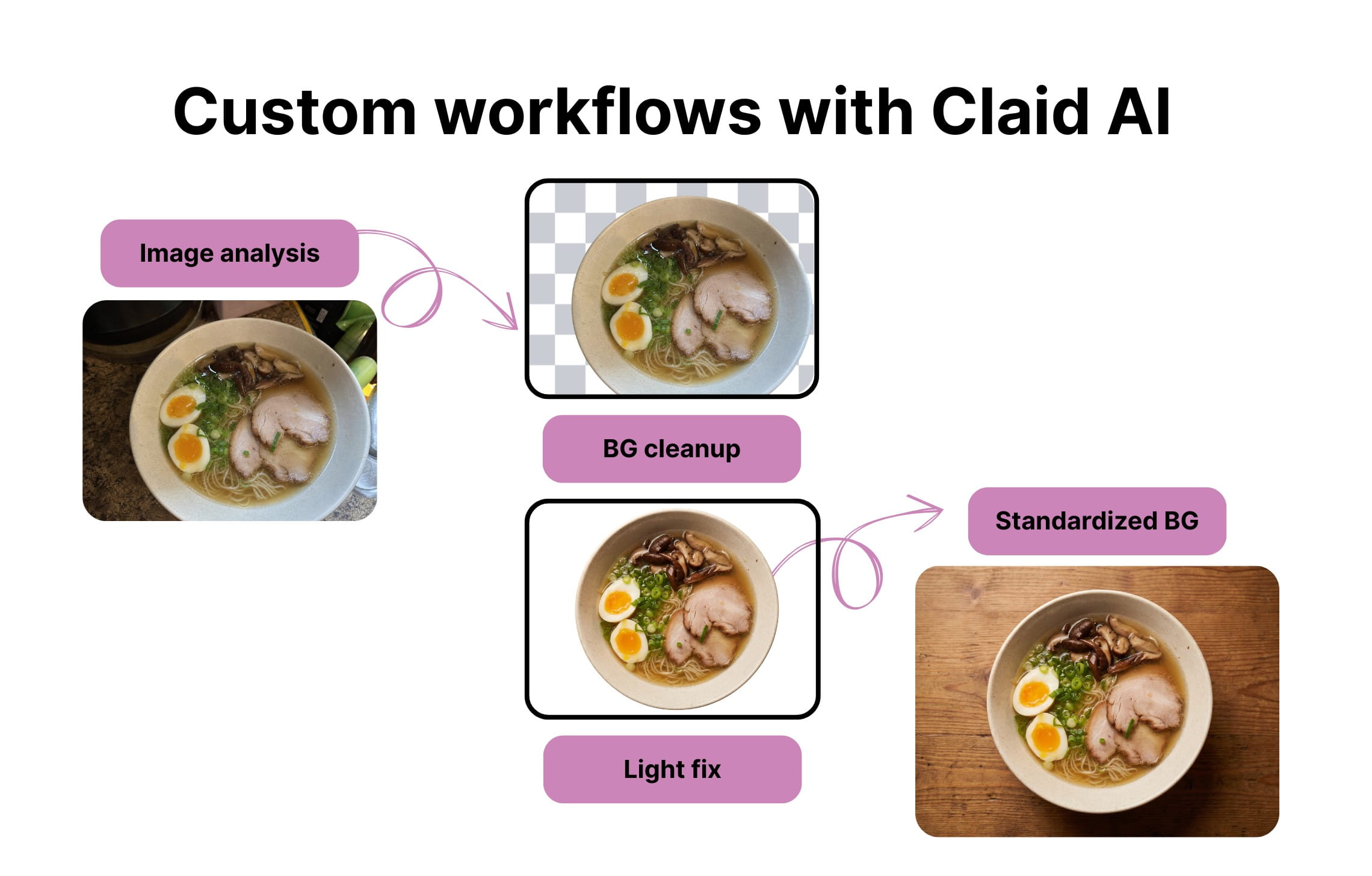
This is where Claid stands out most. Claid can support custom enterprise workflows beyond standard API usage. Examples of custom workflow logic can include category detection, background removal, image enhancement, product detail preservation, export rules, SKU-based formatting, batch processing, and multi-step pipelines built around a client’s catalog requirements.
Best fit: enterprise and ecommerce teams that need scalable image production workflows.
2. Photoroom API: best editing API for broad ecommerce use
Photoroom API is a broad AI image editing API for ecommerce and marketplace workflows. It’s best suited for teams that need to automate common product image edits, especially background removal, shadows, relighting, image expansion, and standardized product visuals.
For ecommerce apps, seller tools, resale platforms, and marketplaces, Photoroom is strongest when teams need a polished editing API with many ready-made transformations available out of the box.
Features available via API
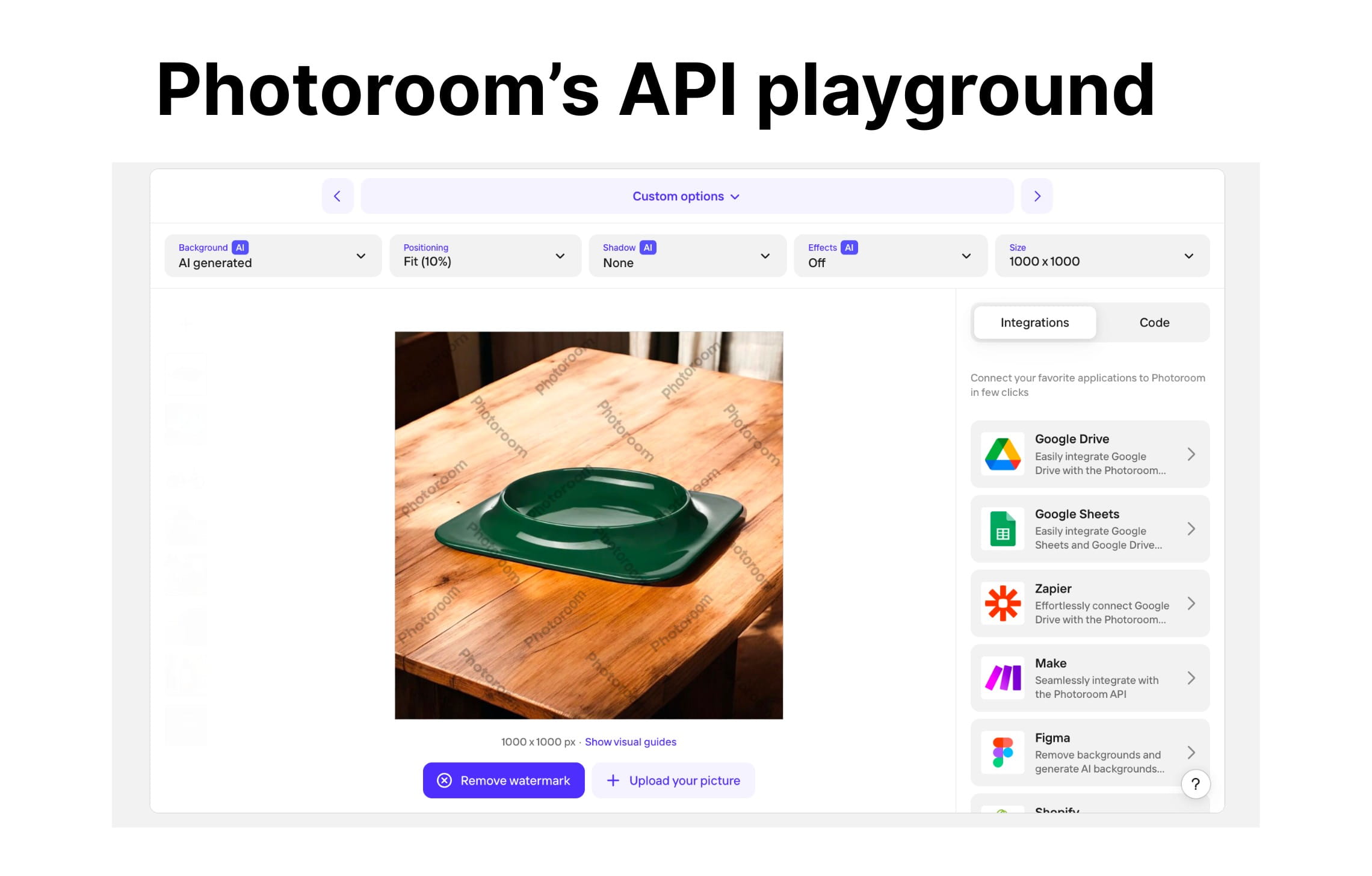
Photoroom’s API supports a wide range of ecommerce image editing tasks.
- Background removal: Remove product backgrounds and create clean cutouts for listings, marketplaces, seller uploads, or product pages.
- AI backgrounds: Generate new backgrounds around products to create cleaner studio images, lifestyle visuals, or campaign-ready product shots.
- Shadows: Add realistic shadows to product cutouts so images look less flat and more natural on white, colored, or generated backgrounds.
- Relighting: Adjust lighting to make product images more consistent and polished across a catalog.
- Text removal: Remove unwanted text from images, useful for cleaning seller photos, repurposing assets, or preparing marketplace-ready visuals.
- Background blur: Blur distracting backgrounds while keeping the product or subject visible.
- Flat lay and ghost mannequin: Create apparel-focused product visuals, including cleaner clothing presentation for fashion ecommerce.
- Virtual model: Generate model-based apparel visuals through Photoroom’s virtual model functionality.
Throughput and technical fit
- Default API limits: 60 images per minute
- Higher-volume usage: Higher limits are available through Enterprise plans, which is important for marketplaces, resale platforms, and tools processing large seller catalogs.
- Batch processing: Photoroom can fit batch-oriented workflows where teams need to process many product images with the same editing logic.
- Latency expectations: Many Photoroom operations are designed for direct image processing workflows. Simpler edits such as background removal or shadow generation are easier to fit into faster production flows, while generative backgrounds or virtual model outputs should be treated as heavier jobs.
- Output quality: Photoroom supports image generation up to 4K.
Pricing
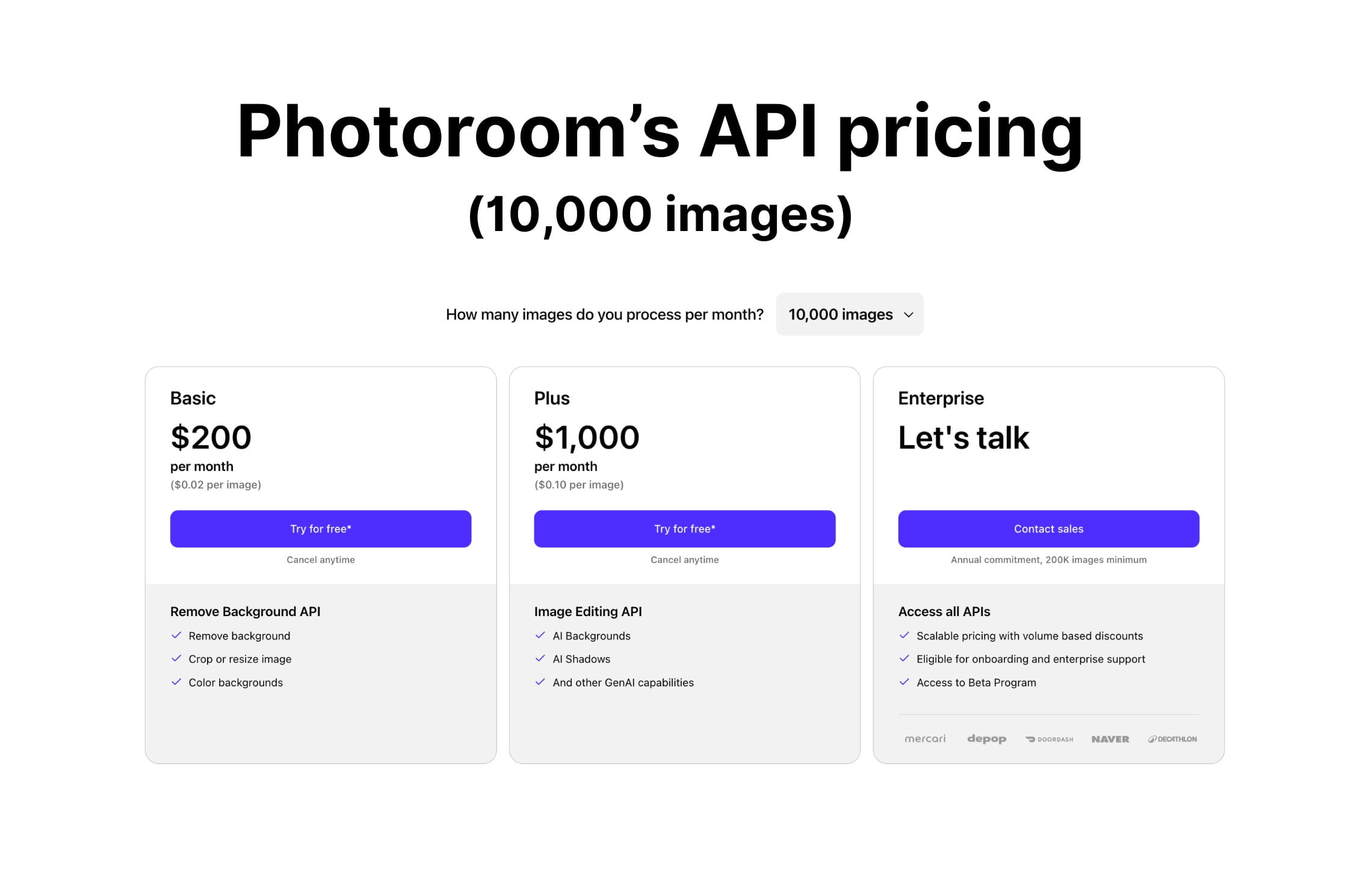
Photoroom API pricing is usually based on processed images. Successful API calls consume image credits or usage, while failed calls typically do not. This makes cost planning fairly straightforward for teams that know their monthly image volume.
Enterprise pricing may depend on volume, usage patterns, and required limits.
Custom workflows
Photoroom offers many built-in operations, but deeper customization usually depends on what your team builds around the API.
It works well when the workflow maps clearly to available features: remove background, add shadow, generate a background, expand, upscale, or standardize a product image.
For more complex ecommerce workflows, such as category-based rules, SKU-specific output formats, detailed garment preservation, multi-step QA, or PIM/DAM routing, teams may need to build orchestration themselves.
Best fit: ecommerce apps, seller platforms, marketplaces, and resale tools that need a polished image editing API with predictable per-image usage.
3. remove.bg: best dedicated background removal API
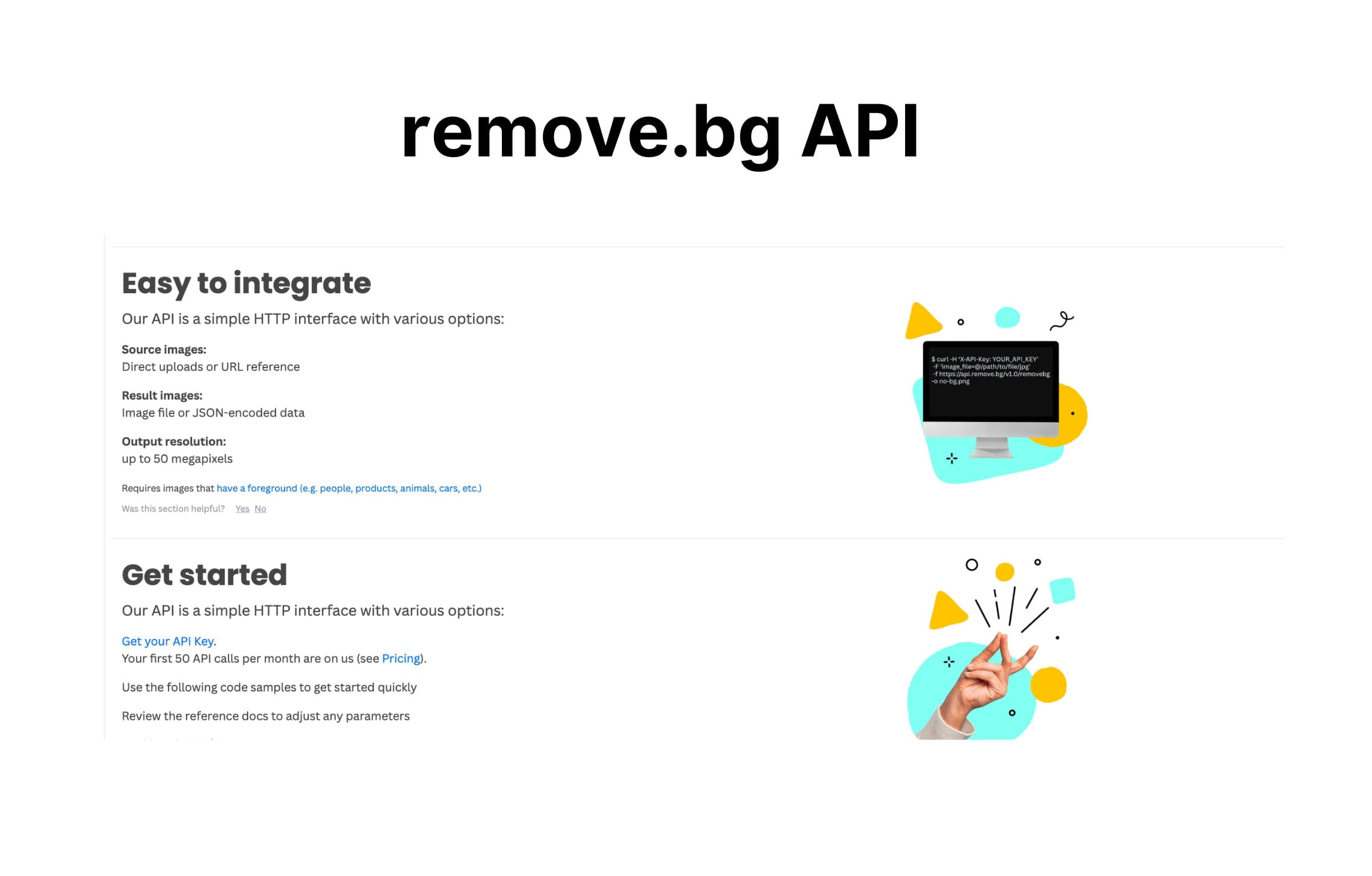
remove.bg is a dedicated background removal API. It’s best suited for teams that need one clear function: removing backgrounds from product images quickly and reliably.
For ecommerce teams, marketplaces, seller platforms, and internal catalog teams, remove.bg is strongest when the workflow is simple: upload an image, remove the background, and use the clean cutout in listings, templates, or downstream editing.
Features available via API
remove.bg focuses primarily on background removal. Its API lets companies:
- Remove image backgrounds automatically and isolate the main subject.
- Create clean transparent-background product assets for marketplaces, PDPs, ads, and design templates.
- Prepare product images for standardized catalog layouts, white-background listings, or compositing workflows.
- Process larger image sets where the same background removal task needs to be repeated across many files.
Throughput and technical fit
- Default API limits: 10-500 images per minute depending on the size (1MP to 50MP)
- Higher-volume usage: Enterprise plans are available for larger annual image volumes, with flexible API, credit, and rate-limit options.
- Batch processing: remove.bg is a practical fit for batch catalog cleanup because the task is narrow and repeatable.
- Latency expectations: Since remove.bg does not need to generate a new scene, latency planning is usually simpler.
Pricing
remove.bg pricing is credit-based and tied to processed images. This is easy to model if your only requirement is background removal. The main pricing consideration is whether you also need to account for other tools for your AI image generation and editing needs.
remove.bg also offers custom pricing for enterprise customers who process over 100,000 images per year.
Custom workflows
remove.bg can be integrated into custom workflows, but the customization happens mostly outside the tool.
Best fit: teams that need reliable background removal at scale and do not need a broader AI image generation or ecommerce workflow platform.
4. Bria: best for licensed-data generative product visuals
Bria is a generative AI image platform with a strong focus on commercial safety and licensed-data generation. It’s best suited for brands and platforms that want to generate product visuals while keeping legal, licensing, and brand-risk questions central to the evaluation.
For ecommerce teams, Bria is strongest as a generative layer for product shots, lifestyle visuals, and product-scene creation. It is less of a ready-made ecommerce workflow platform and more of an API foundation that technical teams can build around.
Features available via API
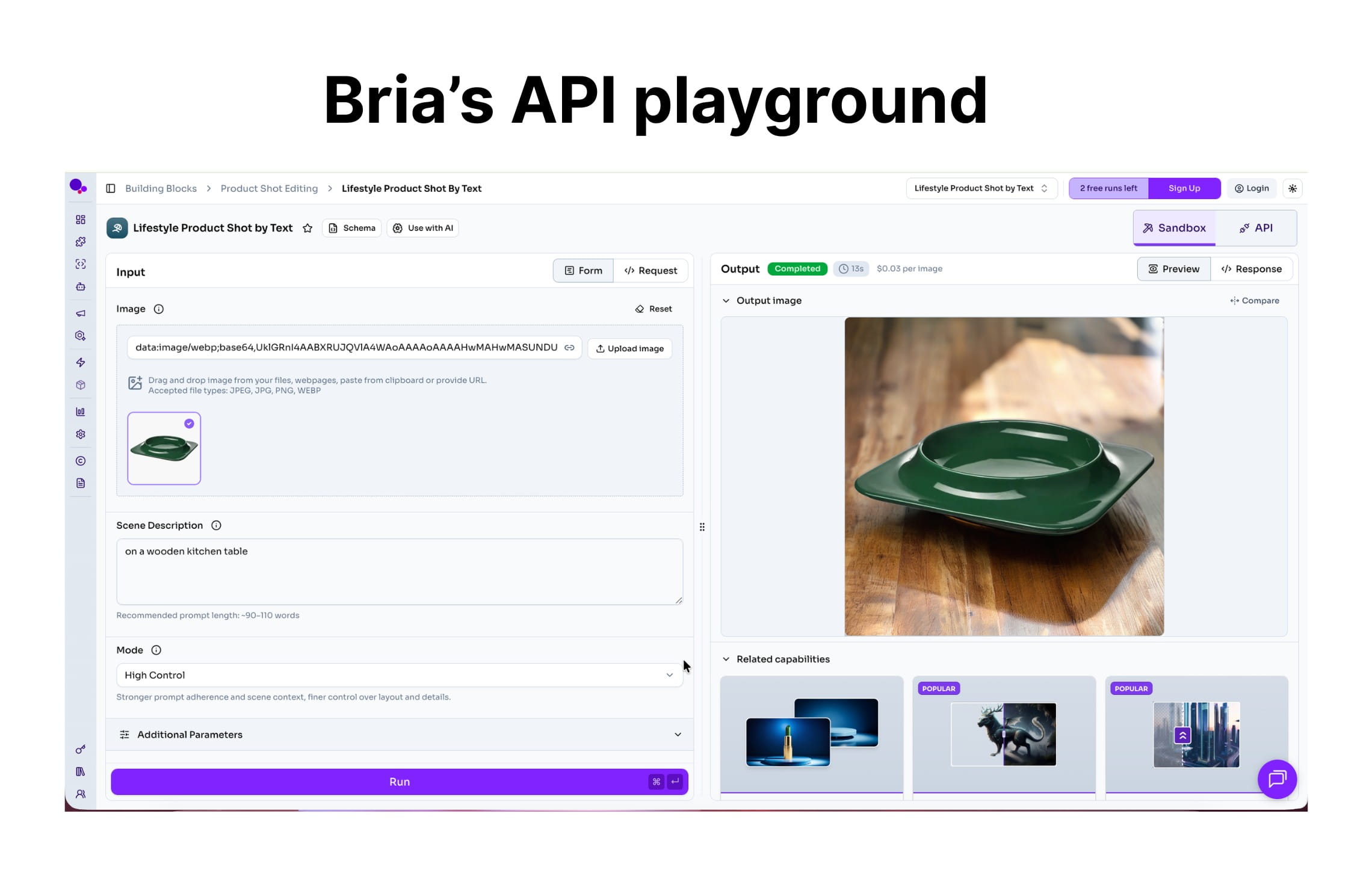
Bria supports product-focused and generative image workflows:
- Product cutouts: Isolate products from original images so they can be used in new scenes or standardized layouts.
- Product shadows: Add shadows to make product images look more natural and less flat.
- Product embedding: Place products into generated or existing environments while keeping the product visible in the scene.
- Product shot generation: Create ecommerce-ready product visuals with generated backgrounds, scenes, and styling.
- Background generation: Generate new surroundings for products, useful for lifestyle images, seasonal campaigns, and creative testing.
- Generative image editing: Modify or adapt visuals with AI-based edits.
- Creative variation: Generate multiple visual directions from one product input to support ads, campaigns, or A/B testing.
Throughput and technical fit
- Default API limits: 60 requests per minute in the Starter plan, 1,000 requests per minute for Pro and Enterprise customers
- Higher-volume usage: Enterprise usage can be arranged for teams that need larger-scale generation, commercial safety, and support.
- Batch processing: Bria can fit batch workflows, but teams should plan for review and selection because generative outputs are less deterministic than simple background removal.
- Latency expectations: Product-shot generation should be treated as a generative task, not a lightweight edit. Teams should plan for asynchronous processing, retries, output review, and possible regeneration.
- Output quality: Bria supports image generation up to 4K and upscaling up to 8K.
Pricing
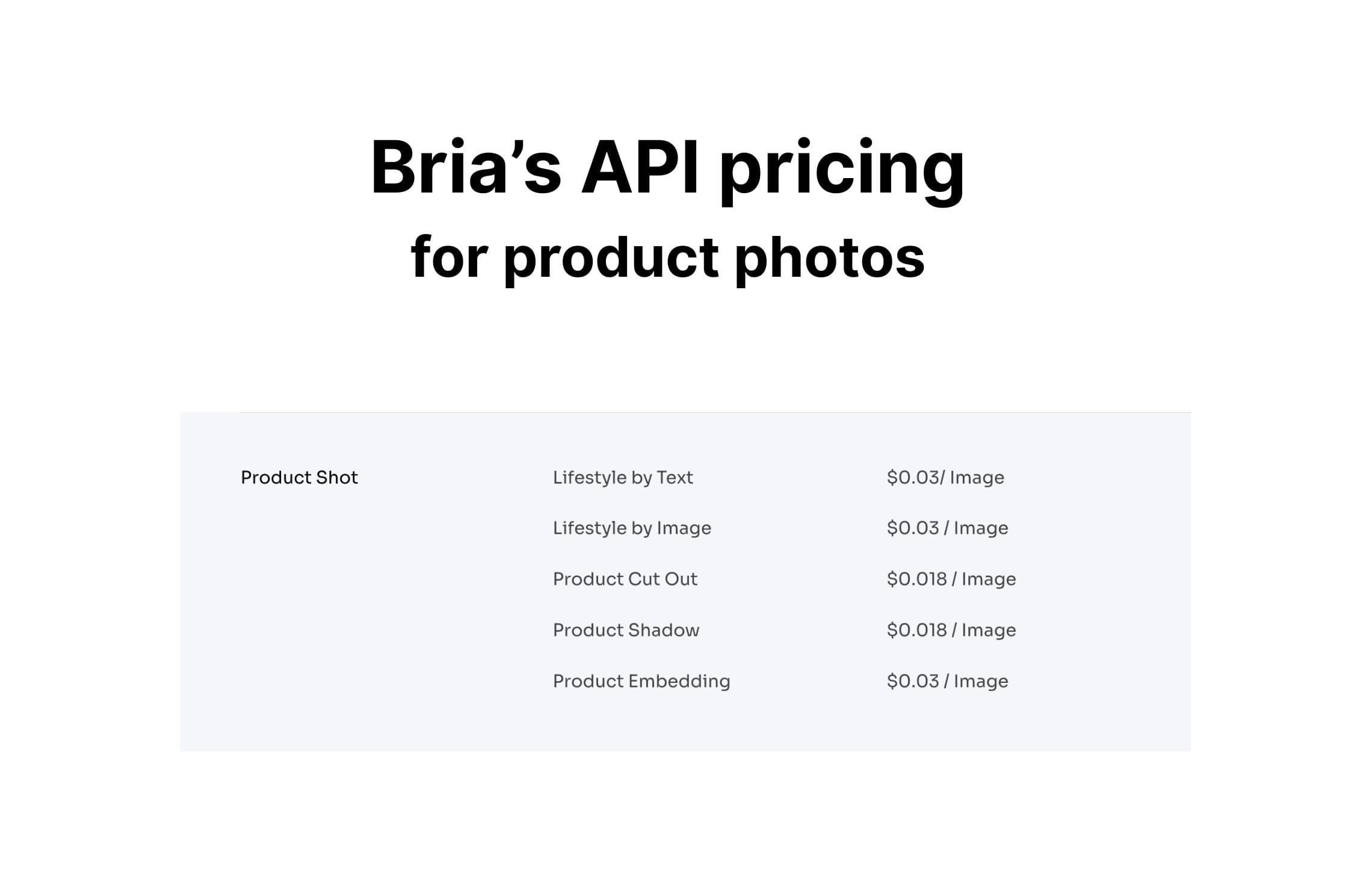
Bria pricing is typically usage-based, with different costs depending on operation, volume, and contract.
Some product-generation implementations are priced in cents per generation, but ecommerce teams should evaluate cost by usable output, not only by raw generation. If it takes several generations to get one approved product image, the effective cost per final asset will be higher than the cost per API call.
Custom workflows
Bria can be integrated into custom visual workflows, especially by teams with strong engineering resources. However, ecommerce-specific workflow logic usually needs to be built around the API. That may include SKU mapping, batch scheduling, product fidelity checks, output QA, export formatting, and connection to internal catalog systems.
Best fit: brands and platforms that prioritize commercially safer generative AI and have the technical resources to build workflow logic around the API.
5. Adobe Firefly Services: best for enterprise creative teams in the Adobe ecosystem
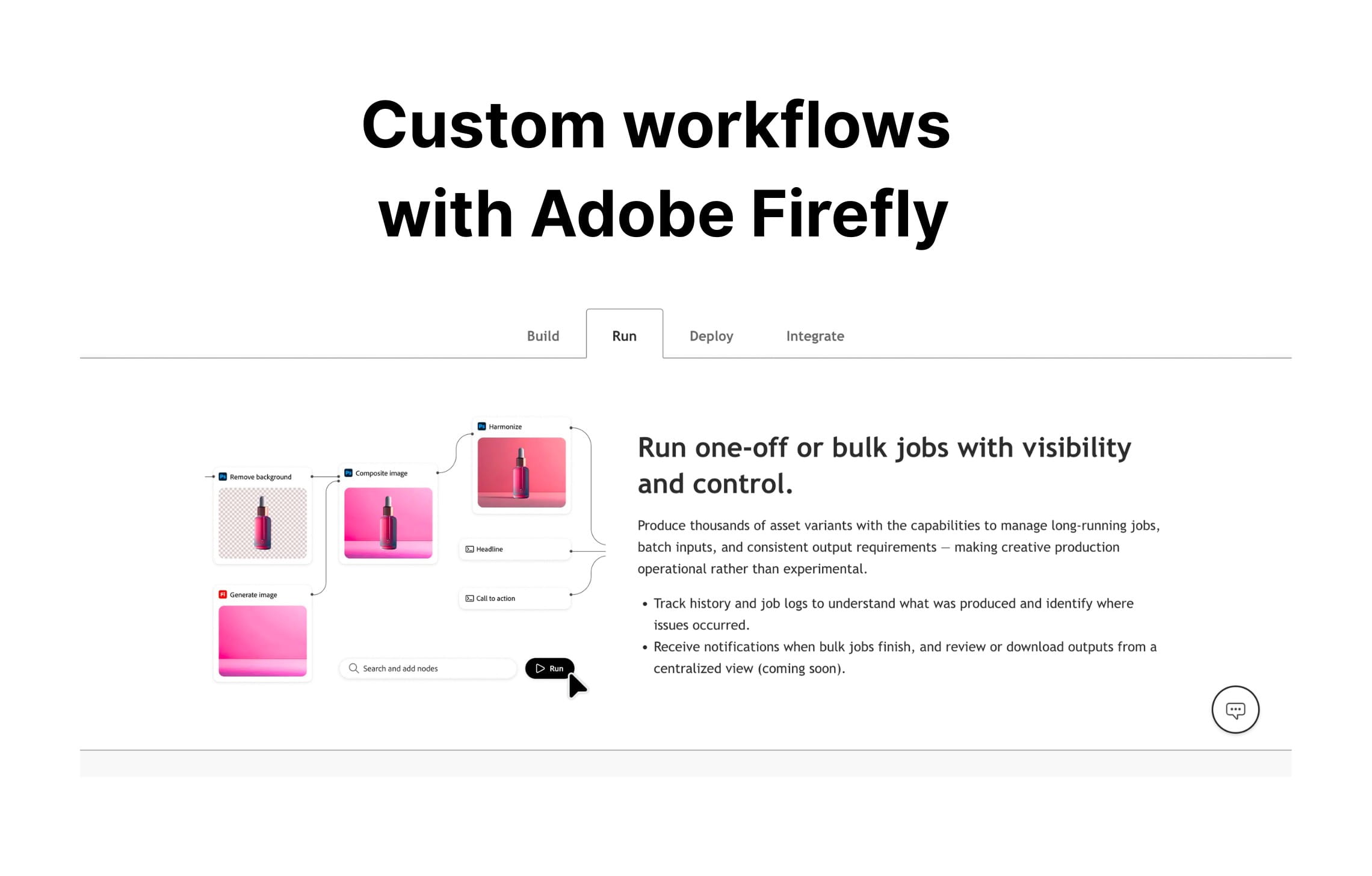
Adobe Firefly Services is an enterprise creative automation platform for teams already working inside Adobe’s ecosystem. It’s best suited for larger companies that need generative AI, brand-controlled creative production, and automation across Adobe-connected workflows.
For ecommerce teams, Adobe is strongest when image automation is part of a broader creative production stack, especially if the company already uses Adobe Experience Manager, Photoshop, Creative Cloud, Adobe Express, or other Adobe tools.
Features available via API
Adobe Firefly Services and related Adobe APIs can support creative and image automation workflows.
- Generative image creation: Create new visual assets with AI for campaigns, ecommerce creatives, and brand content.
- Background removal: Remove backgrounds from images and isolate subjects for further editing or layout work.
- Background replacement: Replace or generate new image backgrounds for product visuals, campaign assets, or localized creative variations.
- Image resizing: Adapt assets to different dimensions and channel requirements.
- Creative production at scale: Generate and adapt many visual assets across campaigns, formats, regions, or product lines.
Throughput and technical fit
- Default API limits: Adobe limits depend on the specific API surface. Firefly API, Photoshop API, Adobe Express API, and other services can have different quotas.
- Higher-volume usage: Enterprise customers can evaluate Adobe Firefly Services as part of a broader Adobe agreement and production setup.
- Batch processing: Adobe is well suited for enterprise creative production where assets need to be adapted across many formats, campaigns, or markets.
- Latency expectations: Processing time depends on the API and operation. Simple edits may fit faster workflows, while generative image production and bulk creative adaptation should be planned as heavier production jobs.
- Output quality: Adobe Firefly natively supports 4K generation and upscaling.
Pricing
Adobe Firefly Services is usually evaluated as an enterprise creative solution rather than a simple per-call ecommerce API.
Pricing may depend on Adobe products used, generation volume, contract terms, and the broader Adobe stack. For teams already using Adobe enterprise products, procurement may be easier than onboarding a smaller vendor.
For smaller ecommerce teams, Adobe may feel too heavy if the goal is simply to remove backgrounds or generate product photos through a lightweight API.
Custom workflows
Adobe supports strong customization inside its own ecosystem.
Customization works best when creative production, brand governance, asset management, and Adobe-native workflows are already part of the company’s operations. Teams can build powerful workflows around Adobe, but it is less suited to lightweight ecommerce teams that want a simple standalone image API.
Best fit: enterprise creative teams and Adobe-heavy organizations that need brand-safe image generation and creative automation at scale.
Build on your own: AWS Bedrock, Gemini Enterprise Agent Platform, fal.ai, and Replicate
These four aren’t image APIs in the same sense as the tools above. They’re platforms for building your own pipeline. You pick the models, wire them together, and run the result on their infrastructure. There’s no product-photo endpoint to call, you’re assembling one.
If you’re weighing one of these against Claid or Photoroom, what you’re really deciding is build vs buy.
What you get by building:
- fal.ai and Replicate host open-source models (Flux, Nano Banana, background-removal models, etc.) on a pay-as-you-go basis. They’re the fastest, cheapest way to run a specific model, and developers like them for experimentation and full control over which model does what.
- AWS Bedrock and Gemini Enterprise Agent Platform (formerly Vertex AI) give you model access inside the cloud you already run on, with the governance, security review, and billing your team is used to. If you’re standardized on AWS or GCP, building here keeps everything in one place.
Building your own pipelines can win when you have a strong ML and infrastructure team, a narrow and stable set of operations, and enough volume that a few cents per image adds up to real money. At that point the low per-image cost of raw models is the headline number, and you have the people to capture it.
For most ecommerce teams, a ready-made API wins, for reasons that never show up in the per-image price:
- You’re live in days, not a multi-month build.
- The ecommerce logic is already there: product preservation, marketplace formatting, SKU rules, batch QA, background cleanup.
- Pricing is a single per-image number your whole team can plan around, not a stack of per-model, per-region, per-resolution line items.
- You don’t need to staff an ML or infrastructure team, or carry the on-call.
Best fit: teams with strong ML and infrastructure capacity, repeatable image operations, and enough volume.
How to choose the right AI image API
The right API depends on how much of the workflow you want the vendor to handle. Some tools are built for one specific task, like background removal. Others give you broad editing features, generative capabilities, or cloud infrastructure for building a custom system. Here’s the simplest way to choose.
- Choose Claid if you need ecommerce-specific image automation, product preservation, enhancement, product photography, fashion workflows, batch processing, and enterprise flexibility.
- Choose Photoroom if you want a polished image editing API with strong ecommerce operations and a broad set of built-in transformations.
- Choose remove.bg if you only need background removal and want the simplest dedicated API for that task.
- Choose Bria if commercial safety and licensed generative AI are central to your buying process.
- Choose Adobe Firefly Services if your team already runs creative production through Adobe and needs enterprise-grade creative automation.
If your engineering team wants to build custom image pipelines from the ground up, choose AWS Bedrock, Gemini Enterprise Agent Platform, Fal, Replicate, or similar model platforms.
These are good alternatives to specialized ecommerce image APIs when you want direct access to image models, control over orchestration, and flexibility to combine generation, editing, storage, review, and catalog logic in your own infrastructure. The tradeoff is that your team also owns the ecommerce layer: product preservation, batch handling, retries, QA, pricing optimization, and workflow maintenance.
FAQ
What is the best AI image API for ecommerce in 2026?
The best AI image API depends on the workflow. Claid is the strongest fit for ecommerce-specific image automation, especially when teams need product preservation, enhancement, product photo generation, fashion workflows, batch processing, and enterprise flexibility. For narrower needs, Photoroom, remove.bg, Bria, Adobe Firefly Services, AWS Bedrock, or Gemini Enterprise Agent Platform may be better fits.
Which AI image API is best for product photo generation?
Claid is a strong choice for product photo generation because it supports ecommerce-specific workflows such as clean studio shots, lifestyle scenes, AI product photography, image enhancement, expansion, and fashion imagery. Bria is also worth considering if licensed generative AI and commercial safety are central requirements.
Which AI image API is best for background removal?
remove.bg is the simplest dedicated option if you only need background removal. Photoroom and Claid also support background removal, but they make more sense when background removal is part of a larger workflow, such as product image editing, enhancement, resizing, or ecommerce catalog automation.
Which AI image API is best for fashion ecommerce?
Claid is the strongest fit for fashion ecommerce teams that need on-model imagery, garment preservation, multiple model and pose options, PDP-ready visuals, and scalable fashion image workflows. Photoroom also offers fashion-related operations such as flat lay, ghost mannequin, and virtual model functionality.
Which AI image API is best for marketplaces?
Marketplaces should look for APIs that support batch processing, consistent outputs, product detail preservation, flexible rate limits, and workflow customization. Claid is a strong fit for marketplace image automation because it can support multi-step workflows around messy seller uploads, background removal, enhancement, resizing, and catalog formatting.
Do AI image APIs support batch processing?
Many AI image APIs support batch-style workflows, but the details vary. Dedicated image processing tools are usually easier to batch for simple edits such as background removal. Generative image APIs may require asynchronous processing, retries, review steps, and more careful cost planning. Enterprise contracts often matter when batch volume is high.
How much do AI image APIs cost?
Pricing varies by vendor and operation. Some tools use per-image or credit-based pricing, which is easier to model for predictable workflows like background removal. Generative tools may charge per generation, but the real cost should be measured by approved final asset, since teams may need multiple generations, retries, or QA steps.
Should I build my own image pipeline or use an API?
It depends on your team and your volume. Building your own workflows on cloud AI platforms (fal.ai, Replicate, AWS Bedrock, or Gemini Enterprise Agent Platform) can pay off if you have an ML and infrastructure team, a narrow set of operations, and volume high enough that a few cents per image matters. For most ecommerce teams, a managed API like Claid is faster to launch and cheaper to own once you count engineering time, ongoing maintenance, and the ecommerce logic you'd otherwise build yourself.
What should enterprise teams look for in an AI image API?
Enterprise teams should evaluate output quality, product accuracy, rate limits, batch processing, integration support, security and procurement fit, pricing structure, and customization options. For ecommerce, it’s also important to check whether the API can support real catalog workflows.
Need AI product photography at scale?
Scale product image production without stretching your team. Use our API to automate image workflows, or let our team deliver a custom pipeline built around your operations.


Claid.ai
June 5, 2026