Tech
9 virtual try-on tools for fashion ecommerce in 2026


Virtual try-on covers several different jobs in fashion ecommerce. Some tools help brands turn flatlays into on-model content, while others let shoppers visualize products on themselves or provide the infrastructure for custom fitting rooms and AR experiences.
The major approaches solve different problems:
- Content production and visualization turns product images into on-model assets for product pages, marketplaces, campaigns, and social media.
- Shopper-facing try-on adds an interactive experience to product discovery or a retailer’s storefront.
- Infrastructure and multi-category AR gives technical and enterprise teams the APIs, SDKs, and category-specific technology needed to build a larger system.
Choosing between these tools starts with the intended outcome: producing catalog assets, improving the shopping journey, or building a proprietary experience. Brands with more specific requirements can also combine self-serve tools, APIs, and custom AI fashion production, covering everything from asset preparation and generation to quality control and delivery.
This guide compares 9 relevant platforms across these 3 areas, including their deployment options, pricing, scale, and practical limitations.
Virtual try-on tools at a glance
Let’s overview the 9 best virtual-try-on tools before going into details.
| Tool | Category | Deployment | Pricing |
| Claid | Content production and visualization | Web studio, API, custom production | Free trial; paid plans from $15/month; custom business plans |
| FASHN AI | Content production and visualization | Web app, mobile app, API | From $19/month; API priced separately |
| The New Black | Content production and visualization | Web platform, Shopify, API | From $15/month |
| Google Shopping | Shopper-facing try-on | Google Search and Shopping | No separate VTO subscription |
| DRESSX | Shopper-facing try-on | API, white-label, Shopify, in-store | Custom pricing |
| Veesual | Shopper-facing try-on | Enterprise ecommerce integration | Custom pricing |
| Genlook | Shopper-facing try-on | Shopify, WooCommerce, PrestaShop, Shopline, API | Free plan; paid plans from $19.99/month |
| Amazon Nova Canvas | Infrastructure and multi-category AR | Amazon Bedrock API | Usage-based; AWS examples use $0.04 per generated image |
| Perfect Corp / WANNA | Infrastructure and multi-category AR | Web modules, mobile SDKs, APIs | Custom pricing |
Need AI fashion photography at scale?
Produce high volumes of on-model and product visuals without slowing down launches. Use our API to automate fashion image workflows or work with our team on a custom pipeline tailored to your operations.
Content production and visualization
These tools are primarily used by fashion teams to turn flatlays, ghost-mannequin images, or other product photos into on-model visuals. The resulting images can appear on product pages, marketplaces, lookbooks, advertisements, and social channels.
For these platforms, the most important questions are usually product preservation, visual consistency, cost per approved image, batch capacity, and the amount of manual review required.
1. Claid: fashion content production with a custom-service path
Claid’s virtual try-on tools place garments on AI-generated or uploaded models. Fashion teams can begin with flatlays, ghost-mannequin images, or other clear product photos and generate on-model visuals without organizing a conventional photoshoot.
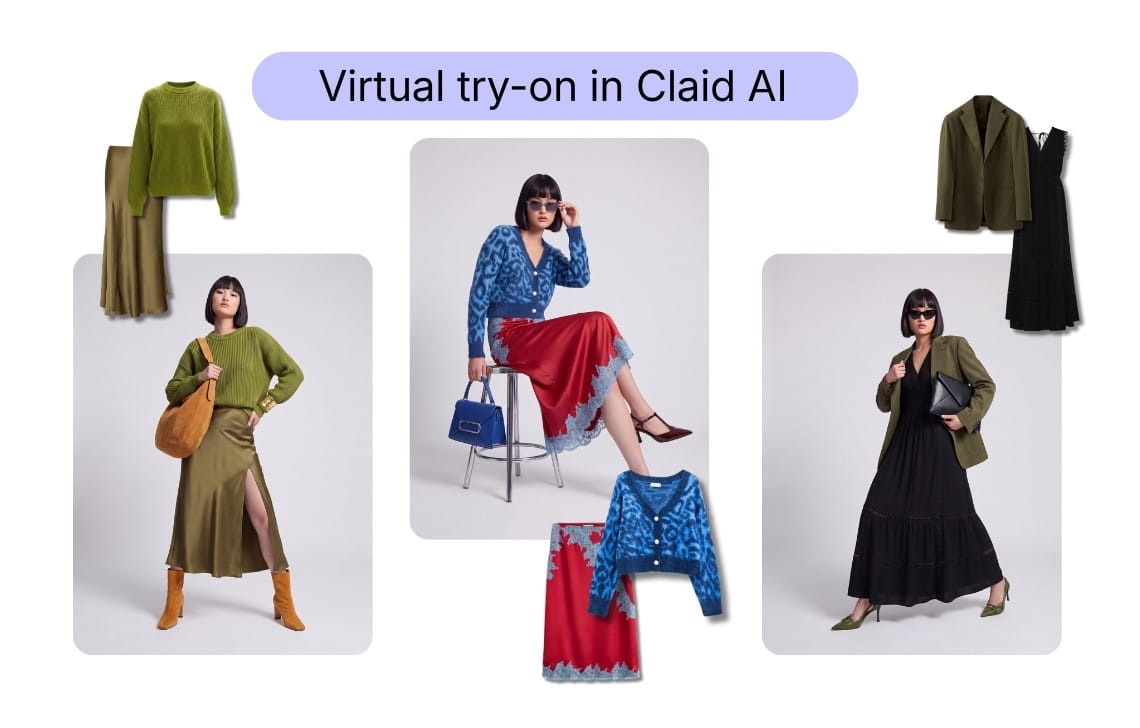
Users can choose from more than 100 models representing different body types and demographics or upload model references that match an established brand cast. Claid can also combine complementary garments into complete looks. Native 4K generation is available for workflows that need larger commercial assets.
On top of a self-serve web application, you can use Claid’s APIs to connect fashion generation and image editing to a catalog workflow or get custom fashion production with the Claid’s team handling tailored automation, managed output, review, and ongoing support.
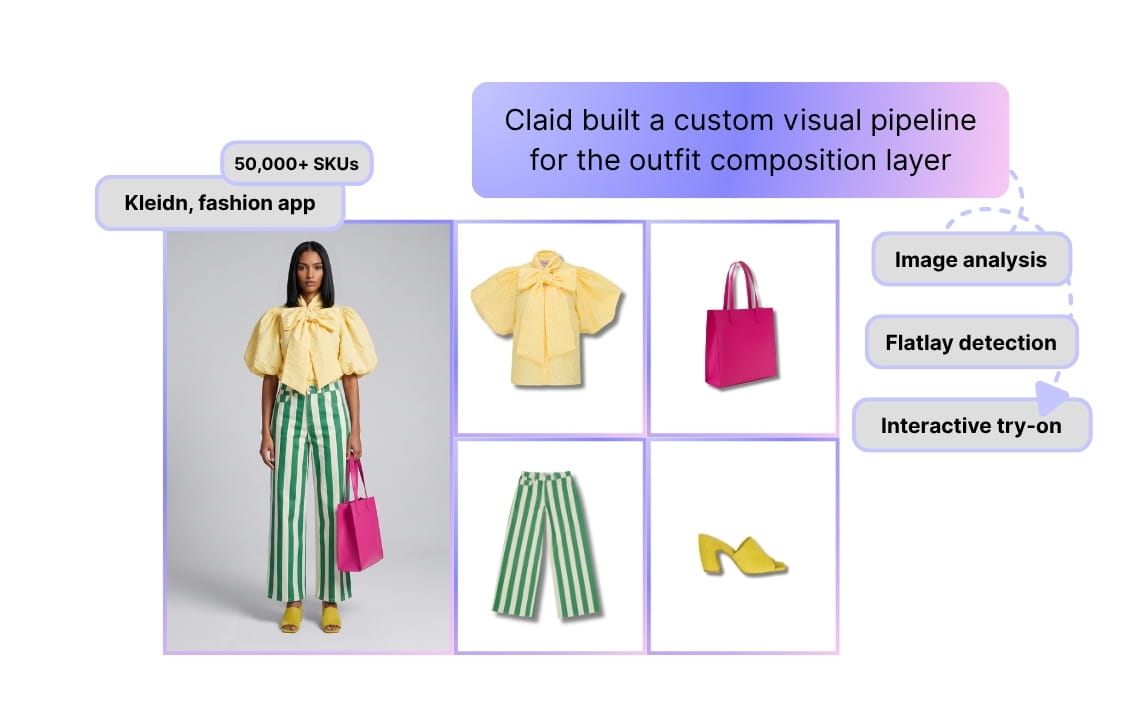
Claid supports high-volume catalog production and the visual infrastructure behind custom fashion products, including virtual try-on experiences. For Kleidn, Claid helped build a smart outfit editor, by automatically identifying usable flatlays, removing backgrounds, and preparing products from a catalog of more than 50,000 items. For Kasta, a marketplace with more than 3 million SKUs and over 100,000 new products arriving each month, Claid made image processing 3 times faster.
Useful for
- Fashion brands producing on-model assets across recurring collections
- Marketplaces processing large and inconsistent product catalogs
- Teams that want to combine self-serve creation with API automation
Pricing
- Free trial with 50 credits
- Paid plans from $15/month, or from $9/month with annual billing
- Enterprise volumes and custom production plans use custom pricing
What to consider
Claid is focused on creating and processing fashion visuals. A retailer that only needs a ready-made shopper widget may find a storefront-focused product faster to implement.
For more complex requirements, Claid’s AI fashion production service can cover workflow design, integration, production, and delivery in addition to generation.
2. FASHN AI: generative fashion tools with developer access
FASHN AI combines virtual try-on with product-to-model generation, model creation, model swapping, packshots, editing, video, and image upscaling.
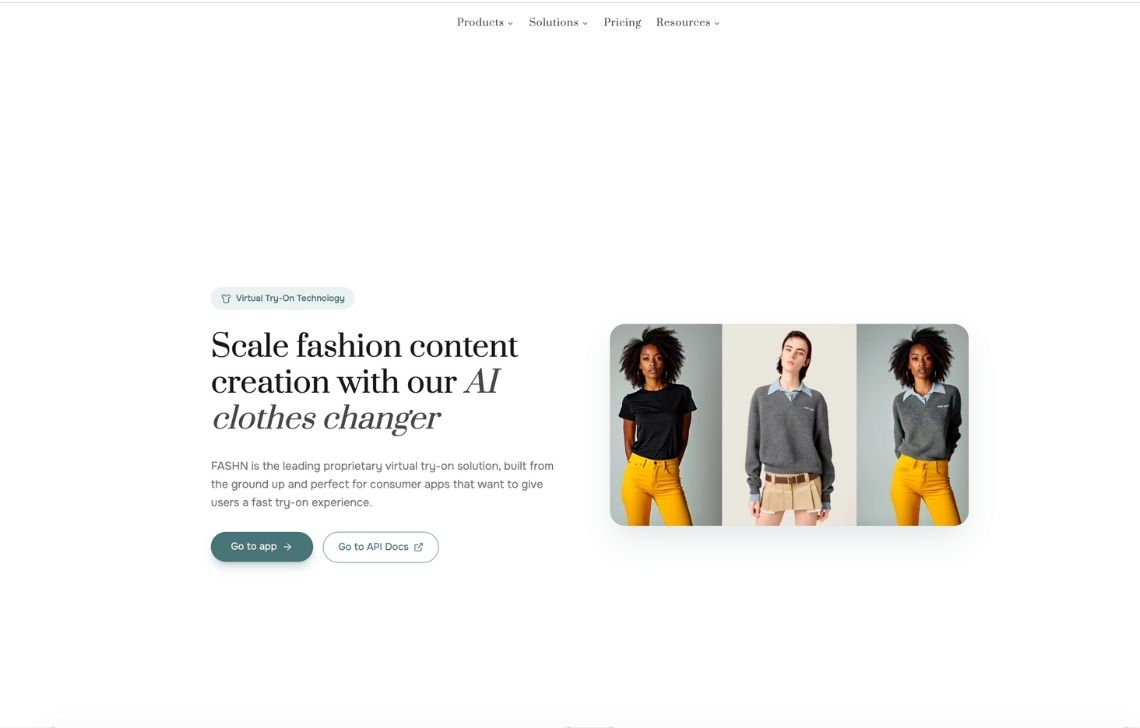
Its web and mobile applications give creative teams a relatively accessible environment for testing garments on models and producing visual variations. Teams can explore different model identities, poses, and presentation options without starting with an API integration.
The platform’s broader toolset is useful for small teams and agencies that need product-to-model images, model changes, image enhancement, packshots, and short-form fashion content. FASHN also provides an API so that you can test the visual capability manually, then evaluate whether the underlying models fit a custom production or shopper-facing product.
Useful for
- Creative teams experimenting with on-model fashion generation
- Agencies producing images for several brands
- Smaller businesses that need several fashion-image tools in one product
Pricing
- Free access with 10 credits
- Paid plans from $19/month for 200 monthly credits and 2 team members
- API pricing is separate from app subscriptions
What to consider
Before moving from experimentation to production, test garment preservation, difficult fabrics, output acceptance rates, concurrency, generation time, and the real cost per approved image.
A low generation price may not translate into a low production cost if the team has to reject or manually repair a significant share of the results.
3. The New Black: visualization inside a broader fashion workflow
The New Black positions virtual try-on as one component of a wider fashion platform.
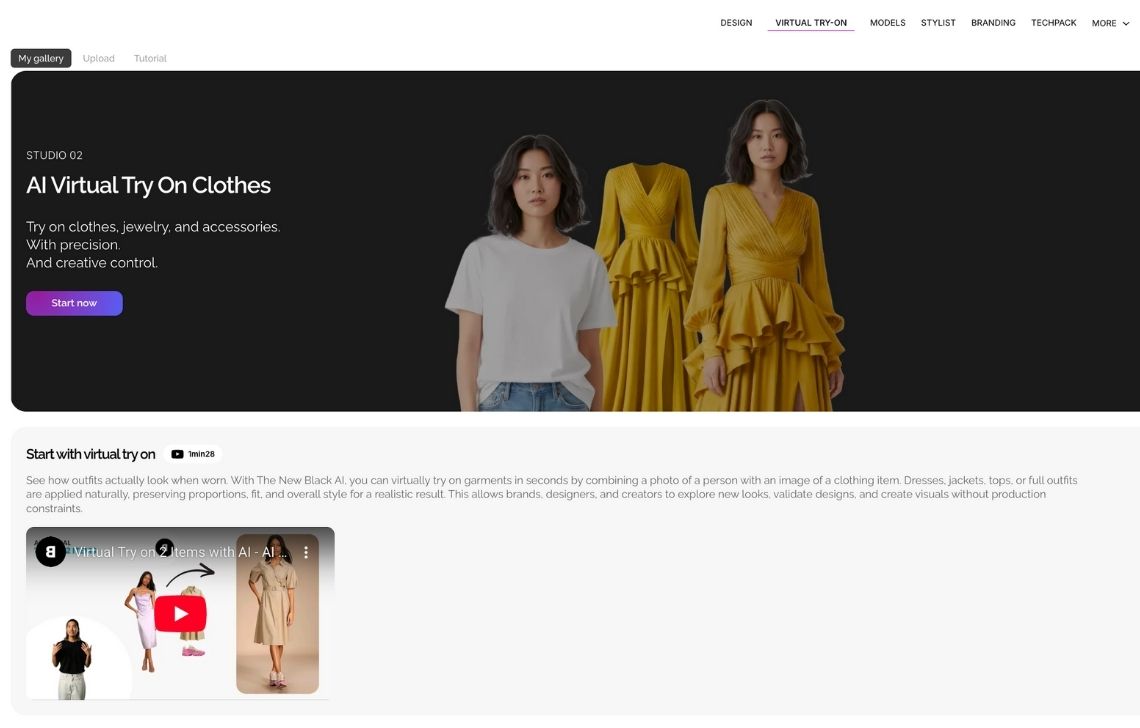
Teams can create fashion concepts, generate AI models, place garments on models, produce product videos, prepare tech packs, develop Visual DNA profiles, and publish content to Shopify. Higher plans add bulk catalog generation, more team access, increased API capacity, and automated publishing.
This makes the platform relevant to fashion businesses that want to connect early design work with ecommerce content. Instead of moving between separate tools for concepts, factory documentation, product images, and publishing, teams can manage several parts of the process in one environment.
The product-to-model and try-on features can work with clothing, jewelry, bags, shoes, and accessories. Shopify integration lets merchants move approved visuals into their product catalog without maintaining a completely separate export process.
Visual DNA profiles help teams retain recognizable brand characteristics across generated content. Bulk generation on the higher plans is also important for stores that need to apply an approved direction across more than a handful of products.
Useful for
- Fashion design teams that also produce ecommerce content
- Emerging brands consolidating design, tech packs, and product imagery
- Shopify merchants that want direct publishing
Pricing
- Paid plans from $15/month for 200 credits, 3 seats, and 2K enhancement
- 4K enhancement and bulk generation are available at higher plans
What to consider
The platform covers a wide range of fashion functions. Teams focused only on virtual try-on should determine how much of the broader product they will use and whether they need an internal creation tool or a customer-facing experience.
Shopper-facing try-on
Shopper-facing platforms sit inside product discovery or the ecommerce journey. They help customers visualize products on themselves or on a representative model before purchasing.
The experience must be easy to find, fast enough to use on mobile, compatible with enough of the catalog, and measurable against engagement, cart activity, conversion, and returns.
4. Google Shopping: try-on during product discovery
Google’s virtual try-on experience brings apparel visualization into Search and Shopping.
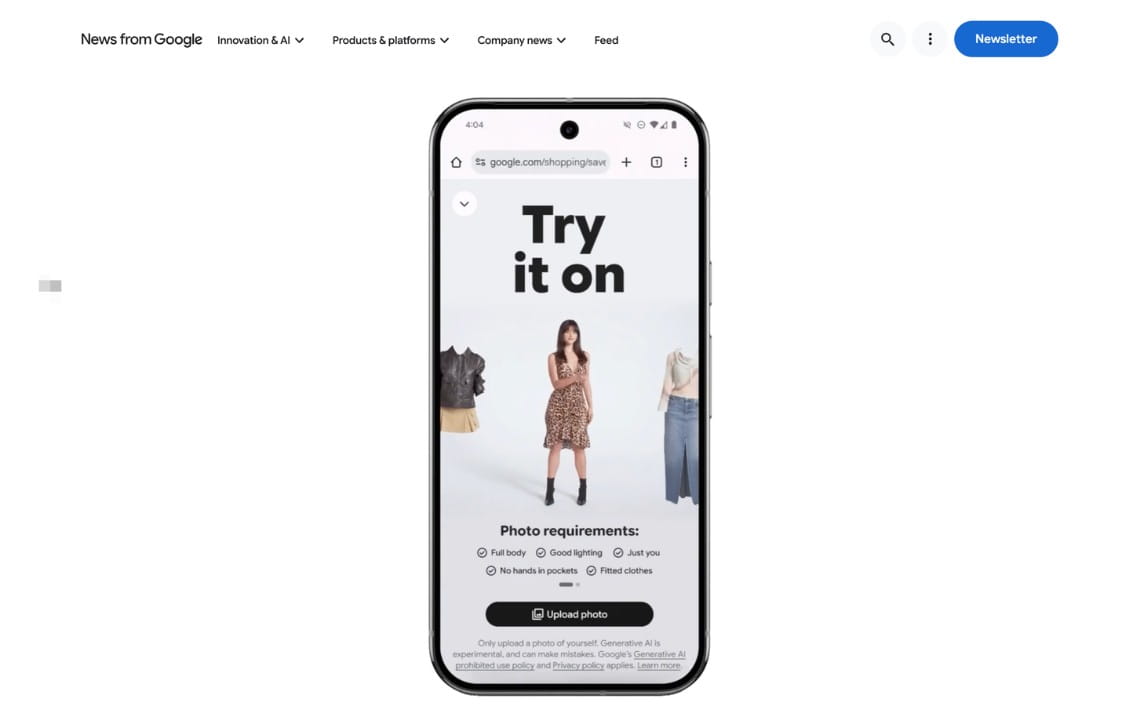
A shopper uploads a full-length photo and selects the try-on option on an eligible apparel listing. Google then generates a visualization of the selected shirt, trousers, skirt, or dress on that person.
For fashion brands, the main value is distribution. The shopper encounters try-on while comparing products from different retailers, before necessarily reaching a brand’s product page. Google says the technology can work across billions of apparel listings in its Shopping Graph.
This is different from installing a try-on platform on a retailer’s website. Google controls the interface, generation experience, shopper account, and placement. Merchant participation depends on the products and imagery represented in Google Shopping.
Useful for
- Apparel retailers with substantial visibility in Google Shopping
- Brands that want try-on to appear during product discovery
- Ecommerce teams already maintaining detailed Merchant Center feeds
Pricing
The pricing follows standard Google Cloud Vertex AI generative image/model API consumption rates.
What to consider
Retailers have limited control over the interface and availability. Coverage can vary by location, garment category, product listing, and account eligibility.
Google’s experience should be treated as a distribution surface, not a direct substitute for a retailer-owned fitting room.
5. DRESSX: full-body enterprise try-on and styling
DRESSX Virtual Try-On lets shoppers apply individual garments, complete looks, or mixed outfits to their own photos.
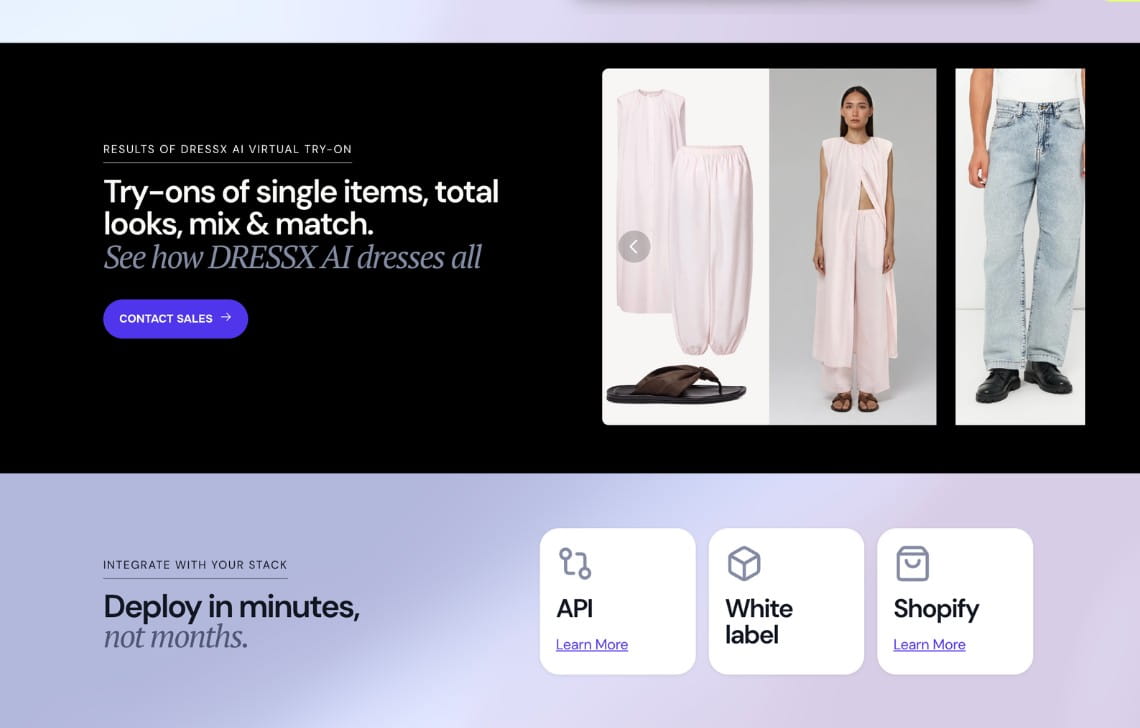
The platform supports API, white-label, and Shopify deployment. DRESSX also offers denim-specific try-on, an AI stylist, in-store Mirror experiences, video try-on, and sizing functionality.
This makes the product relevant to enterprise brands that want to connect visualization with styling and assisted shopping rather than placing a single image generator on the product page.
Useful for
- Enterprise brands introducing customer-facing full-body try-on
- Retailers that want API, white-label, or Shopify deployment
- Brands combining visualization with styling and size guidance
Pricing
DRESSX uses custom pricing. Cost depends on the experience, integration, catalog coverage, traffic, and selected services.
What to consider
A large DRESSX implementation requires planning around customer photos, product eligibility, size data, regional privacy rules, analytics, and ongoing merchandising.
Size recommendations should also be tested against the brand’s own products rather than assumed to work equally across every category.
6. Veesual: model-based visualization and outfit discovery
Veesual’s established virtual try-on products take a different approach from shopper-photo generation. Instead of requiring every customer to upload a personal image, the experience lets shoppers view products on models representing different body shapes, sizes, and skin tones.
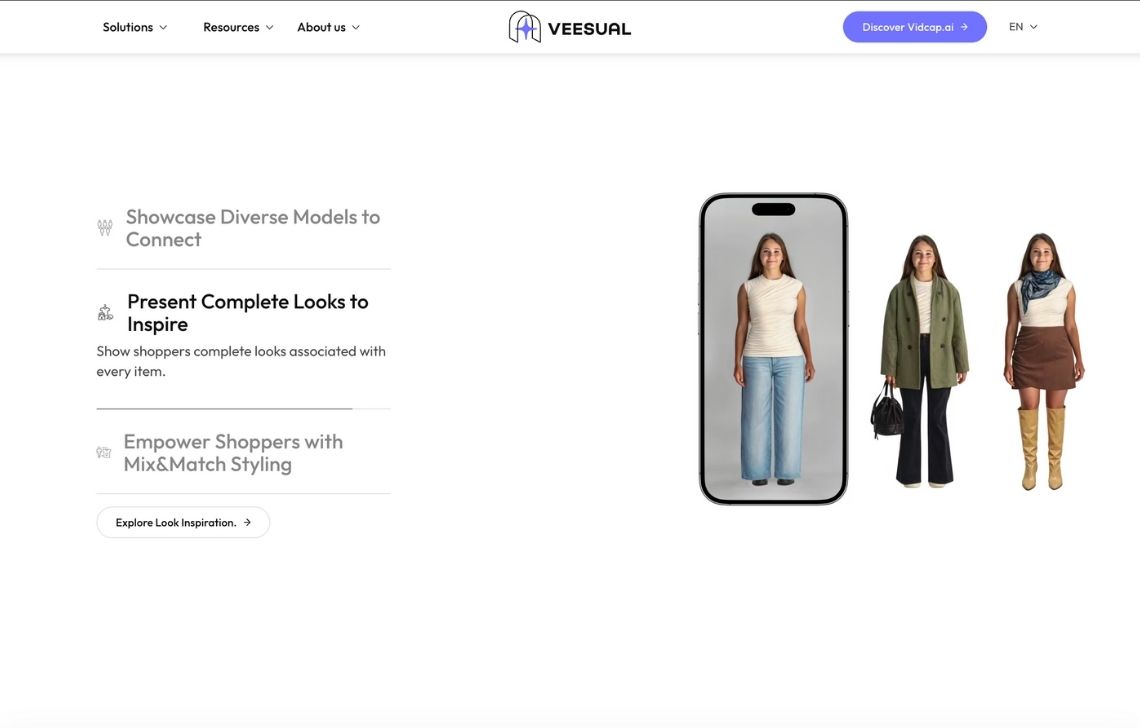
Its Switch Model experience changes the model displaying a garment. Mix & Match lets shoppers combine tops, bottoms, jackets, shoes, and accessories into complete outfits. This can make the feature useful for merchandising and cross-selling, not only visualizing an individual SKU.
The tradeoff is personalization. A representative model may help customers understand styling and body-type presentation, but it does not show the product on the shopper’s actual photograph.
Useful for
- Fashion retailers that want model-based visualization without photo uploads
- Brands emphasizing representation across body types and skin tones
- Retailers that want shoppers to combine several products into a look
Pricing
Veesual does not publish current virtual try-on pricing. Enterprise implementations require a custom quote.
What to consider
Confirm that the required virtual try-on product is available for new deployments. Buyers should also clarify catalog-preparation requirements, supported categories, analytics, service terms, and the relationship between VTO and Veesual’s current video offering.
7. Genlook: accessible storefront try-on for ecommerce teams
Genlook adds photo-based virtual try-on to ecommerce product pages.
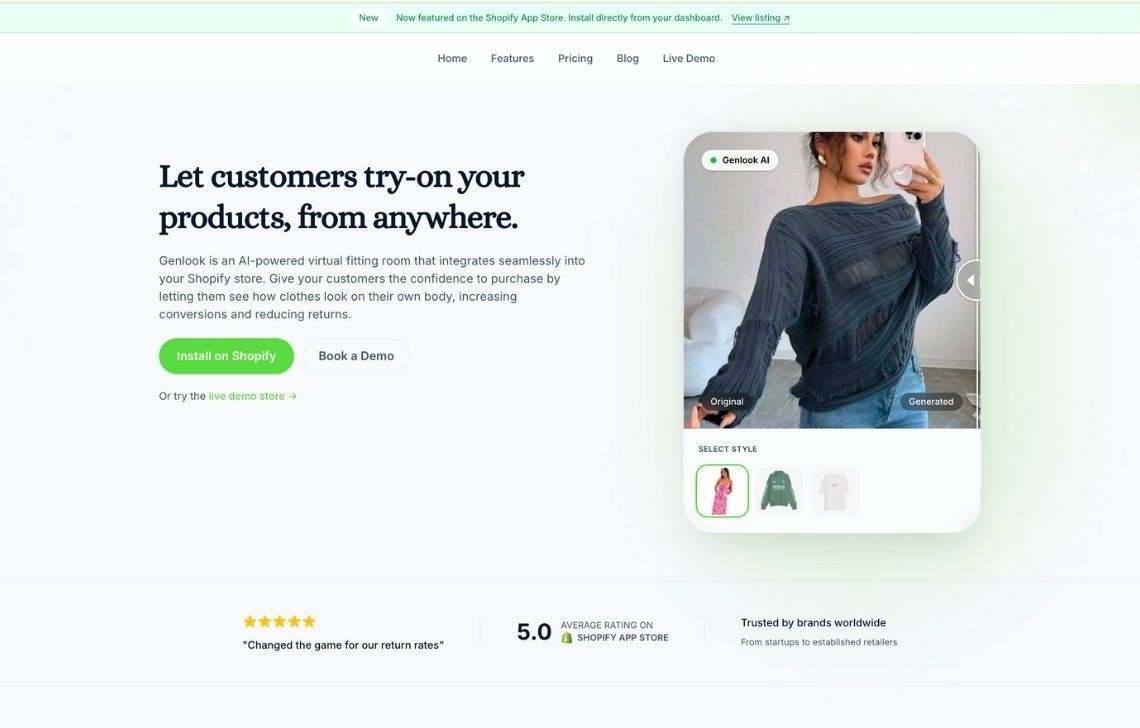
A shopper opens the widget, uploads a photo, and generates an image wearing the selected product. The experience stays connected to the store rather than sending the customer to a separate creative application.
Genlook includes widget customization, usage analytics, email collection, and reporting around try-on activity. It supports Shopify, WooCommerce, PrestaShop, Shopline, a JavaScript SDK, and an API.
The platform has also added retail QR codes, Klaviyo integration, shareable results, and try-on launched from shoppable video. These features allow try-on activity to feed into retargeting, lead capture, social sharing, and physical retail campaigns.
Published entry-level pricing makes Genlook practical for a controlled trial. A retailer can enable the feature for selected categories, observe how shoppers use it, and estimate the economics before expanding coverage.
Useful for
- Shopify and WooCommerce stores testing shopper demand
- Mid-market retailers that want a configurable storefront widget
- Headless stores working with a JavaScript SDK
Pricing
- Free: 10 try-ons per month
- Paid plans from $19.99/month for 100 try-ons, then $0.17 per additional try-on
- API plans are available for custom and higher-volume implementations
What to consider
Model expected traffic before rollout. Shopper-facing generation can create substantially more usage than an internal production tool, particularly when customers test several products or regenerate results.
The trial should measure completion and downstream shopping behavior, not only how many people open the widget.
Infrastructure and multi-category AR
Infrastructure providers give retailers the underlying technology for building a custom virtual try-on product. They offer more control, but they also leave more responsibility with the customer.
These platforms are most relevant when virtual try-on is part of a larger product strategy rather than an isolated storefront feature.
8. Amazon Nova Canvas: an AWS foundation for custom try-on
Amazon Nova Canvas virtual try-on is available through Amazon Bedrock.
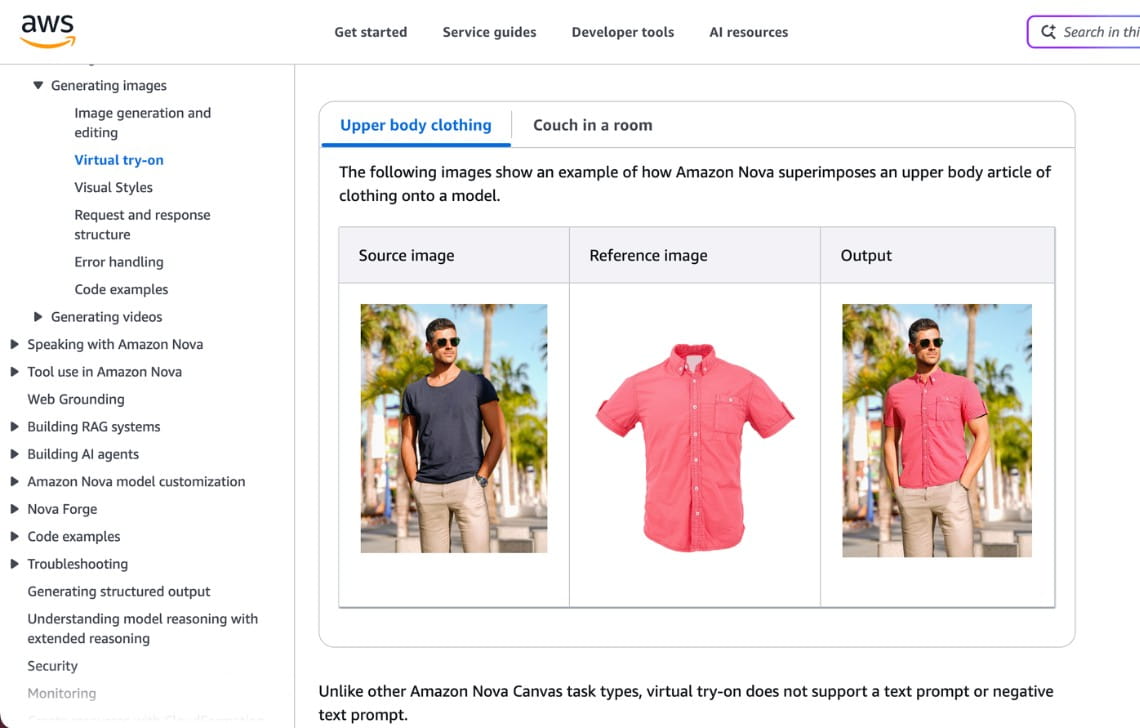
Developers submit a source image of a person and a reference image of a product. Nova Canvas then generates a new image through the Bedrock API.
The API includes garment-aware masks for upper-body clothing, lower-body clothing, full-body outfits, and footwear. Developers can choose whether to preserve or regenerate elements such as the face, hands, and pose.
This control is useful for custom applications. A retailer could use Nova Canvas inside a shopping assistant, fitting room, internal content system, or broader recommendation product.
Amazon also provides a separate AR experience inside its Shopping app for eligible footwear and eyewear. Sellers with compatible products and assets can let shoppers visualize these items through a live camera view.
The two offerings serve different purposes. Nova Canvas is developer infrastructure for generating images. Amazon Shopping AR is a marketplace feature controlled by Amazon.
Useful for
- Retailers with engineering teams already operating on AWS
- Applications that need API-level control over masks and preserved features
- Teams connecting VTO with AWS storage, search, or recommendation services
Pricing
Amazon Bedrock uses consumption-based pricing. Storage, networking, monitoring, search, security, and application infrastructure create additional costs.
What to consider
Nova Canvas provides a generation component, not a complete retail product. The retailer remains responsible for shopper interfaces, authentication, image storage, moderation, and other aspects.
AWS also states that visualization should not be interpreted as a guarantee of size or physical fit.
9. Perfect Corp and WANNA: enterprise AR across fashion categories
Perfect Corp combines generative AI, augmented reality, and 3D technology across clothing, shoes, bags, watches, jewelry, eyewear, makeup, and hair.
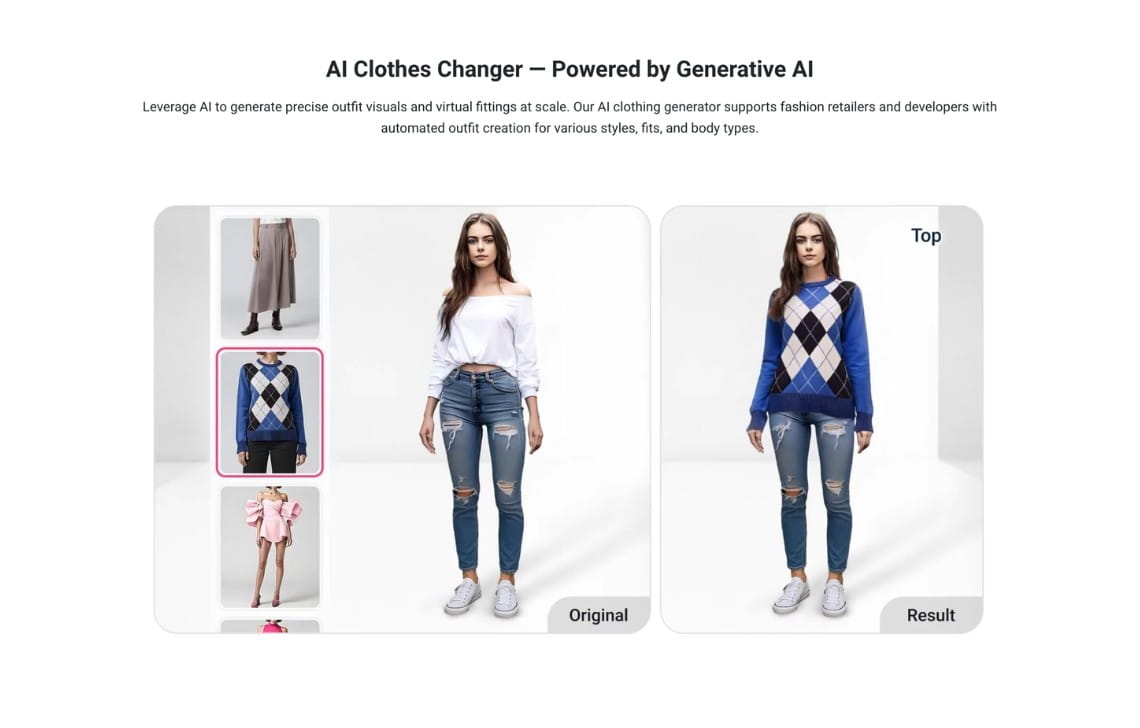
For clothing, shoppers can upload a photo and combine it with a product reference. For shoes, watches, jewelry, and eyewear, live AR or 3D visualization can place the product into the customer’s camera view.
Perfect Corp’s acquisition of WANNA added specialist technology for footwear, watches, bags, and luxury accessories. This gives the combined company a particularly broad category footprint.
Deployment options include ecommerce web modules, mobile SDKs, and APIs. A retailer can therefore use one enterprise provider across its website and mobile applications while selecting the appropriate visualization technology for each department.
This is useful for multi-category businesses that would otherwise need separate vendors for apparel, beauty, footwear, and accessories. It can also support consistent procurement, security review, service agreements, and implementation management across business units.
Useful for
- Multi-category fashion and beauty retailers
- Footwear, jewelry, watch, eyewear, and bag brands
- Companies that need live AR in addition to generated images
Pricing
Perfect Corp uses custom enterprise pricing.
What to consider
Every product category has different asset and implementation requirements.
A clothing photo workflow, live shoe AR, virtual watch placement, and makeup simulation should be scoped separately. Buyers should calculate the cost of 3D models, asset preparation, integration, QA, and catalog maintenance in addition to the platform license.
How to choose a virtual try-on tool
Choosing a virtual try-on platform starts with identifying where it will create value. Content-production teams need reliable, publishable assets; ecommerce teams need an experience shoppers will actually complete; and product teams building custom applications need infrastructure they can control and operate at scale.
The following criteria help evaluate each category on its own terms.
Choose content production when the output is the product
Content-production tools are appropriate when the brand needs more on-model images, broader model representation, faster catalog launches, or a lower cost per approved asset.
Evaluate:
- Garment and product preservation
- Support for flatlays and existing catalog images
- Model consistency
- Brand controls
- Batch generation
- Review and approval workflows
- Cost per accepted image
- API and catalog integration
- Availability of managed production
Claid, FASHN AI, and The New Black all serve this area, but with different operating models. Claid combines self-serve tools, API automation, and custom production. FASHN emphasizes application and developer access. The New Black connects visualization to a wider design and publishing platform.
Choose shopper-facing try-on when interaction is the product
Shopper-facing tools should be judged as part of the ecommerce experience.
Evaluate:
- Widget-open and completion rates
- Generation time on mobile
- Product coverage
- Photo-upload friction
- Model or body-type selection
- Outfit building
- Analytics and experimentation
- Consent and image deletion
- Accessibility
- Connection to cart and checkout behavior
Google offers distribution within product discovery. DRESSX supports a broad enterprise experience. Veesual represents model-based visualization and outfit building. Genlook provides a more accessible storefront entry point.
Choose infrastructure when the experience must be owned
Infrastructure is appropriate when the company has a defined product concept and the engineering resources to build it.
Evaluate:
- API performance and regional availability
- Supported categories
- Concurrency and rate limits
- Output controls
- Security and data retention
- Monitoring and failure handling
- Infrastructure costs beyond generation
- SDK and documentation quality
- Enterprise support
- 2D, 3D, and AR asset requirements
Amazon Nova Canvas supplies a flexible AWS generation layer. Perfect Corp and WANNA provide a broader combination of enterprise APIs, SDKs, AR, and category-specific capabilities.
FAQ
What is the difference between virtual try-on and on-model AI?
On-model AI creates product imagery using selected, uploaded, or generated models. The brand publishes the results on product pages, marketplaces, advertisements, and social media.
Shopper-facing virtual try-on creates an interactive experience during shopping. The customer may upload a personal photo, select a representative model, create an avatar, or use a live camera.
Can a brand use content production and shopper try-on together?
Yes. The systems can serve different stages of the workflow.
A brand might use Claid to create consistent catalog imagery and prepare assets, then use DRESSX, Genlook, or another storefront platform for shopper interaction. A larger retailer might also use Amazon or Perfect Corp as infrastructure for a custom application.
Which platforms support large catalogs?
Claid, DRESSX, Veesual, Amazon, Perfect Corp, and The New Black provide enterprise, bulk, API, or custom routes.
Large-catalog suitability depends on ingestion, throughput, product eligibility, asset preparation, output acceptance rates, and the amount of manual review required.
Which platforms work with Shopify?
Genlook, DRESSX, and The New Black offer Shopify options. Veesual has historically supported enterprise ecommerce integrations rather than a low-cost public app.
Claid can produce assets for Shopify catalogs, while custom workflows can connect generation and processing to a broader commerce operation.
Can a brand use its own models?
Yes. Claid supports uploaded model references as well as its model library. FASHN AI and The New Black also support custom or consistent model workflows.
This is useful when a brand wants to retain a recognizable cast or create content around an approved model identity.
Which option is suitable for a custom fashion experience?
Amazon Nova Canvas provides infrastructure for engineering teams. DRESSX and Perfect Corp support enterprise integrations. Genlook offers an API and SDK alongside its widget.
Claid is relevant when the custom experience also needs product analysis, asset preparation, fashion generation, or a managed visual workflow. The Kleidn outfit editor is an example of this production layer supporting an interactive fashion product.
Need AI fashion photography at scale?
Produce high volumes of on-model and product visuals without slowing down launches. Use our API to automate fashion image workflows or work with our team on a custom pipeline tailored to your operations.


Claid.ai
October 23, 2026