Tech
6 AI people removers for cleaner product photos in 2026


A passerby, model, photographer, or reflected person can distract from the product a photo is meant to sell. AI people removers let you select that person and reconstruct the space behind them without rebuilding the image manually.
The right tool depends on the scene and the workflow around it. Some are designed for quick individual edits, while others connect people removal with catalog preparation, creative production, or professional retouching.
AI people removers at a glance
Plans, regional prices, usage limits, and promotional offers may change, so confirm current terms before purchasing.
| Tool | Suitable for | Pricing |
|---|---|---|
| Claid | Ecommerce photos and repeatable catalog cleanup | Free trial; Paid plans from $9/month |
| Adobe Photoshop | Complex scenes and detailed professional retouching | Free mobile version; Paid plans from $7.99/month |
| Photoroom | Seller-friendly product and marketplace editing | Free plan; Paid plans from $7.50/month |
| TouchRetouch | Removing photobombers and background crowds on mobile | Free version; Paid plans from $1.25/month |
| Canva | Cleaning photos while creating ads, posts, and sales graphics | Free plan; Paid plans from $12/month |
| Cleanup.pictures | Quick browser-based people removal | Free plan; Paid plans from $3/month |
Need photo cleanup at scale?
Keep product photos clean and consistent at scale, without adding manual work. Use our API to automate cleanup, or work with our team on a custom setup tailored to your workflow.
1. Claid.ai, for ecommerce image workflows
Claid’s AI people remover is designed for cleaning commercial images while protecting the product that needs to remain accurate.
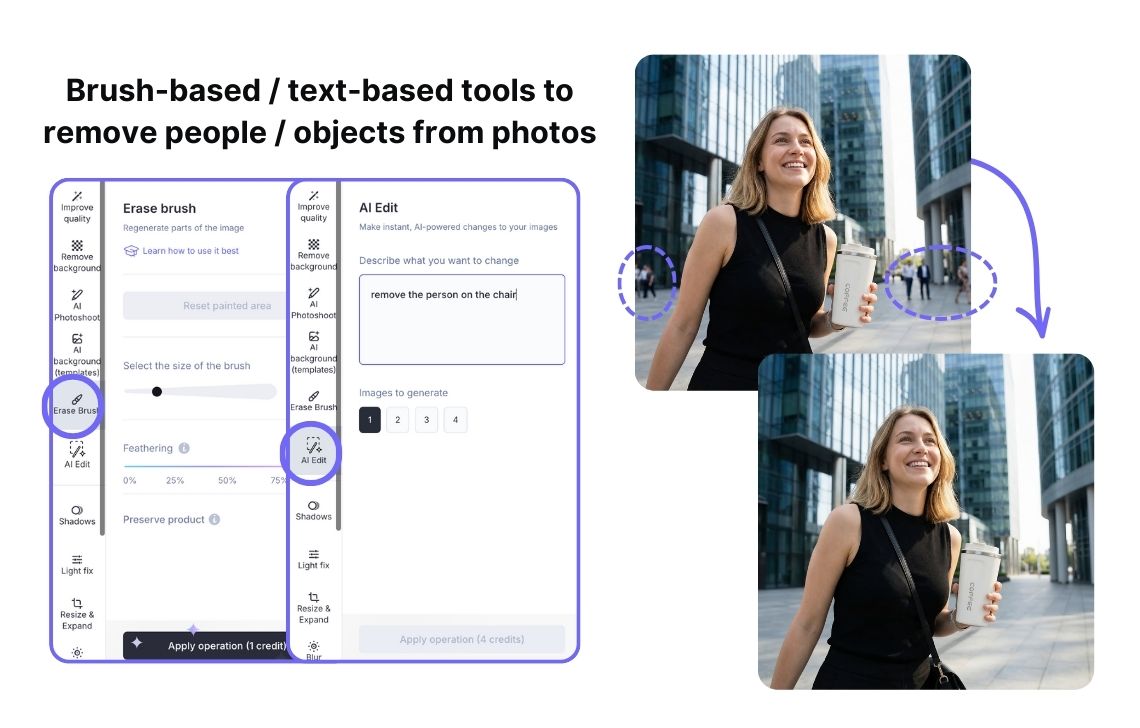
You brush over a person or another distraction, and Claid reconstructs the selected area using the surrounding texture, lighting, and perspective. Adjustable brush size and feathering help the selection blend into the surrounding scene.
You can also describe what to remove through AI Edit. Instead of manually selecting several small distractions, you can request a cleaner scene. Once the cleanup is complete, you have other image-editing and generation tools in Claid to improve your assets and make them ready for catalogs, socials, or ads.
For larger-scale needs, Claid offers APIs and custom workflows that can connect image cleanup with existing systems. Human review is still valuable for complex removals, but routine image preparation does not have to depend on downloading and reuploading every file.
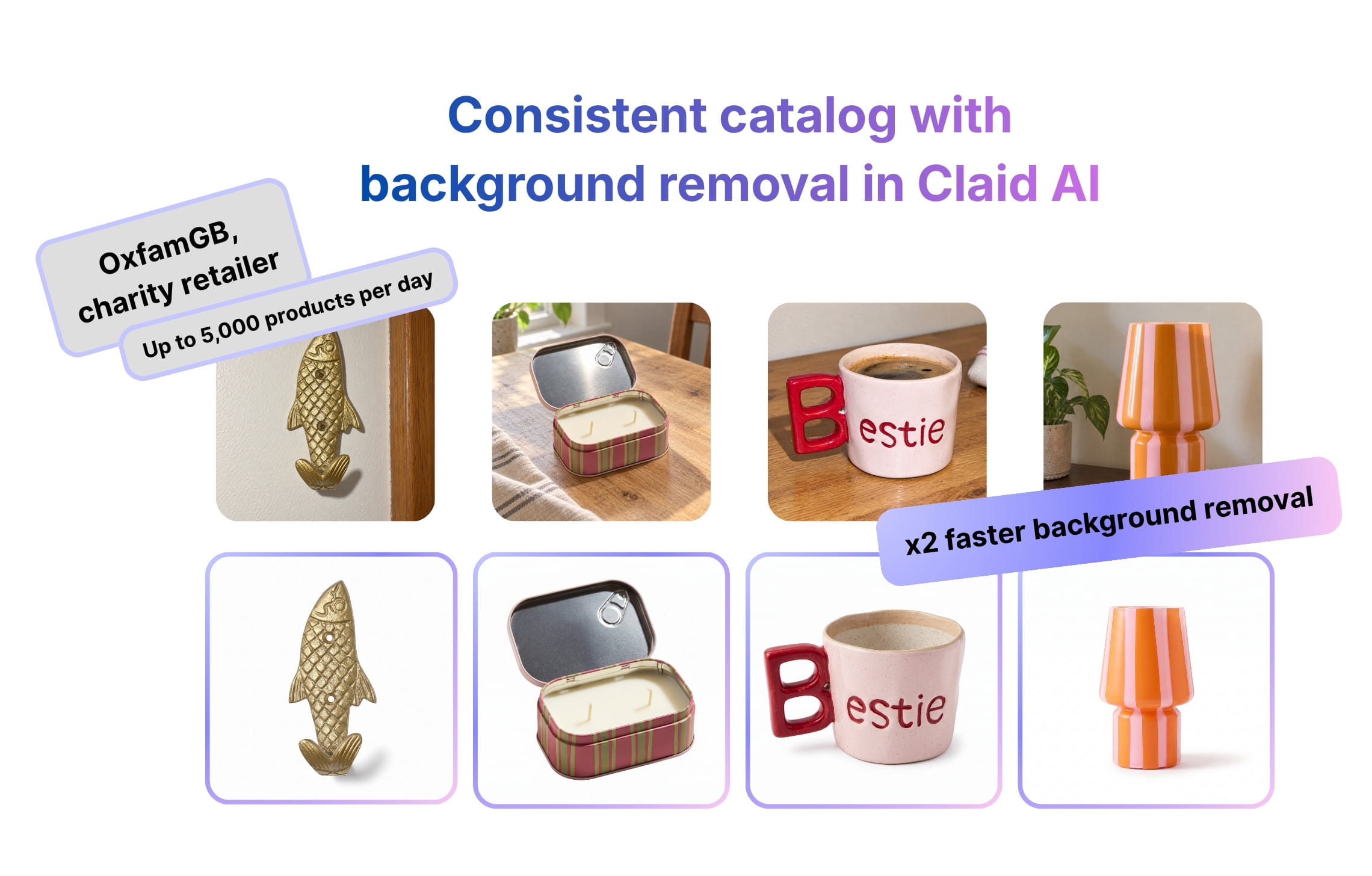
A charity retailer OxfamGB, which uses Claid AI for photo cleanup, reduced average background-removal time from 33 seconds to 15 seconds.
Key features
- Brush-based removal (Brush tool)
- Prompt-based cleanup (AI Edit tool)
- Connected image editing and generation tools (you can create product scenes, enhance photos, outpatient them, add shadows, etc.)
- APIs and custom workflows for automation
Suitable for
Claid is a practical option for marketplaces, retailers, agencies, and product-content teams that need people removal to fit into a repeatable ecommerce image workflow.
Pricing
- Free trial with 50 web credits
- 50 free API credits
- Paid plans from $15 monthly or $9 per month billed annually
- Custom enterprise arrangements
Verdict
Claid.ai is worth considering when removing a person is only one part of preparing a product image for publication. Its ecommerce focus, product-preservation controls, and workflow options make it relevant to catalog production.
2. Adobe Photoshop, for detailed professional retouching
Adobe Photoshop gives retouchers several ways to remove people from a photograph. Its Remove Tool can automatically detect background people, after which the editor can review, add to, or subtract from the proposed selection before applying the edit.
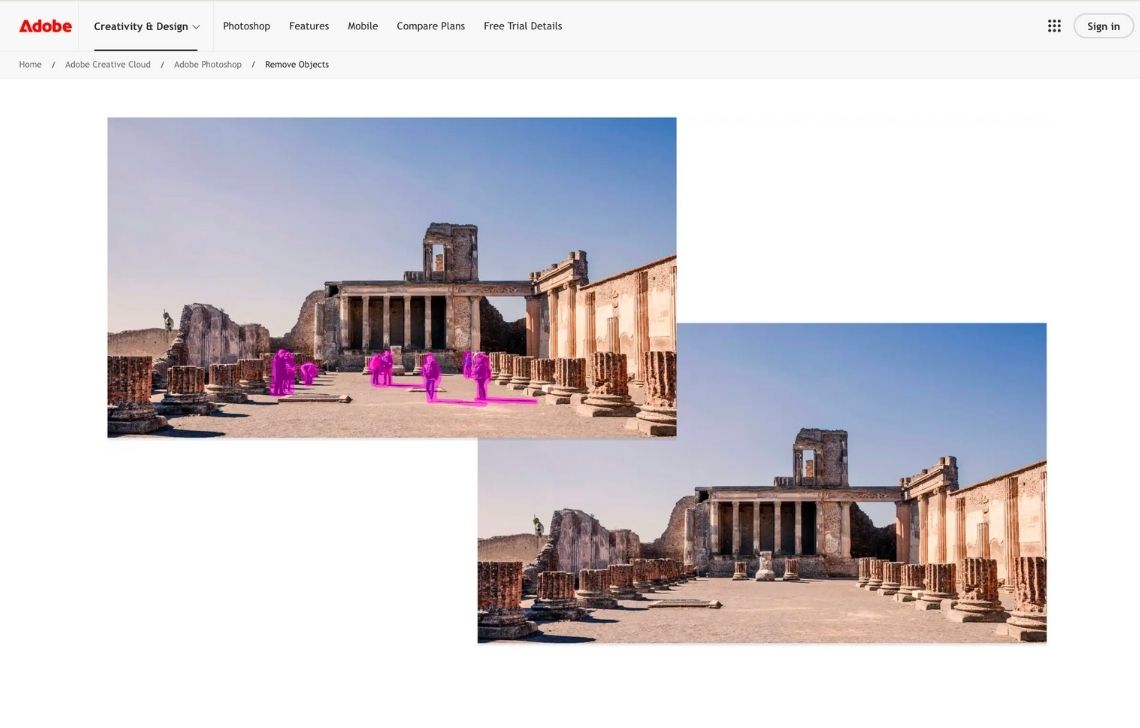
That review step is useful when a scene contains a main model who must remain in the image. Photoshop is designed to identify distracting background people separately, but the editor can correct the selection before anything is removed.
For larger subjects or difficult scenes, Content-Aware Fill lets the user control which parts of the image Photoshop should sample when rebuilding the missing area. Generative Fill, the Clone Stamp, healing tools, selections, masks, and layers provide additional ways to repair textures, shadows, and edges.
These options matter when the removed person overlaps a product, stands in front of repeated architecture, appears in a reflection, or casts a visible shadow. Instead of accepting one generated result, a retoucher can combine several techniques and keep the adjustments separate from the original image.
Photoshop can also support larger production environments through reusable actions and enterprise automation. However, complex people removal still benefits from visual inspection. Its scaling advantage lies in standardizing surrounding steps while giving retouchers detailed control over exceptions.
Key features
- Automatic people detection
- Controlled reconstruction
- Generative removal
- Layer-based workflow
- Manual finishing tools (clone, healing, masking, and painting controls help repair edges, shadows, and repeated textures)
Suitable for
Photoshop suits professional retouchers, agencies, creative departments, and brands working with valuable images that require careful finishing.
Pricing
- 7-day free trial
- Photoshop for desktop, web, and mobile costs $22.99 per month with an annual commitment
- Mobile version: Premium plan costs $7.99 monthly or $69.99 annually
Verdict
Photoshop provides the greatest level of manual control in this selection. It takes longer to learn and use than a dedicated eraser, but it is a sensible choice when an inaccurate reconstruction, damaged product edge, or broken reflection cannot be accepted.
3. Photoroom, for seller-friendly product editing
Photoroom combines people removal with the other tasks a seller commonly performs before publishing an image. Its Retouch tool lets users brush over a person, hand, reflection, or unwanted object, and the application reconstructs the selected area.

The workflow is available on the web, iOS, and Android. This makes it convenient for resellers and small brands that capture inventory on a phone, clean the image, replace its background, and export a finished listing without transferring the file into a desktop editor.
Removal is selection-based rather than fully automatic. The user still needs to identify the person in each photo, and complex results may require another pass. Straightforward removals against walls, floors, skies, and other predictable backgrounds are easier than rebuilding patterned shelving, overlapping products, or detailed interiors.
After removing a person, users can continue with background generation, product repair, shadows, image expansion, and enhancement. Paid plans include the core Retouch tool without drawing from the generative AI credit allowance.
Photoroom offers higher export tiers, collaborative features, and enterprise arrangements for teams. Its wider platform can support substantial product-content output, although freehand Retouch remains an image-specific task rather than an automatic instruction that can be applied identically across an entire catalog.
Key features
- Brush-based Retouch
- Product-oriented follow-up tools
- Web and mobile editing
- Marketplace-ready outputs
- Collaboration features for teams
Suitable for
Photoroom fits independent sellers, resellers, small ecommerce brands, and social-commerce teams that want people removal inside a broader listing-image application.
Pricing
- Limited free plan
- Paid plans start at $7.50 per month billed annually (1,000 monthly exports)
- Custom enterprise pricing
Verdict
Photoroom is convenient when a cleaned image will immediately become a product listing, advertisement, or social post. It offers less reconstruction control than Photoshop, but its workflow is easier for sellers who do not need professional retouching tools.
4. TouchRetouch, for removing people on mobile
TouchRetouch is a focused mobile editor for removing people and other distractions. It includes a dedicated people-removal workflow for photobombers, individual background figures, and crowds that compete with the intended subject.
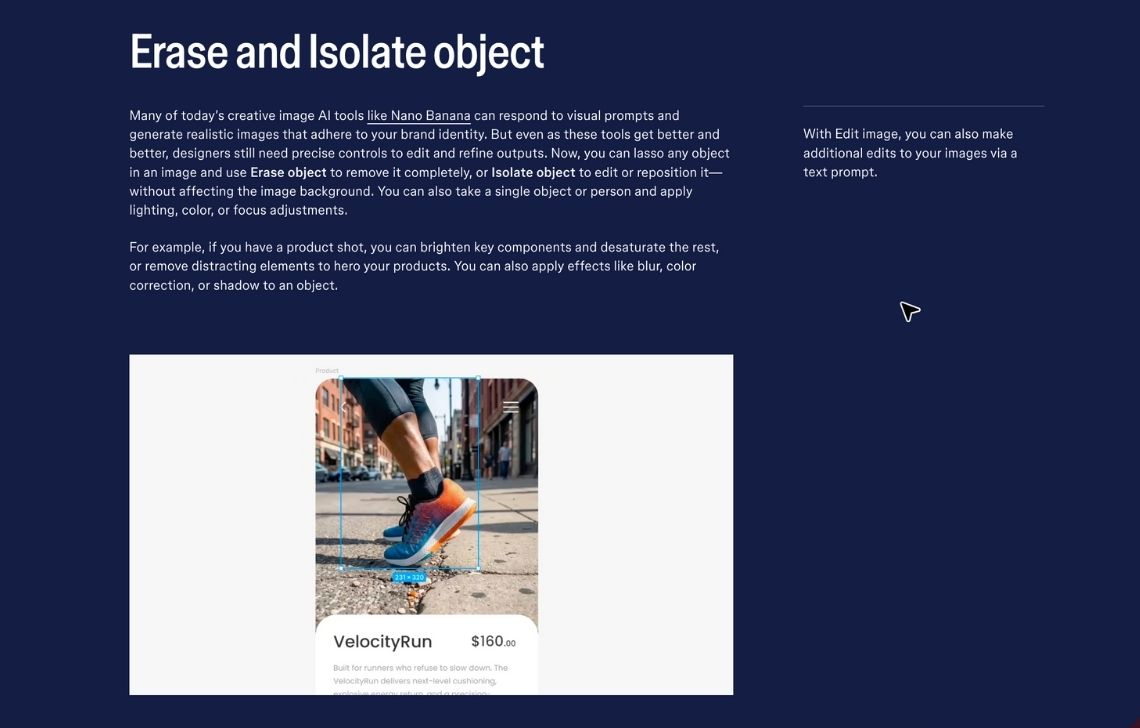
Users can apply automatic detection or select an area manually. If the generated fill is not convincing, the Clone Stamp provides a second way to rebuild part of the scene using pixels from another area of the image. This combination is useful when automatic removal leaves a repeated texture, broken edge, or visible patch.
TouchRetouch also handles related distractions, including shadows, wires, fences, signs, and foreground mesh. Those tools can help when removing a person exposes another element that also needs correction.
The application is designed for one image at a time. It doesn’t provide a catalog API or production-management system.
Key features
- People removal with automatic and manual selection
- Clone-based repair
- Shadow removal
- Specialized distraction tools (separate controls address wires, cables, fences, mesh, blemishes, and small background objects)
Suitable for
TouchRetouch is suited to photographers, property agents, creators, and mobile users who regularly remove people from travel, lifestyle, interior, or promotional images.
Pricing
- The application is free to download
- Annual price starts at $14.99 in the US
Verdict
TouchRetouch is a more relevant people-removal option than a general design application when the work happens primarily on a phone or tablet. Its focused controls are useful for individual edits, but it is not intended for automated catalog production.
5. Canva, for cleanup inside a design workflow
Canva’s Magic Eraser removes people and other unwanted elements without taking the photo out of the Canva editor. A user can click a detected object or brush over the person manually, adjust the selected area, and generate a cleaned version of the image.

Its value comes from what happens after removal. The cleaned photograph can immediately become part of a product banner, marketplace graphic, social post, presentation, or advertisement. Teams can apply templates, typography, logos, brand colors, and other design elements without creating a new file in a separate application.
Magic Eraser can select multiple objects, the main foreground subject, or text. This makes it useful when a photo contains several types of distraction rather than one isolated person. Users can compare the edited and original versions before saving the result.
Canva is not a dedicated retouching platform, so it provides fewer options for correcting complex textures, reflections, shadows, and product edges. Its collaboration and template system can support large creative teams, but the erasure itself remains an image-by-image editing task.
Key features
- Click or brush selection
- Multiple-selection cleanup
- Integrated creative production (templates for advertising, social media, presentations, and ecommerce graphics)
- Brand controls (teams can apply approved colors, typefaces, logos, and layouts)
- Shared projects and approvals
Suitable for
Canva is useful for marketers, small businesses, and social-commerce teams that need to remove people before turning an image into a designed asset.
Pricing
- Magic Eraser requires a paid plan
- Subscriptions start from $144 annually
Verdict
Canva makes sense when people removal is an early step in creating a complete graphic. Teams needing detailed reconstruction or catalog automation will likely require a more specialized tool, but Canva reduces handoffs for everyday marketing work.
6. Cleanup.pictures, for quick browser-based removal
Cleanup.pictures provides a narrow browser workflow: upload an image, brush over the people who should disappear, and wait for the selected region to be reconstructed.
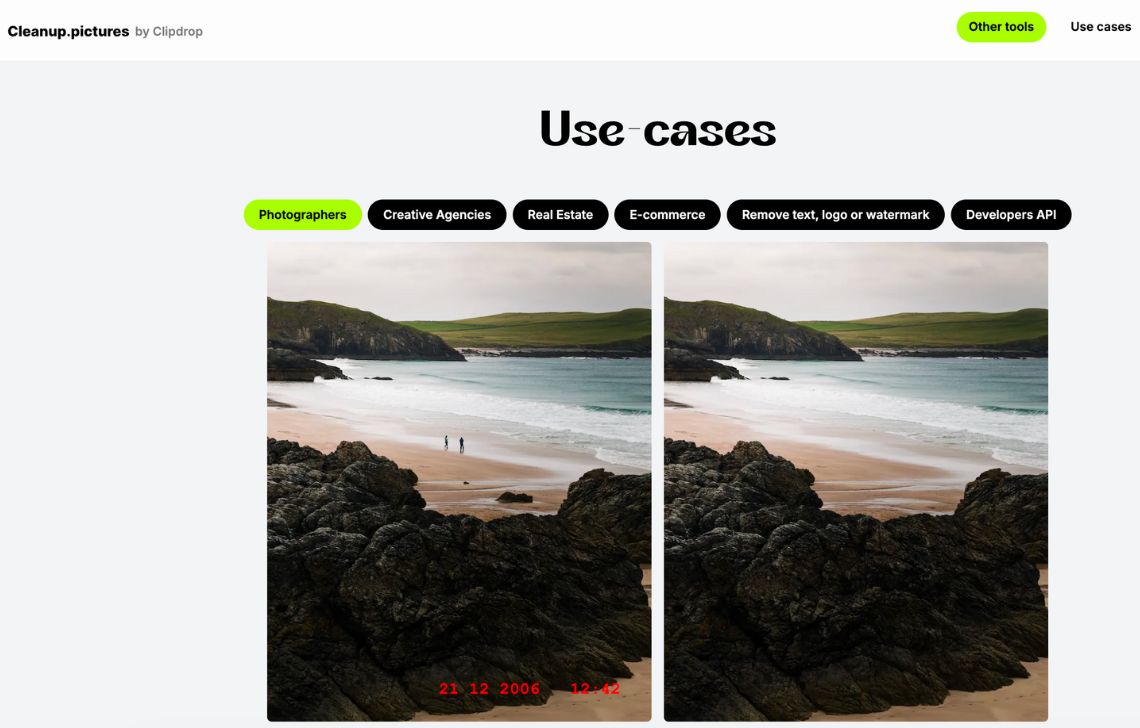
The simplicity makes it accessible to users who do not want to install an application or learn a full editing suite. It can handle passersby, partial figures near the edge of a frame, people against simple backgrounds, and other straightforward distractions.
The result depends heavily on the scene behind the selected person. Open sky, grass, pavement, water, and plain walls provide clearer visual information for reconstruction. Crowded shelves, repeated architecture, text, complex shadows, and people overlapping the main product create more difficult gaps.
The Pro plan supports unlimited full-resolution edits for one user. An API is available separately, but teams considering it for production should confirm pricing, throughput, quality controls, and support requirements before building it into a larger workflow.
Key features
- Simple browser editor
- Adjustable brush
- Unlimited paid editing
- APIs for integrating
Suitable for
Cleanup.pictures works well for occasional edits, simple backgrounds, freelancers, and teams that need an uncomplicated browser-based eraser.
Pricing
- Free plan with unlimited edits but exports limited to 720p
- Paid plans start at $5 monthly or $36 annually
Verdict
Cleanup.pictures offers a direct way to remove people without paying for a broader creative suite. It is less suitable for complex product scenes, team collaboration, or multi-stage catalog production, but it is convenient for straightforward corrections.
How to choose the best AI people remover
Choosing a people remover requires more than comparing how quickly each tool can erase a clearly separated background figure. Test how well it protects the product, reconstructs the hidden scene, and fits the workflow that follows the edit.
Start with the reason for removing the person
A person can appear in several different ways:
- A passerby behind the product
- A hand holding or arranging an item
- A model wearing the product
- A photographer reflected in glass or metal
- A partial figure at the edge of the frame
- A crowd covering a substantial part of the background
These are not equally difficult. Removing a small passerby against a wall is different from removing a model whose body obscures most of a garment. If the person covers essential product information, the software must invent what it cannot see, which may produce a misleading result.
Test scenes with realistic difficulty
Use representative images rather than a single easy example. Include people who overlap products, cast shadows, appear in reflections, or stand in front of repeated patterns.
Inspect each result at full resolution. Look for:
- Warped product edges or altered proportions
- Repeated textures and visible patches
- Broken floor, shelf, or architectural lines
- Shadows that remain after the person disappears
- Invented packaging, labels, or garment details
- Reflections that no longer match the scene
An edit that looks clean at thumbnail size may show obvious reconstruction errors on a zoomable product page.
Protect product accuracy
For ecommerce, the product must remain the source of truth. Avoid relying on generative removal when a person covers a substantial part of the item, unless the reconstructed product area is reviewed carefully.
Selection controls, product-preservation options, masks, layers, and manual repair tools reduce the risk of changing important details. Where exact accuracy is mandatory, reshooting the product or compositing from another original photograph may be safer than generating the hidden area.
Match control to the value of the image
Simple listing images may only require a brush-based removal tool. Campaign photography, hero images, and reusable brand assets justify more detailed selection and repair controls because the same edit may appear across websites, advertisements, marketplaces, and print.
The cost of manual retouching should be weighed against the cost of publishing an inaccurate or visibly edited image.
Consider the complete workflow
Removing a person is rarely the final step. The photograph may still require background replacement, resizing, lighting correction, or upscaling.
A connected ecommerce or design platform can reduce file transfers and repeated exports. A focused people remover may still be sufficient when the source image already meets every other requirement.
Check volume and collaboration needs
For occasional work, a mobile or browser tool may be enough. Teams handling regular catalog updates should consider shared workspaces, export allowances, review steps, and consistent operating procedures.
At larger volumes, APIs and reusable workflows can automate surrounding image operations. However, people removal often requires a different selection for every image. A scalable system should make it easy to route difficult results to a person instead of publishing every generated reconstruction automatically.
Compare the effective cost
Subscription prices do not capture the full production cost. Compare resolution limits, export allowances, credit consumption, seat charges, API fees, and the amount of rework each tool creates.
Process the same representative image set through each shortlisted platform. The proportion of outputs accepted without correction is often more informative than the advertised monthly price.
Review privacy and image-use rules
Photographs containing identifiable people may create privacy, consent, or contractual considerations. Confirm that your organization has the right to edit and publish the source images, especially when they feature customers, employees, models, or members of the public.
Businesses should also review how uploaded images are stored, processed, and deleted. Sensitive or unreleased commercial imagery may require specific security terms or an enterprise agreement.
Consistent AI people removal
Try out Claid.ai yourself or reach out to us if you want to build a custom pipeline for fashion and product photography. We can help you remove distractions from photos at scale, as well as generate new backgrounds, animate images, and apply many other operations.
FAQ
How does an AI people remover work?
In an AI people remover, the user or software identifies a person, removes the selected pixels, and generates replacement content based on the surrounding image. The tool does not reveal the real background that was hidden behind the person. It creates a plausible replacement, which is why the result must be checked for invented details and structural errors.
Which people remover is suitable for product photography?
Claid.ai is worth considering when people removal needs to connect with product preservation, catalog preparation, or API workflows. Photoroom offers an accessible workflow for sellers, while Photoshop provides more control for complex scenes.
The appropriate choice depends on image volume, scene complexity, product-accuracy requirements, and the editing experience available within the team.
Which free tool can remove people from photos?
Cleanup.pictures provides unlimited free edits with exports limited to 720p. Photoroom, TouchRetouch, Canva, and Photoshop mobile offer free access with different feature or usage restrictions. Claid provides trial credits for testing its web and API tools.
Before using a free option for ecommerce, confirm that it supports the required resolution, export quality, and commercial use.
Can AI remove a crowd from a photo?
AI can remove multiple people when enough background context remains around them. Results become less predictable when a crowd covers most of the scene, overlaps the main subject, or hides important architecture and product details. Large crowd removal may require several passes, a generative fill, or manual reconstruction in a layered editor.
Can people removal be automated?
Parts of the workflow can be automated, including file intake, resizing, enhancement, exporting, and quality routing. The removal itself is harder to automate when the position and identity of the unwanted person change from one image to another.
Automation is more reliable when people appear in predictable areas or when detection results are reviewed before the reconstructed image is published. Need to clean and standardize product photos across a growing catalog? Explore Claid’s AI APIs and custom workflows.
Need photo cleanup at scale?
Keep product photos clean and consistent at scale, without adding manual work. Use our API to automate cleanup, or work with our team on a custom setup tailored to your workflow.


Claid.ai
October 21, 2026