Tech
7 best AI background generators for product photos, social content, and more (2026)


With an AI background generator, you can turn a plain product shot into a polished scene in seconds. No studio, props, or manual retouching needed.
In this list, we’re going to compare 7 tools that can help you create on-brand visuals for ecommerce, social media, and ads straight from your laptop or phone.
Key takeaways
- Not all AI background generators are built for the same job. Some tools focus on ecommerce workflows and consistent product photos (Claid, Pacdora), others lean into design and social (Canva, Kittl, Picsart), and a few are optimized for solo resellers on mobile (Photoroom, Pixelcut).
- Ecommerce teams should prioritize realism and control over vibes. Look for tools that preserve product shape, label details, and lighting, and that can output clean studio shots and lifestyle scenes without hallucinating a different product.
- Your device and workflow matter as much as model quality. If you shoot and publish from your phone, a mobile-first app with templates will save more time than a complex API stack. If you manage hundreds of SKUs, API access, batch processing, and workflows matter more than a pretty UI.
- Design platforms vs. photo-first tools. Design suites (Canva, Kittl) are ideal when you want to turn product photos into full marketing assets with text, graphics, and layouts. Photo-first tools (Claid, Pixelcut, Photoroom, Pacdora) are better when the main goal is clean, consistent product imagery.
- Free plans are great for tests, but serious use needs paid tiers. Most tools limit resolution, credits, or exports on free plans. For final ecommerce images, expect to pay for higher-res output, commercial rights, and batch features.
- The “best” tool depends on where your images end up. Amazon listings, Shopify PDPs, Instagram reels, packaging mockups, and brand campaigns all have different background needs. This guide maps each tool to the channels where it shines.
Now, let's dive into each AI background tool.
1. Claid
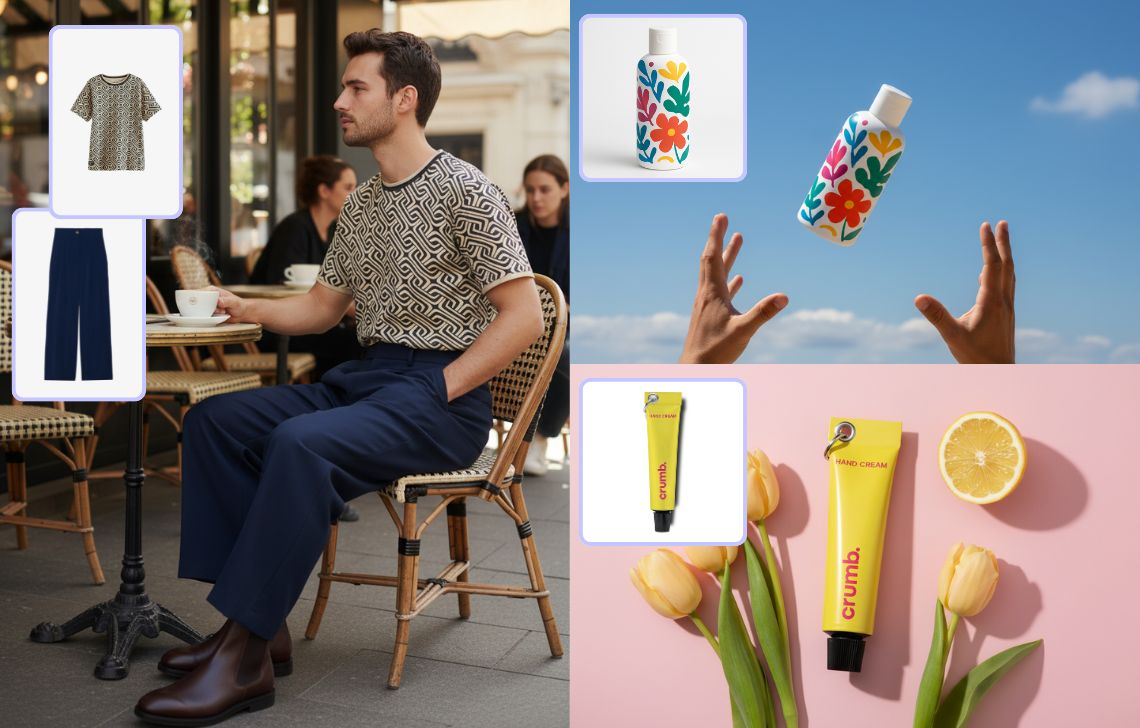
Claid is an AI photo editing studio built for ecommerce. It focuses on turning raw product shots into consistent catalog, marketplace, and ad images while preserving true product details and textures.
You can generate backgrounds for products in AI Photoshoot by using different modes (navigating the AI with a prompt or a reference image, using a mockup photo to swap products, etc.). For clothing items, you can create both studio-like and lifestyle backgrounds to on-model photos in AI Fashion Models.
On top of that, you can refine the results directly in Claid: remove unwanted elements, expand the background, or upscale the final image to a higher resolution.
Key features
- AI Photoshoot with different generation modes: Precise for consistent product images, Creative for experimenting with concepts, Inspiration for replicating a certain style, Backgrounds for placing products into custom scenes, and Mockups for swapping products inside an existing photo.
- AI Fashion Models that turn ghost mannequin or flatlay garment photos into on-model images while staying true to the product and showing its realistic fit.
- Enhancer tuned for products, places, people, digital art, and text, up to 16 MP.
- Image expander for quick retouching or new aspect ratios for marketplaces and social media.
- API for batch processing and other automations.
Best for
- Ecommerce brands that need consistent catalog, PDP, and ad creatives across collections.
- Marketplaces and aggregators dealing with thousands of SKUs.
- Teams that want a programmable background generator via API.
Pricing
- Free trial with 50 credits
- 2 credit-based plans, starting from $9 per month
- Custom enterprise and API pricing
Pros
- Built specifically around ecommerce needs.
- Background generation is part of a broader AI photography tool suite.
- Strong product preservation and control over AI creativity.
- Strong support for fashion use cases with a separate feature dedicated to on-model photos.
Cons
- Overkill if you just want to generate a background for a personal photo.
2. Photoroom
Photoroom offers AI product backgrounds for resellers and small brands. From a single mobile photo, you can remove the background, pick an AI background template, and get a listing-ready product image.
It also supports advanced tools like virtual models and ghost mannequin, though Reddit feedback shows that recent AI background quality changes have been a mixed bag for some users, with halos and inconsistent edges mentioned in complaints.
Key features
- AI background remover and AI backgrounds with many presets.
- Brand kits with saved logos, colors, and fonts for consistent output.
- AI tools like product staging, virtual models, and ghost mannequin in higher tiers.
- Batch export on paid plans for higher volume.
- API for background generation and product-ready output.
Best for
- Marketplace sellers on eBay, Amazon, Vinted, Depop, etc.
- Solo and small teams that primarily work on iOS / Android.
- Quick “phone to product listing” workflows with templates.
Pricing
- Free tier with limited generations.
- Paid plans start at $4.99 per month.
- Custom enterprise pricing.
Pros
- Very approachable mobile UI.
- Strong template library for ready-made ecommerce and Instagram looks.
- Good balance of removal, background generation, and basic editing in one app.
Cons
- Backgrounds can look “AI-ish” or inconsistent, especially on complex products, according to multiple user reports.
- Credit usage is not very transparent.
3. Pixelcut
Pixelcut is a popular AI editor that bundles background remover, background generator, upscaler, and basic design tools. It targets both solo sellers and small brands and is available on web and mobile.
Users often mention its affordability and the variety of photo backgrounds available in it.
Key features
- Free background remover and upscaler on the web.
- AI background generator that turns product photos into staged scenes.
- Additional generators like tech backgrounds and pricing tables.
- Batch editing and simple templates.
Best for
- Resellers and indie brands that want low-friction background changes.
- Side hustlers who need transparent backgrounds and simple product scenes without a big learning curve.
- People who want a decent mobile alternative to Photoroom.
Pricing
- The free plan doesn’t include background generation.
- Paid plans start at $10 per month.
Pros
- Good free remover for transparent PNGs.
- Many prebuilt photo background styles, especially on mobile.
- Web and app support covers most workflows.
Cons
- Some users report occasional edge artifacts or blur on difficult subjects.
- Less control over lighting and photorealism than tools focused purely on product realism.
4. Canva
Canva is a design suite first and an AI background generator second, but its tools are tightly integrated. You get a one-click background remover plus an AI background generator that can create new scenes from text prompts and drop them behind your subject.
For many users, the killer feature is that you can go from raw photo to Instagram post, Shopify banner, or Pinterest pin without leaving Canva.
Key features
- Background remover available in the editor, with one free try on the free plan and unlimited in Canva Pro.
- AI background generator based on text prompts that embeds your subject into the generated backdrops.
- Full design suite: templates for ads, Instagram stories, reels covers, YouTube thumbnails, etc.
- Brand kits, content scheduling, and team collaboration.
Best for
- Social media managers and content teams that live inside Canva already.
- Small businesses that want to design ads, Instagram graphics, and presentations along with product photography.
Pricing
- Free plan with limited background generations.
- Pro subscriptions start at $15 per month.
Pros
- Everything lives in one place: design, text, video, and AI backgrounds.
- Easy to adapt ecommerce images for social, email, and print.
- Strong template ecosystem, including for Instagram and other social platforms.
Cons
- Background generation quality is solid for marketing visuals but less consistent for strict ecommerce product standards.
- Batch and API capabilities are not as deep as tools built purely for background workflows.
5. Picsart
Picsart is a cross-platform creative suite that sits between Canva and mobile photo editors. It offers background removal, background changer, AI background generator, and a large library of templates and effects.
Its audience is mainly creators, influencers, and small brands that care as much about style and filters as about strict realism.
Key features
- AI background remover for photos and videos.
- AI background generator with presets and creative styles.
- Templates for Instagram posts, stories, YouTube covers, and more.
- API for background removal for those who need automation.
Best for
- Influencers and social-first brands that want stylized backgrounds both for images and short video content.
- Users who sometimes need transparent background PNGs but mostly care about visually loud, on-trend designs.
Pricing
- Free plan with basic tools and up to 5 AI background generations per week.
- Pro subscriptions start at $13 per month.
Pros
- Strong mobile experience and lots of creative effects.
- Handles both images and video backgrounds, useful for Instagram reels and TikTok.
- Good balance of AI tools and manual editing for touchups.
Cons
- Output often has more of an “edited” feel than a native product photoshoot.
- API and automation docs are less ecommerce-specific.
6. Pacdora
Pacdora started as a packaging mockup and dieline platform and now offers a capable AI background generator and background changer.
It shines when you want to place packaged products into environments that look like high-end 3D renders: think bottles on rocks, boxes in retail shelves, or coffee bags in a studio scene.
Key features
- AI background generator that removes the product background, then suggests and generates studio-like scenes.
- 3D-aware design that accounts for product angle, shadow direction, and scale.
- Library of packaging mockups and templates, tightly integrated with the background generator.
Best for
- Packaged goods, cosmetics, beverages, and CPG brands.
- Designers who already use Pacdora for dielines and want coherent product visuals.
Pricing
- Free tier with 50 credits to try AI backgrounds.
- Paid plans start at €16 per month.
Pros
- Great fit when your main subject is packaging.
- Strong 3D look that feels like a proper studio scene.
Cons
- Less suited for apparel, people, or lifestyle portraits.
- Overall workflow is more complex than simple online background removers.
7. Kittl
Kittl is a collaborative design platform similar to Canva but with a strong focus on typographic and illustration-heavy designs.
Its AI background generator and dedicated AI product background feature let you drop products into AI-generated environments without leaving your brand layout. That combination is powerful when you need backgrounds that match complex poster or label designs, not just simple product-on-backdrop.
Key features
- AI background generator inside the editor.
- AI product backgrounds that remove backgrounds and place products into new AI scenes.
- Strong design platform with fonts, templates, infinite canvas, and team collaboration.
Best for
- Designers and brands who already work in Kittl and want integrated AI scenes for labels, posters, and merch.
- Product-based brands that need backgrounds aligned with print and web brand systems.
Pricing
- Free plan with limited AI use (up to 100 generated images powered by the simplest model).
- Paid plans start at $15 per month.
Pros
- Tight integration of AI backgrounds with complex layouts.
- Fine-grained design tools beyond photo editing.
Cons
- Not focused on high-volume ecommerce automation or API use.
- Slightly steeper learning curve for non-designers compared to Canva.
How to choose the best AI background generator
When you pick a background generator, the biggest mistake is treating all AI tools as interchangeable. They are not. Here is how to evaluate them.
1. Clarify your core use case
- High-volume ecommerce:
- You care about consistency across SKUs, catalogs, and marketplaces.
- Look for: API, workflows, batch editing, aspect ratio presets, stable product geometry.
- Strong options: Claid, Pacdora.
- Mobile-first reselling or Instagram selling:
- You mostly shoot with your phone and post to marketplace apps or Instagram.
- Look for: iOS/Android apps, simple templates, and direct sharing.
- Strong options: Photoroom, Pixelcut, Picsart.
- Design-heavy brand work:
- You design posters, ads, and packaging plus product imagery.
- Look for: layout tools, fonts, brand kits, vector support.
- Strong options: Canva, Kittl, Pacdora.
2. Decide between remover, generator, or both
- Background removers focus on delivering a clean transparent PNG so you can design in Photoshop, Canva, or Figma.
- Background generators both cut out and composite your subject into a new AI scene.
For ecommerce, you usually need both: start with removal, then auto-generate scenes that match your brand. For instance, Claid combines these functions, along with other features helpful for ecommerce businesses.
3. Look for realism, not just “nice images”
Common complaints from users include:
- AI backgrounds that look “too fake” or low detail
- Halos, weird edges, or blur where the product meets the background
- Shadows and reflections that don’t line up with the product lighting
To avoid these problems:
- Prefer tools that talk explicitly about lighting, shadow, and perspective matching (Claid, Pacdora)
- Test them on your hardest cases: glossy bottles, transparent packaging, reflective surfaces, or ghost mannequin garments
4. Consider scaling possibilities
- If you manage hundreds or thousands of SKUs, manual upload-download flows will break.
- Look for:
- APIs or SDKs
- Ability to chain steps (remove background, expand, generate, upscale) in one workflow
- Bulk upload and export
Claid is particularly strong here because it offers lots of automations via its APIs.
5. Check “free” limits and licensing
Most “free AI background” tools hide real costs in one of three places:
- Low resolution images on the free tier
- Watermarks or limited downloads
- Strict rate limits or trial periods on mobile apps
Also confirm:
- Commercial usage rights for marketplace listings, ads, and packaging
- Whether you retain ownership of backgrounds or if they become part of a shared gallery
Best AI background generators: brief overview
Based on what we’ve explored, here’s a brief comparison of the best 7 tools:
- Claid: best overall for ecommerce. Strengths: fine-grained creative control and flexible generation of both clean studio-style and rich lifestyle backgrounds.
- Photoroom: best for resellers and mobile-first sellers. Strengths: a highly polished mobile app with ready-made templates and product-centric AI backgrounds.
- Pixelcut: best for side hustlers and small shops. Strengths: an intuitive interface, capable background-generation tools, and a notably generous free background remover.
- Canva: best for all-in-one design and social content. Strengths: prompt-based AI backgrounds built directly into a comprehensive design suite for social, web, and print.
- Picsart: best for creators mixing photo, video, and reels. Strengths: an extensive set of creative filters, effects, and AI tools tailored to social-first visuals and short-form video.
- Pacdora: best for packaging and 3D-style product scenes. Strengths: 3D-aware AI backgrounds that respect product angle, lighting, and scale for realistic packaging shots.
- Kittl: best for designers who need product scenes inside brand layouts. Strengths: AI product background tools tightly integrated into a modern, layout-first design environment.
| Tool name | Best for | Pricing model | Key strength |
|---|---|---|---|
| Claid | Best overall for ecommerce | Starting from $9 / month; Free trial with 50 credits | Creative control and possibility to generate different studio-like and lifestyle backgrounds |
| Photoroom | Mobile-first sellers | Starting from $4.99 / month; Limited free trial | Polished mobile app with templates and product-focused AI backgrounds |
| Pixelcut | Small shops | Starting from $10 / month; Limited free trial | Simple UI, strong background tools, generous free remover |
| Canva | Social content | Starting from $15 / month; Limited free trial | Background remover plus text-based AI backgrounds inside a full design suite |
| Picsart | Individual creators | Starting from $13 / month; Limited free trial | Lots of creative effects and AI tools for social-first content |
| Pacdora | Packaging businesses | Starting from €16 / month; Limited free trial | 3D-aware backgrounds that match angle, light, and product scale |
| Kittl | Designers | Starting from $15 / month; Limited free trial | Integrated AI product background tool in a modern design platform |
FAQ: best AI background generators for ecommerce and other use cases
What is an AI background generator?
An AI background generator automatically creates new backgrounds for your images after detecting and isolating the subject. Some tools need a text prompt, others use templates or your original photo as context to generate matching scenes.
What is the difference between background remover and background generator?
- A background remover outputs a transparent background (usually PNG) or a simple solid color like white.
- A background generator both removes the original background and composites the subject into a new AI-created environment, including shadows, reflections, and perspective.
Claid, Photoroom, Pixelcut, Pacdora, and Kittl all combine both removal and generation, but with different levels of control and realism.
Which AI background generator is best for ecommerce product photos?
For pure ecommerce:
- Claid is the strongest all-round choice if you need consistent, photoreal outputs across many SKUs and want an API for batch generation.
- Pacdora is very good if you focus heavily on product packaging and want promptless background generation.
If you just need occasional product shots and already use Canva or Picsart, their background tools can be “good enough” as long as you manually check shadows and edges.
Are AI background generators really free?
Most tools offer:
- A genuinely free tier for testing, limited in resolution, credits, or watermarks.
- Paid tiers that unlock HD exports, batch features, higher DPI, and commercial rights.
If you care about product quality, assume you will need a paid plan for at least your final exports. Free tools are fine for mockups and internal reviews.
Can I use AI-generated backgrounds on Amazon, Etsy, or Instagram ads?
In practice, many sellers do. The real constraints are:
- Listing rules: some marketplaces require white or plain backgrounds on the main image. Use AI for secondary images or ensure your tool can output clean white or light gray scenes.
- Reality alignment: avoid scenes that misrepresent product size, color, or features. Several Reddit threads show buyers reacting negatively when AI scenery misleads them.
Claid’s AI Photoshoot is helpful here because it’s focused on keeping the product intact while only changing the environment around it.
What resolution and DPI should I export for ecommerce?
As a rule of thumb:
- For most marketplaces and online stores, 1500 to 3000 px is enough.
- For print catalogues or posters, aim for 300 DPI at the physical size you need and use an upscaler if the original is smaller.
Claid’s upscaler can take web-size product shots to print-ready resolutions while preserving product detail and label readability.
Can I expand an image with an AI-generated background?
Yes. With outpainting, sometimes called canvas expansion, you can extend your image in one or more directions while generating new background content that matches the original scene. This is useful when:
- You need a 1:1 square for Instagram from a 3:4 photo
- Marketplaces require specific aspect ratios
- You want more breathing room for text, stickers, or logos
Claid includes an AI outpainting tool where you can resize for marketplaces or other needs.
Need AI product photography at scale?
Scale product image production without stretching your team. Use our API to automate image workflows, or let our team deliver a custom pipeline built around your operations.


Claid.ai
August 26, 2026